

PDF Scanner : Photo to PDF App
Shardaben Katharotiya Productivity iPhoneiPadiPod touch
PDF Scanner : Photo to PDF App is a free Productivity app for iPhone and iPad by Shardaben Katharotiya. Requires iOS 15.0. Updated October 1, 2026.
- Price
- Free
- on the App Store
- Size
- 69 MB
- Age 4+
- Updated
- Oct 1
- 2026 · v1.9
Screenshots


About PDF Scanner : Photo to PDF App
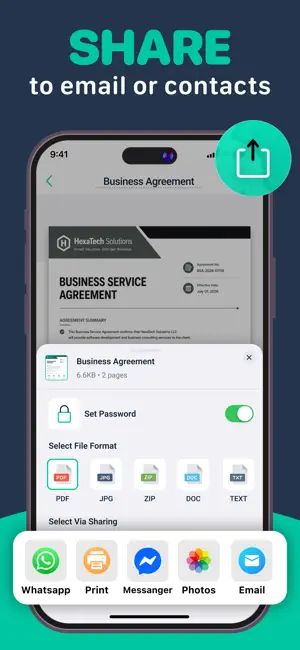
Turn Your iPhone into a Powerful PDF Scanner Scan documents, receipts, IDs, notes, photos with an easy-to-use document scanner. Turn paper images into high-quality PDFs with our smart scanner app, powerful OCR convenient PDF tools. Whether you need to scan to PDF, convert images, edit documents share files, everything you need is available in one place. Key Features PDF Scanner & Document Scanner Quickly scan documents, receipts, IDs, notes photos. Our doc scanner automatically detects pages helps create clear professional scans. Scan to PDF Scan documents save them as PDF files in seconds. Easily create PDF files from your camera imported images. PDF Converter & Image to PDF Convert photos images into PDF documents with ease. Use image to PDF, photo to PDF convert to PDF tools to organize your files. PDF Editor Make quick changes to your scanned documents, add signatures prepare PDFs for sharing submission. AI OCR & Text Recognition Extract copy text from scanned pages images using smart OCR technology. Batch Scanning Scan multiple pages continuously combine them into a single PDF without scanning each page separately. Photo Scanner & Image Scanner Turn pictures, printed documents photos into digital files with our easy photo scanner image scanner. ID Card Scanner Capture both sides of an ID card conveniently keep them together in one document. Easy File Sharing Share your PDFs scanned documents quickly whenever you need them. Area Measurement Measure length, size spaces using your device. QR Code Scanner & Generator Scan QR codes create your own QR codes anytime. Scan & Convert Almost Anything Use the scanner app for: • Documents paperwork • Receipts invoices • ID business cards • Photos pictures • Notes homework • Contracts forms • Office documents • School study materials Why Choose Our Scanner App? • Fast simple document scanning • Powerful PDF scanner doc scanner • Easy scan to PDF functionality • Convert images photos to PDF • Built-in PDF editor • AI-powered OCR text recognition • Batch scanning for multiple pages • Import photos from your gallery • Create organize PDF files • Quickly share scanned documents From a single photo to a multi-page document, this free PDF scanner app makes it easy to scan, convert, edit share your files from your iPhone. Subscription Pricing & Terms In-App Purchases: USD $9.99 — Yearly Subscription USD $4.99 — Monthly Subscription USD $2.99 — Weekly Subscription Subscriptions automatically renew unless auto-renewal is turned off at least 24 hours before the current subscription period ends. You can manage your subscription through your iTunes Account Settings. Your account will be charged when the purchase is confirmed. Privacy Policy: https://sites.google.com/view/scannerpp/home Terms & Conditions: https://sites.google.com/view/scanner-tc/home We value your privacy work to provide a reliable convenient document scanning experience. For questions, feedback support, contact us at [email protected]. Download the PDF scanner today turn your documents, photos paperwork into digital PDFs in just a few taps.
What’s new
Version 1.9 · Updated October 1, 2026
Scanning just got smarter. • Sync your documents seamlessly with iCloud. • Get quick insights with AI-powered document summaries. • Faster and more accurate document scanning. • Improved edge detection and image enhancement. • Cleaner, sharper PDF results. • Smoother performance and greater reliability. • Bug fixes and overall optimizations. Update now and turn every document into a clean, professional scan.
App privacy
The developer, Shardaben Katharotiya, reported these privacy practices to Apple.
Data Used to Track You
The following data may be used to track you across apps and websites owned by other companies:
- Location: Precise Location
- Contacts: Contacts
Data Linked to You
The following data, which may be collected and linked to your identity, may be used for the following purposes:
- Location: Precise Location
- Contacts: Contacts
Used for: Third-Party Advertising, Product Personalization
Alternatives to PDF Scanner : Photo to PDF App
Looking for apps like PDF Scanner : Photo to PDF App? Here are 6 similar apps on the App Store. The highest rated is Image to PDF Converter: Editor (5.0/5), and all 6 are free to download.
-
 Oken PDF Scanner : ScannerOK
4.8
Oken PDF Scanner : ScannerOK
4.8
-
 OKEN - Doc Scanner, PDF Scan
4.8
OKEN - Doc Scanner, PDF Scan
4.8
-
 Image to PDF Converter: Editor
5.0
Image to PDF Converter: Editor
5.0
-
 Doc Scanner- PDF & OCR Scanner
-
 PDF Scanner - Document Scanner
4.8
PDF Scanner - Document Scanner
4.8
-
 Image to pdf: easy converter
4.3
Image to pdf: easy converter
4.3
| App | Rating | Price | Last updated | Compare |
|---|---|---|---|---|
| PDF Scanner : Photo to PDF App | – | Free | October 1, 2026 | |
| Oken PDF Scanner : ScannerOK | 4.8 / 5 (5) | Free | Aug 8, 2026 | Compare |
| OKEN - Doc Scanner, PDF Scan | 4.8 / 5 (6) | Free | Sep 30, 2026 | Compare |
| Image to PDF Converter: Editor | 5.0 / 5 (2) | Free | Oct 12, 2026 | Compare |
| Doc Scanner- PDF & OCR Scanner | – | Free | Feb 23, 2026 | Compare |
| PDF Scanner - Document Scanner | 4.8 / 5 (99) | Free | Oct 13, 2026 | Compare |
| Image to pdf: easy converter | 4.3 / 5 (14) | Free | Sep 7, 2026 | Compare |