

Doc Scanner- PDF & OCR Scanner
Pratik Kadam Productivity iPhoneiPadiPod touch
Doc Scanner- PDF & OCR Scanner is a free Productivity app for iPhone and iPad by Pratik Kadam. Requires iOS 17.6. Updated February 23, 2026.
- Price
- Free
- on the App Store
- Size
- 3 MB
- Age 4+
- Updated
- Feb 23
- 2026 · v2.8
Screenshots

About Doc Scanner- PDF & OCR Scanner
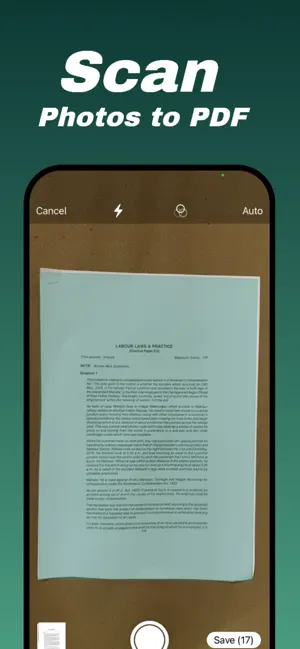
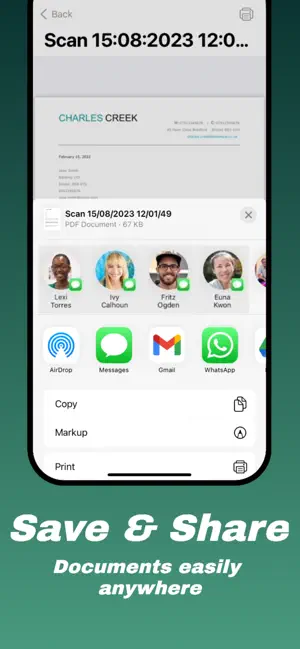
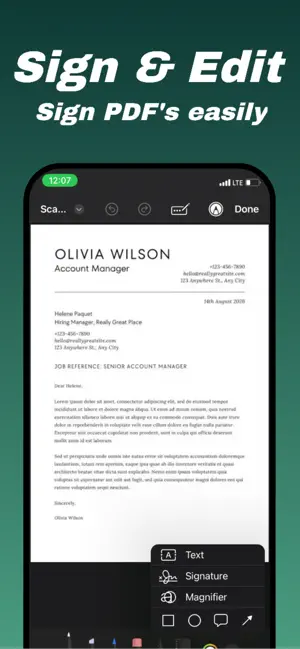
DocScanner - PDF Scanner, converter & maker. Convert image to pdf. Document Scanner and PDF Maker is an all-in-one PDFscan app that provides you with more advanced scan options. Scan, Print & Share any document to PDF. Doc Scanner is the easiest & simple app to use, which will turn your iPhone & iPad into a portable mobile scanner. Scanner PDF supports image processing and can transform, rotate, sharpen your images, for best document quality. You can Scan any documents, passport, ID cards, photos, contracts, tax forms, tickets, and books into clear PDFs and pictures. SCAN DOCUMENTS - Scan any document automatically or manually and save it as a PDF file or image. - Try various Camera Modes to scan specific types of documents. - Import documents right from Photos for further editing and sharing. - With this PDF scanner, scan anything you need, receipts, contracts, paper notes, fax papers, books, and store your scans as multipage PDF or JPG files. KEY FEATURES - Easily scan multiple pages into one document. - Sign your scans manually or add a signature from an image - Add text over the forms or autofill documents - Protect your confidential scans by locking PDF & Documents with Password. - Document sharing as PDF, JPG through email, or uploading to Dropbox, Google Drive, Box, OneDrive, Evernote, iCloud Drive - Professional filter options, including Color, Black & White, Photo, and Grayscale; - Add markup or annotation to document - Print your PDF & Documents easily. PDF Converter –PDF Converter: This PDF scanner enables you to create PDF from a website, and convert documents in multiple formats to PDF. –Supported file formats: PDF, JPG, PNG, JPEG - You can also called app as Photos to PDF Maker app. Personalize Document Editor & File Manager - Edit, replace, share, rename and delete your PDF or Documents as per you want. - Create and organize your folders. - Save PDF or Documents in your local file manager. # Subscription Details # • Monthly and annual subscriptions are available. • Payment will be charged to your iTunes account at confirmation of purchase. • Your subscription will automatically renew unless auto-renew is disabled at least 24 hours before the end of the current subscription period. • Automatic renewals will be charged at the same price you were originally charged for the subscription. • Subscriptions can be managed by going to Account Settings on the App Store after purchase. Privacy policy: https://technicaldeveloperapps.blogspot.com/2023/07/this-page-is-used-to-inform-visitors.html Terms of Use: https://technicaldeveloperapps.blogspot.com/2023/08/doc-scanner-terms-of-use.html
What’s new
Version 2.8 · Updated February 23, 2026
Thanks for choosing Doc Scanner- PDF & OCR Scanner. This update contains : - Minor bug fixes - UI improvements.
App privacy
The developer, Pratik Kadam, reported these privacy practices to Apple.
Data Linked to You
The following data, which may be collected and linked to your identity, may be used for the following purposes:
- Identifiers: Device ID
- Usage Data: Advertising Data
Used for: Third-Party Advertising
Alternatives to Doc Scanner- PDF & OCR Scanner
Looking for apps like Doc Scanner- PDF & OCR Scanner? Here are 6 similar apps on the App Store. The highest rated is Image to PDF Converter: Editor (5.0/5), and all 6 are free to download.
-
 Doc Scanner .
4.7
Doc Scanner .
4.7
-
 Doc Scanner: Scan PDF
4.6
Doc Scanner: Scan PDF
4.6
-
 Document Scanner - Scan Photo
4.7
Document Scanner - Scan Photo
4.7
-
 Doc Scanner
-
 OKEN - Doc Scanner, PDF Scan
4.8
OKEN - Doc Scanner, PDF Scan
4.8
-
 Image to PDF Converter: Editor
5.0
Image to PDF Converter: Editor
5.0
| App | Rating | Price | Last updated | Compare |
|---|---|---|---|---|
| Doc Scanner- PDF & OCR Scanner | – | Free | February 23, 2026 | |
| Doc Scanner . | 4.7 / 5 (14) | Free | Sep 22, 2026 | Compare |
| Doc Scanner: Scan PDF | 4.6 / 5 (57) | Free | Jun 22, 2026 | Compare |
| Document Scanner - Scan Photo | 4.7 / 5 (325) | Free | Oct 14, 2026 | Compare |
| Doc Scanner | – | Free | Aug 12, 2026 | Compare |
| OKEN - Doc Scanner, PDF Scan | 4.8 / 5 (6) | Free | Sep 30, 2026 | Compare |
| Image to PDF Converter: Editor | 5.0 / 5 (2) | Free | Oct 12, 2026 | Compare |