

Doc Scanner: Scan PDF
SHELL INFRASTRUCTURE PRIVATE LIMITED Productivity iPhoneiPadiPod touch
Doc Scanner: Scan PDF is a free Productivity app for iPhone and iPad by SHELL INFRASTRUCTURE PRIVATE LIMITED. Rated 4.6/5 from 56 ratings. Requires iOS 15.0.
- Rating
- 4.6
- 56 ratings
- Price
- Free
- on the App Store
- Size
- 23 MB
- Age 4+
- Updated
- Jun 22
- 2026 · v2.9
Screenshots

About Doc Scanner: Scan PDF
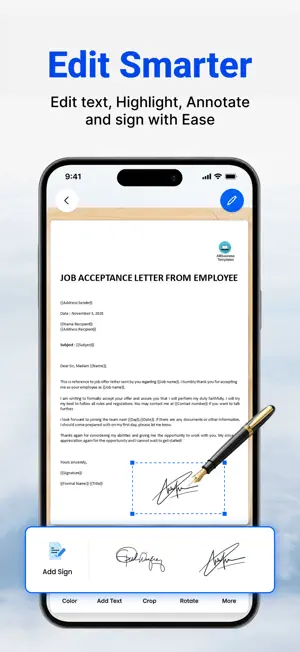
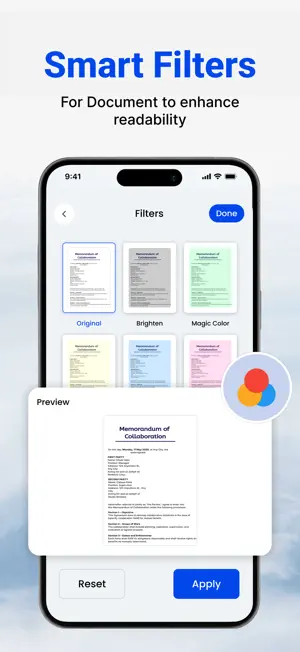
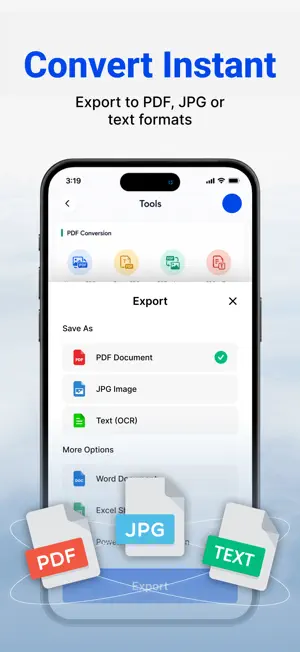
Scan documents, photos, and cards quickly and easily, then translate them into other languages. Scan documents into a clear, sharp image or PDF to email, fax, print, or save to files. Doc Scanner is a free scanner app that helps users scan, edit, and store data on smartphones, iPads, and computers. Extract texts with OCR and convert PDF to Word, Word to PDF, PDF to JPEG, etc. Features: * A powerful and quick mobile scanner Use your phone's camera to scan receipts, notes, invoices, whiteboard discussions, business cards, certificates, QR codes, etc. * Improve scan quality Smart cropping, editing, and auto-enhancing make the texts and graphics in DocuSign look clear and sharp. * E-signature Contracts can be signed and DocuSign files shared to your PDF drive. It is widely used among the CSB, e-file, real estate agents, and in government form filling. * PDF Converter: Image to PDF Converter, Just select some images or take a picture with your camera and convert it into a PDF file, or convert a document file (doc, docx, ppt, pptx) to a PDF. You can open any PDF with the Camera Scanner. You can also highlight key sections, add comments, fill out the form, and sign it with a cam scaner. * Advanced Editing It is possible to add annotations or a customised watermark to documents. You can make barcodes with a barcode generator. * OCR Text Recognition The OCR Text Recognition feature lets you recognise text from images, edit texts, or share texts to a printer, mail, or other reference apps. * Share PDF/JPEG Files Easily share documents in PDF or JPEG format with others via social media, email attachment, or by sending the doc link. There are pdf compressors, pdf mergers, pdf combiners, converters of jpg to pdf and jpeg to pdf, qr code generators, and qr code readers. * AirPrint documents Instantly print out documents in CamScanner to a nearby printer via AirPrint. CamScanner users scan and manage * A simple scanner with scannable office lens files * The most effective PDF scanner for ilovepdf, iscanner, and Adobe Scan * Scan a bill, an invoice, a contract, a tax return, or a business card with the can scaner. * A whiteboard, a memo, a script, a letter. * A blackboard, a note, a PowerPoint presentation, a book, an article, and so on. * A certificate, a document of identification, a painting. * Word to PDF converter, pdf editor, QR code scanner, Doc to PDF converter, and Word to PDF converter are all included. Convert office documents to PDF files. Turn your PDF files into editable and scannable office formats such as Word, Excel, and PowerPoint. == DocScanner Pro Feature == There are two subscription plans. $1.99 per month $11.99 per year with a 3-day trial Payment will be charged to your iTunes Account upon purchase confirmation. The subscription automatically renews unless auto-renew is turned off at least 24 hours before the end of the current period. The account will be charged for renewal within 24 hours prior to the end of the current period, and we will identify the cost of the renewal. Subscriptions may be managed by the user, and auto-renewal may be turned off by going to the user’s Account Settings after purchase. Any unused portion of a free trial period, if offered, will be forfeited when the user purchases a subscription to that publication, where applicable. No cancellation of the current subscription is allowed during the active subscription period. Terms of Service: http://shellinfra.com/tos.html Privacy Policy: http://shellinfra.com/privacy-policy.html If you have any questions, please email [email protected]. Thanks for using this app !!!
Ratings & reviews
4.6
56 ratings
What’s new
Version 2.9 · Updated June 22, 2026
- Minor bug fixes - Performance improvements. Thanks for using our app !!
App privacy
The developer, SHELL INFRASTRUCTURE PRIVATE LIMITED, reported these privacy practices to Apple.
Data Used to Track You
The following data may be used to track you across apps and websites owned by other companies:
- Identifiers: Device ID
- Usage Data: Advertising Data, Other Usage Data
- Diagnostics: Crash Data
Data Linked to You
The following data, which may be collected and linked to your identity, may be used for the following purposes:
- Identifiers: Device ID
- Usage Data: Advertising Data, Other Usage Data
- Diagnostics: Crash Data
Used for: Third-Party Advertising, Analytics, Other Purposes
Alternatives to Doc Scanner: Scan PDF
Looking for apps like Doc Scanner: Scan PDF? Here are 6 similar apps on the App Store. The highest rated is Document Scanner by Lufick (4.8/5), and all 6 are free to download.
-
 Doc Scanner .
4.7
Doc Scanner .
4.7
-
 Document Scanner by Lufick
4.8
Document Scanner by Lufick
4.8
-
 PDF Scanner : Converter,Editor
4.4
PDF Scanner : Converter,Editor
4.4
-
 OKEN - Doc Scanner, PDF Scan
4.8
OKEN - Doc Scanner, PDF Scan
4.8
-
 Document Scanner - Scan Photo
4.7
Document Scanner - Scan Photo
4.7
-
 Camera Scanner: PDF Converter
4.7
Camera Scanner: PDF Converter
4.7
| App | Rating | Price | Last updated | Compare |
|---|---|---|---|---|
| Doc Scanner: Scan PDF | 4.6 / 5 (56 ratings) | Free | June 22, 2026 | |
| Doc Scanner . | 4.7 / 5 (13) | Free | Sep 22, 2026 | Compare |
| Document Scanner by Lufick | 4.8 / 5 (1,443) | Free | Jan 28, 2025 | Compare |
| PDF Scanner : Converter,Editor | 4.4 / 5 (45) | Free | Sep 17, 2026 | Compare |
| OKEN - Doc Scanner, PDF Scan | 4.8 / 5 (6) | Free | Sep 30, 2026 | Compare |
| Document Scanner - Scan Photo | 4.7 / 5 (323) | Free | Oct 6, 2026 | Compare |
| Camera Scanner: PDF Converter | 4.7 / 5 (779) | Free | Oct 3, 2026 | Compare |