

Camera Scanner: PDF Converter
Liger Infotech Productivity iPhoneiPadiPod touch
Camera Scanner: PDF Converter is a free Productivity app for iPhone and iPad by Liger Infotech. Rated 4.7/5 from 792 ratings. Requires iOS 15.0.
- Rating
- 4.7
- 792 ratings
- Price
- Free
- on the App Store
- Size
- 167 MB
- Age 4+
- Updated
- Oct 16
- 2026 · v9.4
Screenshots
About Camera Scanner: PDF Converter
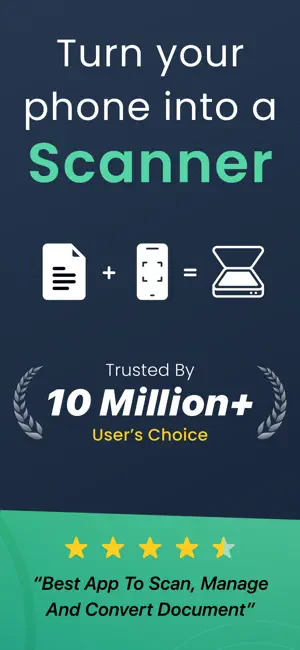
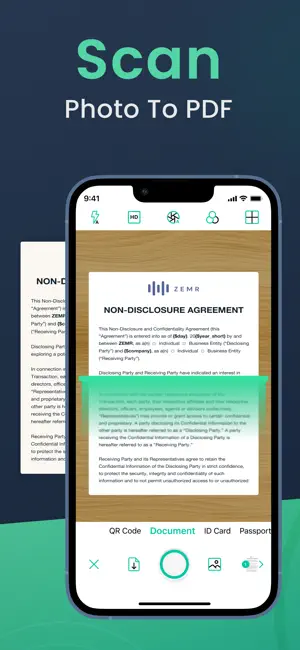
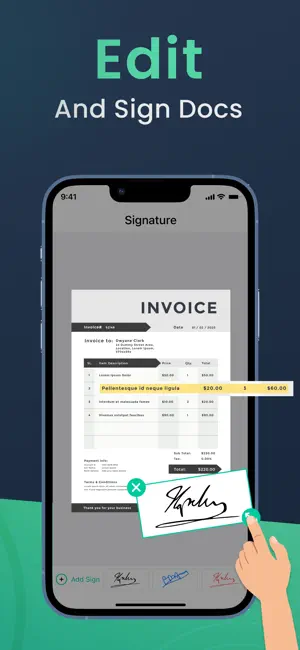
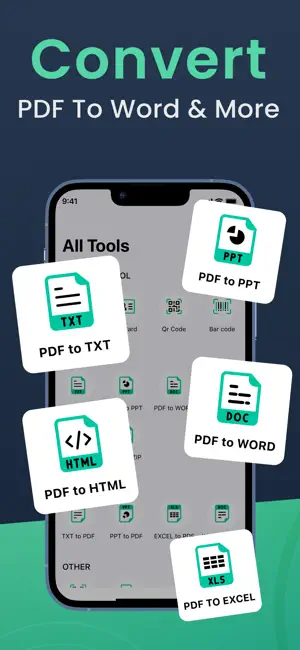
Turn your iPhone into a powerful camera scanner and PDF converter. Camera Scanner helps you scan documents, convert photo to PDF and manage files with a fast, professional PDF scanner built for everyday productivity. Whether you need a document scanner for work, a receipt scanner for expenses, or a photo scanner to digitize memories, this all-in-one scanner app makes going paperless simple. → Scan Documents Anytime, Anywhere: Use your device as a smart document scanner to scan documents, contracts, notes, IDs, books and receipts. Advanced edge detection ensures clean, sharp results every time. • Scan documents with high accuracy • Automatic edge detection and perspective correction • Save scans as high-quality PDF documents • Perfect for document scan, doc scan and paper scanner needs This mobile scanner PDF app is ideal for professionals, students and anyone who needs a reliable scanning app. → Photo to PDF & PDF Converter: Easily convert photo to PDF and create professional files in seconds. The built-in PDF converter and PDF maker allow you to combine images, scan photos to PDF and organize multi-page documents. • Photo to PDF converter for instant file creation • Merge multiple scans into one PDF document • Convert PDF and images with ease • Create PDFs using a powerful PDF maker Perfect for users searching for photos to PDF, photo scanner tools or a scanner to PDF solution. → PDF Editor & Sign Documents: Edit, annotate, and sign PDF files directly from your phone. Whether you need to sign documents, fill forms or add notes, Camera Scanner makes document management effortless. • Sign PDF and sign documents securely • Add annotations and comments • Edit files with an easy PDF editor • Ideal for business, contracts and forms A must-have PDF editor and PDF reader for managing important files on the go. → Smart PDF Reader & File Manager: Organize and access your files with a built-in PDF reader designed for speed and clarity. • Open and read PDF documents instantly • Manage files in one scanning app • Search and organize your document scanner app library • Keep receipts and records neatly stored This scanner app helps you stay productive and organized. → Receipt Scanner for Expenses & Taxes: Track expenses and store receipts digitally with a reliable receipt scanner. • Scan receipts for business and personal use • Save and share expense records quickly • Perfect for freelancers and small businesses → Share & Export in Seconds: Share scanned documents instantly via email, messaging or cloud storage. • Share PDF documents with one tap • Export files for printing or storage • Compatible with popular cloud services → Perfect For: • Professionals needing a document scanner • Students scanning notes and assignments • Businesses managing contracts and receipts • Anyone looking for a fast PDF scanner or scanning app → Secure & Private: Your files remain private and secure on your device. Scan documents with confidence using a trusted scanner app for iPhone. → Go Paperless with Camera Scanner: From document scan tasks to photo to PDF conversion, Camera Scanner is your all-in-one solution for scanning, editing and managing PDFs. Subscription Pricing and Terms In-App Purchase: Weekly Subscription: USD $1.99 Monthly Subscription: USD $4.99 Yearly Subscription: USD $19.99 The subscription automatically renews unless canceled in iTunes Account Settings at least 24 hours before the current period ends. Manage your subscription anytime through iTunes settings. Privacy Policy: https://ligerinfotech.com/Cam_Scanner_iOS/pp Terms of Use: https://ligerinfotech.com/Cam_Scanner_iOS/tou Download the PDF scanner app free today and discover just how powerful your iPhone can be. Thank you very much.
Ratings & reviews
4.7
792 ratings
What’s new
Version 9.4 · Updated October 16, 2026
We’re continuously improving Camera Scanner to make scanning faster, clearer, and more reliable. • Added iCloud sync to store and access your documents across devices • Discover the new iOS 26 Liquid Glass Effect – sleek, fluid, and modern • Enhanced scan quality for sharper, more readable documents • Faster processing for quicker scan-to-PDF conversion • Improved auto edge detection and crop accuracy • Optimized multi-page PDF creation workflow • Smoother export and sharing experience • Stability improvements and bug fixes Update now to enjoy a faster, more reliable document scanning experience.
App privacy
The developer, Liger Infotech, reported these privacy practices to Apple.
Data Used to Track You
The following data may be used to track you across apps and websites owned by other companies:
- Location: Precise Location
- Contacts: Contacts
Data Linked to You
The following data, which may be collected and linked to your identity, may be used for the following purposes:
- Location: Precise Location
- Contacts: Contacts
Used for: Third-Party Advertising, Product Personalization
Alternatives to Camera Scanner: PDF Converter
Looking for apps like Camera Scanner: PDF Converter? Here are 6 similar apps on the App Store. The highest rated is Document Scanner by Lufick (4.8/5), and all 6 are free to download.
-
 Document Scanner by Lufick
4.8
Document Scanner by Lufick
4.8
-
 Cam Scan - PDF Scanner & OCR
4.7
Cam Scan - PDF Scanner & OCR
4.7
-
 CamScanner HD
3.0
CamScanner HD
3.0
-
 Document Scanner - Scan Photo
4.7
Document Scanner - Scan Photo
4.7
-
 PDF Scanner : Converter,Editor
4.4
PDF Scanner : Converter,Editor
4.4
-
 Photo Scanner - PDF and doc
4.6
Photo Scanner - PDF and doc
4.6
| App | Rating | Price | Last updated | Compare |
|---|---|---|---|---|
| Camera Scanner: PDF Converter | 4.7 / 5 (792 ratings) | Free | October 16, 2026 | |
| Document Scanner by Lufick | 4.8 / 5 (1,486) | Free | Oct 24, 2026 | Compare |
| Cam Scan - PDF Scanner & OCR | 4.7 / 5 (2,161) | Free | Apr 30, 2026 | Compare |
| CamScanner HD | 3.0 / 5 (68) | Free | Nov 4, 2025 | Compare |
| Document Scanner - Scan Photo | 4.7 / 5 (325) | Free | Oct 14, 2026 | Compare |
| PDF Scanner : Converter,Editor | 4.4 / 5 (47) | Free | Sep 17, 2026 | Compare |
| Photo Scanner - PDF and doc | 4.6 / 5 (75) | Free | Jul 22, 2024 | Compare |