

CamScanner HD
Linguan Data Productivity iPad
CamScanner HD is a free Productivity app for iPad by Linguan Data. Rated 3.0/5 from 68 ratings. Requires iOS 12.0. Updated November 4, 2025.
- Rating
- 3.0
- 68 ratings
- Price
- Free
- on the App Store
- Size
- 65 MB
- Age 4+
- Updated
- Nov 4
- 2025 · v3.12.0
Screenshots


About CamScanner HD
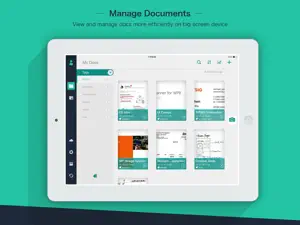
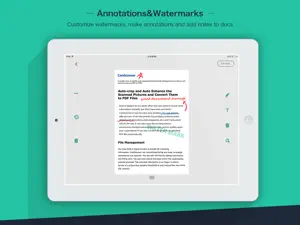
The world’s No. 1 mobile document scanning and sharing today! * Installed on over 60 million devices in over 200 countries around the world * Over 50,000 new registrations per day * CamScanner, 50 Best iPhone Apps, 2013 Edition – TIME * App Store 2011/2012 Rewind Top Productivity App * “The application employs its own image cropping and enhancing algorithm that leads to clearer images.” – Makeuseof.com * “CamScanner may just be the best deal for scanning documents on your iPhone.” – CNET.com CamScanner helps you scan, store, sync and collaborate on various contents across smartphones, iPads, tablets and computers. Features: *Quickly Digitize Document Just use your iPad camera to scan and digitize all kinds of paper documents: receipts, notes, invoices, whiteboard discussions, business cards, certificates, etc. *Optimize Scan Quality Smart cropping and auto enhancing ensures the texts and graphics in scanned documents are clear and sharp with premium colors and resolutions. *Extract Texts from Image OCR (optical character recognition) feature recognizes texts in document images and extract them from images for later searching, editing or sharing. (Paid app only) *Share PDF/JPEG Files Easily share documents in PDF or JPEG format with friends via various ways: post on social media, send attachment or document download link through email. *AirPrint & Fax Documents Instantly print out any documents in CamScanner with nearby printer via AirPrint; directly select document and fax to over 30 countries from the app. *Collaborate on Documents Want to get feedback on your documents? Invite friends or colleagues to collaborate on documents. They can view, comment and exchange ideas on documents in groups. (Registrants only) *Advanced Document Editing Make annotations on documents with a full set of editing tools. Also adding customized watermarks are made available to mark your own documents. *Quick Search When you have plenty of documents, you can use Tags to categorize and easily find them. In addition, OCR for Search helps you find texts inside image and notes. Just enter one keyword, you can quickly find the document you want. *Secure Important Documents If you want to protect confidential contents, you can set passcode for viewing important documents; also, while sending document download link, you can set password to protect others from seeing it. *Sync across Platforms Sign up to sync documents on the go. Just sign in to any smartphone, tablet or computer (visit CamScanner website) you own and you can view, edit and share any document. (Registrants only) Premium Subscription Service: 1. Edit OCR results and notes of the entire doc, exporting as .txt file 2. Add 10G cloud space 3. Add 40 extra collaborators 4. Send doc link with password protection and expiration date 5. Batch download PDF files in web app 6. Everything benefit registrants enjoys 7. Everything paid app offers Payment models for Premium subscription: -$ 4.99/month -$49.99/year Please note the subscription is automatically renewed within 24-hours prior to the end of the period unless you choose to cancel the subscription. Subscriptions may be managed by going to your iTunes Account Settings after purchase. For Privacy Policy, please visit http://s.intsig.net/r/terms/PP_CamScanner_en-us.html CamScanner users scan and manage * Bill, Invoice, Contract, Tax Roll, Business Card… * Whiteboard, Memo, Script, Letter… * Blackboard, Note, PPT, Book, Article… * Credential, Certificate, Identity Documents… 3rd Party Cloud Storage Services Supported: -Box.com, Google Drive, Evernote, Dropbox, Check out other INTSIG’s products: CamCard - Business Card Reader CamDictionary - Snap Translator We’d love to hear your feedback: [email protected] Follow us on Twitter: @CamScanner Like us on Facebook: CamScanner Follow us on Google+: CamScanner
Ratings & reviews
3.0
68 ratings
What’s new
Version 3.12.0 · Updated November 4, 2025
Bug fixes
App privacy
The developer, Linguan Data, reported these privacy practices to Apple.
Data Used to Track You
The following data may be used to track you across apps and websites owned by other companies:
- Identifiers: Device ID
- Usage Data: Advertising Data
Data Not Linked to You
The following data, which may be collected but is not linked to your identity, may be used for the following purposes:
- Identifiers: Device ID, User ID
- Usage Data: Advertising Data, Product Interaction
- Contact Info: Email Address, Phone Number
- User Content: Photos or Videos, Customer Support
- Diagnostics: Crash Data, Performance Data, Other Diagnostic Data
Used for: Third-Party Advertising, Developer’s Advertising or Marketing, Analytics, Product Personalization, App Functionality
Alternatives to CamScanner HD
Looking for apps like CamScanner HD? Here are 6 similar apps on the App Store. The highest rated is Prodrafts - Infinite Notes (4.8/5), and all 6 are free to download.
-
 Camera Scanner: PDF Converter
4.7
Camera Scanner: PDF Converter
4.7
-
 百度网盘 HD
3.4
百度网盘 HD
3.4
-
 Prodrafts - Infinite Notes
4.8
Prodrafts - Infinite Notes
4.8
-
 MarginNote 3
4.7
MarginNote 3
4.7
-
 LiquidText
4.6
LiquidText
4.6
-
 MarginNote 4: AI Notes·MindMap
4.5
MarginNote 4: AI Notes·MindMap
4.5
| App | Rating | Price | Last updated | Compare |
|---|---|---|---|---|
| CamScanner HD | 3.0 / 5 (68 ratings) | Free | November 4, 2025 | |
| Camera Scanner: PDF Converter | 4.7 / 5 (778) | Free | Oct 3, 2026 | Compare |
| 百度网盘 HD | 3.4 / 5 (1,968) | Free | Sep 21, 2026 | Compare |
| Prodrafts - Infinite Notes | 4.8 / 5 (3,836) | Free | Sep 26, 2026 | Compare |
| MarginNote 3 | 4.7 / 5 (5,045) | Free | Nov 29, 2025 | Compare |
| LiquidText | 4.6 / 5 (6,376) | Free | Sep 24, 2026 | Compare |
| MarginNote 4: AI Notes·MindMap | 4.5 / 5 (731) | Free | Aug 23, 2026 | Compare |
Compare CamScanner HD with the top alternatives: ratings, updates, ASO score and keyword gaps →