

Remove PDF Pages : PDF Tools
Muhammad Awais Younas Productivity iPhoneiPadiPod touch
Remove PDF Pages : PDF Tools is a free Productivity app for iPhone and iPad by Muhammad Awais Younas. Rated 5.0/5 from 3 ratings. Requires iOS 13.0.
- Rating
- 5.0
- 3 ratings
- Price
- Free
- on the App Store
- Size
- 51 MB
- Age 4+
- Updated
- May 5
- 2026 · v1.2
Screenshots


About Remove PDF Pages : PDF Tools
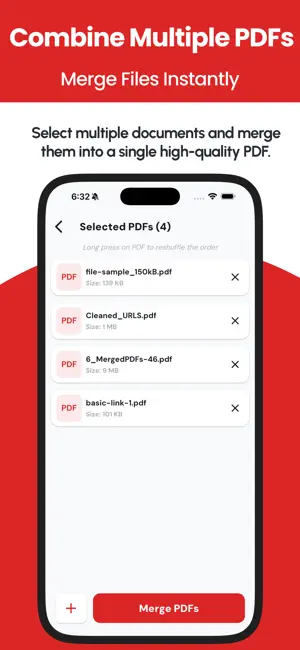
Need to remove pages from a PDF? Remove PDF Pages makes it fast and simple! Whether you want to delete a single page, a specific range, or all even/odd pages, this tool provides an easy and efficient way to edit your PDFs. ALL-IN-ONE PDF POWER TOOLS We have expanded! Beyond just removing pages, you now have a complete professional suite to manage every document task: PDF Merger & Joiner: Seamlessly combine multiple reports, invoices, or projects into a single professional file. Smart PDF Splitter: Precisely extract specific pages or split large documents into smaller, manageable files. Organize & Reorder: Use easy drag-and-drop to fix page sequences or Rotate scans for the perfect orientation. Advanced Security: Lock sensitive PDFs with password encryption or Unlock restricted documents for easier editing. Professional Link Stripper: Automatically identify and remove clickable hyperlinks for a clean, distraction-free document. High-Speed Conversion: Instantly turn photos into high-quality PDFs (Images to PDF) or export PDF pages as clear JPG/PNG images (PDF to Image). Quick Management: Track your work with a dedicated "Recent Files" history tab to share, rename, or export instantly. Main Tool Key Features: Select & Remove Pages – Choose specific pages for deletion. Range-Based Deletion – Remove multiple pages at once. Remove Even/Odd Pages – Instantly delete all even or odd pages. Fast & Secure Processing – No quality loss, and your files stay private. Preview Before Deletion – Ensure accuracy before saving changes. User-Friendly Interface – Simple and intuitive PDF editing. Perfect for students, professionals, and anyone handling PDF documents, Remove PDF Pages gives you total control over your files without requiring complex software. Download now and edit your PDFs effortlessly! Terms of Use: https://codifyappsprivacy.blogspot.com/p/terms-of-use.html
What’s new
Version 1.2 · Updated May 5, 2026
BIGGEST UPDATE YET: The Complete PDF Suite! We’ve evolved! This version transforms Remove Pages From PDF into your ultimate all-in-one document toolkit. POWERFUL NEW TOOLS: Merge & Split: Combine multiple files or extract specific pages instantly. Organize: Drag-and-drop to Reorder or Rotate pages with ease. Security: Lock PDFs with passwords or Unlock restricted files. Convert: High-quality PDF to Images and Images to PDF conversion. Remove Links: Our signature tool to strip unwanted URLs and hyperlinks. Recent Files: A new history tab to quickly manage and share your work. PERFORMANCE & DESIGN: Lightning Fast: Optimized engine for handling large files without lag. New UI: A clean, professional red-and-white theme for a better workflow. Upgrade now and take control of your PDF workflow!
App privacy
The developer, Muhammad Awais Younas, reported these privacy practices to Apple.
Data Not Linked to You
The following data, which may be collected but is not linked to your identity, may be used for the following purposes:
- Identifiers: Device ID
Used for: Third-Party Advertising
Alternatives to Remove PDF Pages : PDF Tools
Looking for apps like Remove PDF Pages : PDF Tools? Here are 6 similar apps on the App Store. The highest rated is Merge PDF - Combine PDF (4.8/5), and all 6 are free to download.
-
 PDF Page Remover
3.2
-
 Split PDF : Extract PDF Pages
3.0
-
 PDF Merge X: PDF Merger
4.1
-
 PDF Splitter + PDF Merge
4.5
-
 Merge PDF - Combine PDF
4.8
-
 PDF Combiner - Merge & Split
4.8
| App | Rating | Price | Last updated | Compare |
|---|---|---|---|---|
| Remove PDF Pages : PDF Tools | 5.0 / 5 (3 ratings) | Free | May 5, 2026 | |
| PDF Page Remover | 3.3 / 5 (8) | Free | May 28, 2026 | Compare |
| Split PDF : Extract PDF Pages | 3.0 / 5 (2) | Free | Oct 20, 2026 | Compare |
| PDF Merge X: PDF Merger | 4.1 / 5 (92) | Free | Aug 14, 2026 | Compare |
| PDF Splitter + PDF Merge | 4.5 / 5 (140) | Free | Aug 25, 2026 | Compare |
| Merge PDF - Combine PDF | 4.8 / 5 (352) | Free | Oct 21, 2026 | Compare |
| PDF Combiner - Merge & Split | 4.8 / 5 (293) | Free | Sep 1, 2026 | Compare |