

Formify: Convert Video to MP4
纯沁 吴 Photo & Video iPhoneiPadiPod touch
Formify: Convert Video to MP4 is a free Photo & Video app for iPhone and iPad by 纯沁 吴. Requires iOS 26.0. Updated October 7, 2026.
- Price
- Free
- on the App Store
- Size
- 26 MB
- Age 4+
- Updated
- Oct 7
- 2026 · v1.3
Screenshots


About Formify: Convert Video to MP4
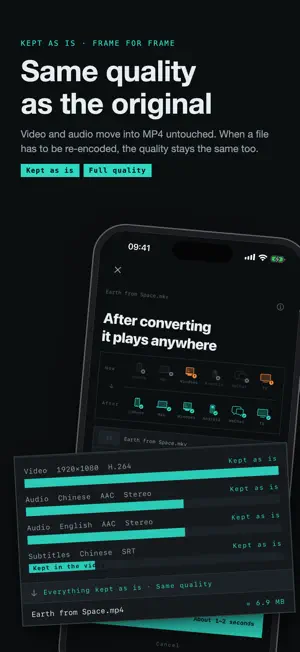
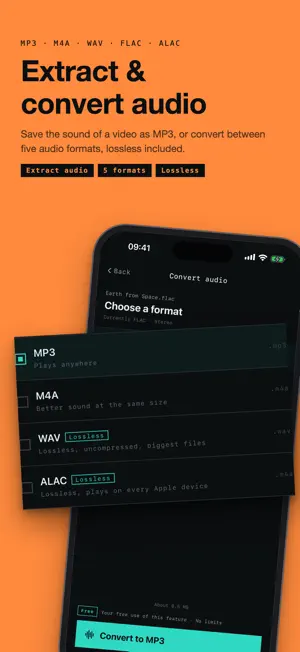
Videos your iPhone won't play become MP4 in seconds, at the same quality. Your iPhone's full power, all on-device. It even works in Airplane Mode. [In seconds] MKV, AVI, WMV, FLV, WebM, TS: most files your iPhone can't open simply come in the wrong container. Formify moves the video and audio into an MP4 as they are, in seconds. Before you start, it shows roughly how long it will take. HEVC video from your iPhone won't open on a Windows PC? Convert it to a universal format and it plays anywhere. [Same quality] When the streams can be kept as they are, every frame stays exactly as in the original. When a file really has to be re-encoded, Formify uses the highest quality setting, so the picture stays just as sharp. No quality cap, no watermark, no file limit. [Your iPhone's full power, all on-device] Converting, recognizing text, making GIFs: every feature runs on your iPhone's own chip, with hardware-accelerated video that's fast and keeps the same quality. No sign-up, and converting needs no internet. The app only goes online to confirm purchases with Apple: App Store payments and checking your purchases. The built-in FFmpeg was compiled with all networking disabled. [Extract audio, convert any format] Save the sound of a video as MP3. Convert between MP3, M4A, WAV, FLAC and ALAC; lossless stays lossless. [Video to Live Photo] Pick the moment for the cover. 1.5 seconds on each side are saved to Photos, and the photo moves when you touch and hold it. [Video to GIF] Cut a clip, choose the size and frame rate, and make your own sticker. Up to 10 seconds, with the file size shown before you convert. [Also in Formify] · Choose your audio and subtitles: tick the tracks you want to keep · Recognize text: turn a photo into text, a table or a searchable PDF, on device · HEIC to JPEG: iPhone photos anyone can open · Photos to PDF: combine several photos into one document · Unzip: opens RAR and 7z too [Pricing] Every feature is free once, in full. After that, pay per use with credits that work for every feature, or buy once for lifetime access; 18 credits turn into lifetime access automatically. Credits and the lifetime unlock follow your Apple Account: tap Restore Purchases on a new phone or after reinstalling. No subscription, no ads. [Technical notes] H.264 and HEVC are encoded by the system's VideoToolbox hardware encoder. This app uses libraries from the FFmpeg project under the LGPL v2.1 for container parsing and for decoding formats VideoToolbox doesn't support. GPL and nonfree components were not enabled at build time. The full build configuration, source checksum and the LGPL v2.1 text are in the app under Settings › About & Licenses, readable offline.
What’s new
Version 1.3 · Updated October 7, 2026
Make ringtones, and move files between your iPhone and computer. • Make a ringtone: cut up to 30 seconds from a video or song; the loudest part is already selected when it opens. Tap Set as Ringtone, then the system's Use as Ringtone, and your ringtone is changed. • Wi‑Fi Transfer (Transfer, top right of the home screen): with your computer or another phone on the same Wi‑Fi, open the address Formify shows in a browser to download converted videos, or send files from the computer to Formify to convert. You can also pick videos from Photos or files from Files for the computer. Files go directly over your Wi‑Fi, through no server. • Plays on older PCs and phones: a new option when converting iPhone videos. If an MP4 you converted earlier won't play on an older PC or phone, check it and convert again. Improved the experience and fixed known issues.
App privacy
The developer, 纯沁 吴, reported these privacy practices to Apple.
Data Not Collected
The developer does not collect any data from this app.
Alternatives to Formify: Convert Video to MP4
Looking for apps like Formify: Convert Video to MP4? Here are 6 similar apps on the App Store. The highest rated is Stillora: MP4 Video Maker (5.0/5), and all 6 are free to download.
-
 轉換工廠 Convert Factory - 圖片影片轉檔
-
 魔法格式
1.0
魔法格式
1.0
-
 Video Converter: MP4 MKV AVI
-
 Stillora: MP4 Video Maker
5.0
Stillora: MP4 Video Maker
5.0
-
 LivePhotoX-Video to Live Photo
-
 JoinCut - Video Merge & Trim
4.7
JoinCut - Video Merge & Trim
4.7
| App | Rating | Price | Last updated | Compare |
|---|---|---|---|---|
| Formify: Convert Video to MP4 | – | Free | October 7, 2026 | |
| 轉換工廠 Convert Factory - 圖片影片轉檔 | – | Free | Jul 25, 2026 | Compare |
| 魔法格式 | 1.0 / 5 (1) | Free | Oct 14, 2026 | Compare |
| Video Converter: MP4 MKV AVI | – | Free | Oct 24, 2026 | Compare |
| Stillora: MP4 Video Maker | 5.0 / 5 (1) | Free | Aug 30, 2026 | Compare |
| LivePhotoX-Video to Live Photo | – | Free | Jul 7, 2026 | Compare |
| JoinCut - Video Merge & Trim | 4.7 / 5 (3) | Free | Oct 22, 2026 | Compare |