

魔法格式
晓兰 许 Photo & Video iPhoneiPadiPod touchMac
魔法格式 is a free Photo & Video app for iPhone and iPad by 晓兰 许. Rated 1.0/5 from 1 ratings. Requires iOS 17.0. Updated October 14, 2026.
- Rating
- 1.0
- 1 ratings
- Price
- Free
- on the App Store
- Size
- 27 MB
- Age 4+
- Updated
- Oct 14
- 2026 · v2.1
Screenshots
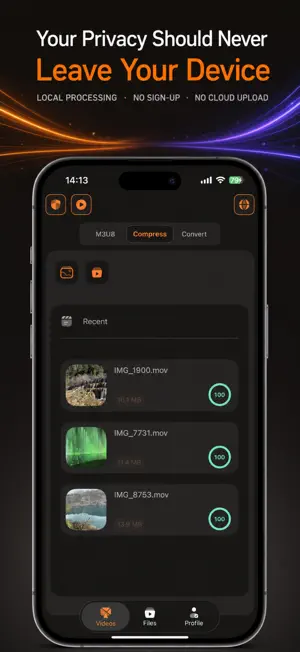

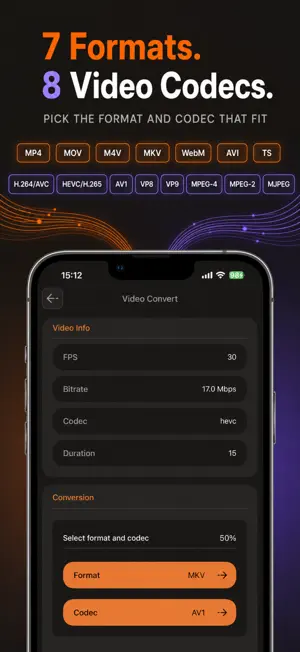

About 魔法格式
MagicFmt is a private video toolbox for the jobs you need to finish quickly: make a video smaller, convert it to a useful format, or save an M3U8 stream you are authorized to use as an MP4. No account. No sign-up. No automatic scan of your photo library or files. LOCAL VIDEO PROCESSING Choose a video from Photos or Files, then compress or convert it directly on your device. Your selected local video is not uploaded to a cloud service for compression or conversion. You stay in control of the original and the output. COMPRESS WITH A CLEAR TARGET Reduce file size before sharing, storing, or moving a video. Review the video details, choose a compression level, see an estimated output size, and follow progress from the task page or File Center. CONVERT FORMATS AND CODECS Turn a video into the format that fits your next step. Select the output container and supported video codec, then keep the finished file ready for preview, export, sharing, or saving to Photos when supported. SAVE YOUR M3U8 AS MP4 Paste an M3U8 link you are permitted to process, review its stream information, give the output a name, and save it as a local MP4. The task view shows download and merge progress, while File Center keeps completed files and task history organized. YOUR FILES, YOUR CHOICE Open a finished video, save compatible files to Photos, share through the iOS share sheet, or remove files whenever you want. Outputs remain in the app’s Files area until you choose to export or delete them. BUILT FOR PRIVACY-MINDED WORKFLOWS MagicFmt asks only for the access needed for the action you choose. It does not require you to create an account just to compress, convert, manage, or export your videos. Please process only media you own or are authorized to use.
What’s new
Version 2.1 · Updated October 14, 2026
Version 2.1 Update Notes: 1. Player optimization: Fixed an issue where playback speed would automatically reset after a period of time. 2. UI optimization and adaptation for some pages on iOS versions below 26. 3. 3.0x playback speed is now supported for video previews.
App privacy
The developer, 晓兰 许, reported these privacy practices to Apple.
Data Not Linked to You
The following data, which may be collected but is not linked to your identity, may be used for the following purposes:
- Identifiers: User ID
- Diagnostics: Crash Data
Used for: App Functionality
Alternatives to 魔法格式
Looking for apps like 魔法格式? Here are 6 similar apps on the App Store.
-
 ClipDock(m3u8 extractor)
-
 实况编辑
-
 VideoGif - GIF Maker Converter
-
 Markora: Watermark Photo Video
-
 Video Player: 4K & IPTV
-
 Formify: Convert Video to MP4
| App | Rating | Price | Last updated | Compare |
|---|---|---|---|---|
| 魔法格式 | 1.0 / 5 (1 rating) | Free | October 14, 2026 | |
| ClipDock(m3u8 extractor) | – | Free | Oct 19, 2026 | Compare |
| 实况编辑 | – | Free | Sep 9, 2026 | Compare |
| VideoGif - GIF Maker Converter | – | Free | Jul 13, 2026 | Compare |
| Markora: Watermark Photo Video | – | Free | Aug 8, 2026 | Compare |
| Video Player: 4K & IPTV | – | Free | Oct 14, 2026 | Compare |
| Formify: Convert Video to MP4 | – | Free | Oct 7, 2026 | Compare |
Compare 魔法格式 with the top alternatives: ratings, updates, ASO score and keyword gaps →