

JoinCut - Video Merge & Trim
mongdaewon Photo & Video iPhoneiPadiPod touch
JoinCut - Video Merge & Trim is a free Photo & Video app for iPhone and iPad by mongdaewon. Requires iOS 17.0. Updated October 9, 2026.
- Price
- Free
- on the App Store
- Size
- 7 MB
- Age 4+
- Updated
- Oct 9
- 2026 · v20261009.1.0
Screenshots


About JoinCut - Video Merge & Trim
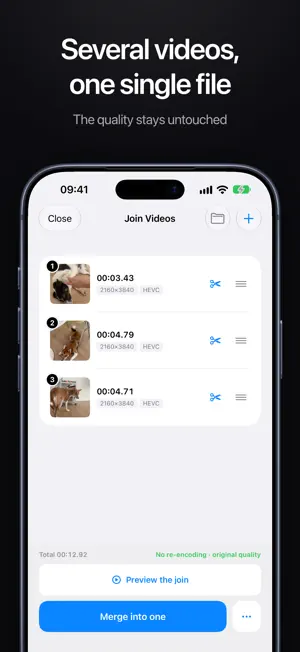
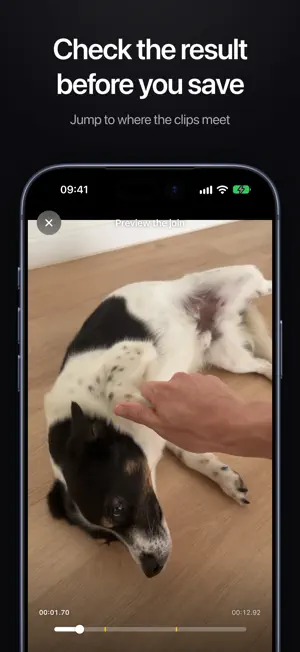
Keep only the parts you want. Or join several videos into one. The quality stays exactly the same as the original, and saving is fast. JoinCut lets you cut one video into several pieces, pick the ones you like, and join them, in the order you choose, into a single video. Because nothing is re-encoded, there is no quality loss at all, and the export finishes quickly. Pick several videos instead of one, and they are joined in the order you picked them. You can also trim the start and end of each video before joining. Formats that match join losslessly, and the rest are re-encoded. WHAT YOU CAN DO • Split a video into multiple sections and select the ones you want • Move a whole selection at once: press and hold it on the minimap and drag • Reorder sections by dragging, add or remove them anytime • Fine-tune each cut with a touch trimmer (1-8x zoom + minimap) • Undo and redo any edit, up to 30 steps back • Merge everything into one clean video, losslessly • Join several whole videos back to back, even when their formats differ • Trim the start and end of each video right in the join list • Preview the result before saving, and jump to where the videos meet • See which video is the one forcing a re-encode, and drop it with a tap • Add videos from Photos or the Files app, or drag them in on Mac and iPad • Open MKV files too, when the video is H.264 or HEVC and the audio is AAC, AC-3 or MP3 • Save straight to Photos, or pick a folder when you're on a Mac • Share right after saving, or open Photos • Export as a GIF too WHY LOSSLESS Most editors re-encode your video, which costs time and quality. JoinCut keeps the original frames untouched and only stitches the parts together, so what you save looks identical to the source, and it's fast. ALWAYS FREE The core, merging your chosen parts and saving losslessly, is free forever. No ads. JoinCut Plus (one-time purchase, yours forever) • Remove the GIF watermark • Unlimited segments (3 and up) • Join 3 or more videos at once • Save selected segments as separate files Works on iPhone, iPad and Apple silicon Mac.
What’s new
Version 20261009.1.0 · Updated October 9, 2026
Editing is now easier and more comfortable to work with. In the trim screen, spread two fingers to zoom in. Want a feature? Tap ? on the start screen and use Send Feedback. Thank you for using JoinCut.
App privacy
The developer, mongdaewon, reported these privacy practices to Apple.
Data Not Linked to You
The following data, which may be collected but is not linked to your identity, may be used for the following purposes:
- Usage Data: Product Interaction
Used for: Analytics
Alternatives to JoinCut - Video Merge & Trim
Looking for apps like JoinCut - Video Merge & Trim? Here are 6 similar apps on the App Store. The highest rated is Split Video: Lossless Cut (5.0/5), and 5 of the 6 are free to download.
-
 Split Video: Lossless Cut
5.0
Split Video: Lossless Cut
5.0
-
 Seam: Merge & Stitch Videos
4.2
Seam: Merge & Stitch Videos
4.2
-
 ChotCut - Fast video trimming
-
 CutterAce - Video Cutter
-
 Video Merger: Join Clips
3.0
Video Merger: Join Clips
3.0
-
 VideoTrim: No Quality Loss
5.0
VideoTrim: No Quality Loss
5.0
| App | Rating | Price | Last updated | Compare |
|---|---|---|---|---|
| JoinCut - Video Merge & Trim | – | Free | October 9, 2026 | |
| Split Video: Lossless Cut | 5.0 / 5 (1) | Free | Oct 3, 2026 | Compare |
| Seam: Merge & Stitch Videos | 4.2 / 5 (6) | Free | Jun 21, 2026 | Compare |
| ChotCut - Fast video trimming | – | Free | Aug 14, 2026 | Compare |
| CutterAce - Video Cutter | – | Free | Apr 9, 2026 | Compare |
| Video Merger: Join Clips | 3.0 / 5 (1) | Free | Jun 13, 2026 | Compare |
| VideoTrim: No Quality Loss | 5.0 / 5 (1) | 6.99 USD | Jul 15, 2026 | Compare |