

FaceRef Studio
Namson Digital Graphics & Design iPhoneiPadiPod touch
FaceRef Studio is a paid Graphics & Design app for iPhone and iPad by Namson Digital. Rated 5.0/5 from 1 ratings. Requires iOS 15.0.
- Rating
- 5.0
- 1 ratings
- Price
- 4.99 USD
- on the App Store
- Size
- 115 MB
- Age 4+
- Updated
- Oct 19
- 2026 · v1.0.1
Screenshots


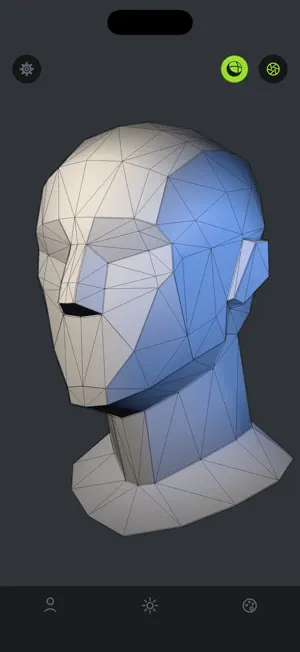

About FaceRef Studio
Study the human head from every angle. FaceRef Studio puts a 3D head on your desk while you draw. Rotate it with one finger, pinch to zoom, and light it the way you need - then get back to your paper or tablet. 25 MODELS ACROSS 4 CATEGORIES Basic - two plane-broken heads, plus sphere, cube, cone and cylinder for blocking out forms Classic - the Asaro head in simple and detailed versions, and a skull Stylized - male, female and teen sculpts Detailed - realistic male and female heads, with and without hair LIGHT IT YOURSELF Three spotlights you can move, dim and recolour. Drop a key light from above, kick in a rim from behind, and watch the planes of the face resolve the way they do in life. SEE THE FORM Switch on the wireframe to read the topology underneath - useful when you are working out how one plane turns into the next. Tint the model to any colour to take the guesswork out of a value study. KEEP WHAT YOU FIND Tap the shutter to save a clean shot of the model straight to your photo library. No interface in the frame, just the reference. BUILT TO STAY OUT OF THE WAY No account. No ads. No internet connection required - the app never goes online, so nothing you do here leaves your device.
What’s new
Version 1.0.1 · Updated October 19, 2026
Lighting presets Ten slots to save a whole three-light setup at once - the colour, brightness and direction of every light. Name a slot, load it back whenever you need it, and it stays on your device between sessions. The first row puts every light back to the lighting the app ships with, so a setup that has wandered off is always one tap from a known start. A new way to aim a light Each light's direction is now set by dragging its dot around a shaded ball instead of three sliders. The ball previews the lighting on a sphere as you move, and the outer ring reaches round behind the model for rim and back light. Built for fingers Dragging the light ball or the colour wheel now moves the handle by how far your finger travels, so the point you are choosing is never hidden under your fingertip. A tap still picks the spot you tapped. Handles and light dots are sized to stay comfortable on a phone screen. Also in this version - The Lighting tab is split into Light and Presets, and the colour wheel now stays open instead of hiding behind a swatch. - The hue ring picks the colour under your finger. It used to measure the angle from the top of the wheel, so the handle landed away from where you pressed. - Taps on high-density screens are no longer mistaken for tiny drags, which stopped the colour wheel from picking the point you tapped. - The panel rises above the on-screen keyboard while you type a preset name, instead of the keyboard covering the field. - Set as default and Reset light have been replaced by presets and the App default row, which do both jobs for all three lights at once.
App privacy
The developer, Namson Digital, reported these privacy practices to Apple.
Data Not Collected
The developer does not collect any data from this app.
Alternatives to FaceRef Studio
Looking for apps like FaceRef Studio? Here are 6 similar apps on the App Store. The highest rated is Paper: 3D Drawing Studio (5.0/5).
-
 Holo.Draw: Sketch On Screen
-
 Holo.Pen: Virtual Tablet
3.0
Holo.Pen: Virtual Tablet
3.0
-
 Paper: 3D Drawing Studio
5.0
Paper: 3D Drawing Studio
5.0
-
 autoTween Animate
4.4
autoTween Animate
4.4
-
 tamga - 3d sculpting
3.1
tamga - 3d sculpting
3.1
-
 Infinite Zoom Drawing Canvas
4.7
Infinite Zoom Drawing Canvas
4.7
| App | Rating | Price | Last updated | Compare |
|---|---|---|---|---|
| FaceRef Studio | 5.0 / 5 (1 rating) | 4.99 USD | October 19, 2026 | |
| Holo.Draw: Sketch On Screen | – | 7.99 USD | Jun 26, 2024 | Compare |
| Holo.Pen: Virtual Tablet | 3.0 / 5 (2) | 9.99 USD | Jun 26, 2024 | Compare |
| Paper: 3D Drawing Studio | 5.0 / 5 (2) | 6.99 USD | Oct 9, 2026 | Compare |
| autoTween Animate | 4.4 / 5 (7) | 4.99 USD | Jan 14, 2025 | Compare |
| tamga - 3d sculpting | 3.1 / 5 (7) | 4.99 USD | Oct 26, 2026 | Compare |
| Infinite Zoom Drawing Canvas | 4.7 / 5 (7) | 9.99 USD | Oct 26, 2026 | Compare |
Compare FaceRef Studio with the top alternatives: ratings, updates, ASO score and keyword gaps →