

Infinite Zoom Drawing Canvas
Imran Gul Graphics & Design iPad
Infinite Zoom Drawing Canvas is a paid Graphics & Design app for iPad by Imran Gul. Rated 4.7/5 from 7 ratings. Requires iOS 26.0. Updated October 19, 2026.
- Rating
- 4.7
- 7 ratings
- Price
- 9.99 USD
- on the App Store
- Size
- 8 MB
- Age 9+
- Updated
- Oct 19
- 2026 · v2.1.0
Screenshots


About Infinite Zoom Drawing Canvas
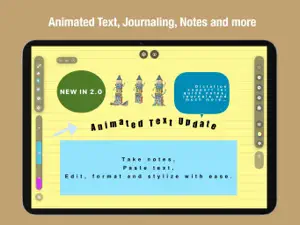
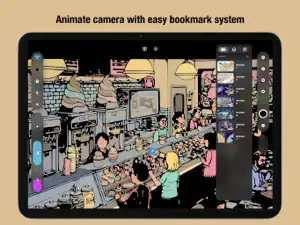
Infinite Zoom Drawing + Animation and Motion Design Pro Drawing and Illustration Studio = VOID Create unlimited concept drawings, illustrations, architectural designs and sketches, mechanical schematics, endless notes and much more with a powerful layer based design. The Ultimate Endless Canvas for Illustration, Fashion, and Tech Experience the future of digital creativity. VOID is a professional-grade Infinite Zoom app powered by a high-performance, pure vector-based engine. Unlike traditional apps that limit you to a fixed canvas size—risking pixelation or device slowdown—VOID offers a truly Endless Canvas that remains lightning-fast and perfectly sharp. Whether sketching galaxies or microscopic details, VOID is the ultimate tool for Animation and Motion Design. Infinite Vector Engine: Draw without limits. Zoom in millions of times with zero pixelation. Deep Zoom Navigation: Seamlessly navigate vast workspaces with intuitive pinch-to-zoom and pan gestures. Spatial Anchors: Save and label specific viewports (camera positions) to create cinematic presentations or navigate complex drawings instantly. Global Textures & Atmosphere: Apply screen-wide effects like Film Grain, Watercolor, Parchment, and Carbon Fiber to give your work a tactile feel. Creative Toolkit Dynamic Brush set: Specialized tools including: Classics: Pen, Pencil, Inker, Marker, Calligraphy. Graphic Bezier Pen tool with Pro-Graphic quality settings and controls. Generative & FX: Nebula, Aura, Fiber, Voltage, Gravity Web. Technical: Isometric Block, Schematic, Blueprint, Ruler. 3D Style: Vox (Volumetric), Tube, Ribbon. Smart Mechanics: Tools react to speed, tilt, and pressure. customizable mechanical settings for "wildness," "scatter," and "flow." Mind Mapping: Notes and planning system. A.R support for reference drawing and vectorization system with one click. Animation & Motion Robust Cell Frame/Stop-Motion Animation System that supports unlimited tracks. Create artistic animations or commercial motion graphics effortlessly with intuitive animation design studio system. Live Loops: Instantly bring any stroke or image to life with no keyframes needed. Motion Presets: Pulse, Spin, Drift, Wiggle, Breathe, Orbit, and more. Particle Systems: Add environmental effects like Rain, Snow, Storm, Dust, and Sparkles to specific layers or objects. Path Animation: Make objects follow drawn paths with adjustable speed and orientation. Animated and paragraphic Text tools for Notes taking, Journaling and much more. Professional Power Advanced Layer System: Unlimited Layers & Groups. 20+ Blend Modes. Alpha Lock & Visibility toggles. Global Color Grading: Real-time adjustment of Hue, Saturation, Brightness, and Contrast for the entire artwork. Object Repository: Save and reuse your favorite drawn elements or imported images across different projects. Media Import: Drag & drop images onto the canvas; they scale deeply with your vector art. Global Assets and Prefab System: With one click, save your art as reusable assets and prefabs available across the app in any file. Simply drag/drop the assets anywhere on the canvas eliminating the need for a cumbersome copy/paste system. Export & Sharing High-Res Export: Generate massive, crisp images of your entire canvas or specific selections. Video Recording: Export seamless loop videos of your animated artwork. PDF Support: Create multi-page scalable documents from your spatial anchors. VOID is where your ideas go to grow, infinitely. WHY VOID IS BEST-IN-CLASS: NO SUBSCRIPTIONS: One-off payment. All future updates are free. COMPLETELY OFFLINE: Your creativity stays on your device. APPLE PENCIL OPTIMIZED: Full support for pressure, tilt, and double-tap. POWERFUL LAYERS: Advanced blending modes and fine control over every stroke (scale, rotate, shear, recolor). COMPOSITION GUIDES: Dynamic Golden Ratio and Rule of Thirds overlays. Now With Touch draw support. Use Apple Pencil for best creative experience.
Ratings & reviews
4.7
7 ratings
What’s new
Version 2.1.0 · Updated October 19, 2026
COLOR DROP FLOOD FILL • Drag & Drop Coloring: Press and hold the color wheel or any palette swatch to lift a color bubble, then drop it into any closed shape or linework. • Smart Gap Tolerance: Relaxed boundary detection automatically seals small hand-drawn line gaps to prevent accidental color leakage. • Vector-Powered Fills: Filled regions generate as clean, scalable vector paths that can be instantly recolored or selected with the Marquee tool. • Refined Pick Timing: A natural, tactile press-and-hold pick duration (~0.25s) with haptic feedback ensures taps always open your color picker while holds engage the drag. CLEAN BÉZIER WORKFLOW • Deactivated Canvas Cleanliness: Bézier anchor points, square nodes, and tangent handles now automatically hide whenever you switch to other tools, keeping your infinite canvas distraction-free. MARQUEE & SELECTION IMPROVEMENTS • Full support for selecting, moving, scaling, and transforming flood-fill shapes using the Marquee/Move tool. IN-APP USER GUIDE 2.1.0 • Added an interactive, step-by-step tutorial covering Color Drop, gap closure techniques, and advanced vector workflows. Performance enhancements and infinite canvas responsiveness polish. Overall app performance improvements for an even more fluid drawing experience.
App privacy
The developer, Imran Gul, reported these privacy practices to Apple.
Data Not Collected
The developer does not collect any data from this app.
Alternatives to Infinite Zoom Drawing Canvas
Looking for apps like Infinite Zoom Drawing Canvas? Here are 6 similar apps on the App Store. The highest rated is Denrim: Forge (4.0/5), and 1 of the 6 are free to download.
-
 Pixelart Studio: Sprite Maker
-
 ZPixit
-
 LowPoly 3D Modeling
-
 Denrim: Forge
4.0
Denrim: Forge
4.0
-
 Layer-Art
-
 Vector Sketch Pro
| App | Rating | Price | Last updated | Compare |
|---|---|---|---|---|
| Infinite Zoom Drawing Canvas | 4.7 / 5 (7 ratings) | 9.99 USD | October 19, 2026 | |
| Pixelart Studio: Sprite Maker | – | 12.99 USD | Oct 15, 2026 | Compare |
| ZPixit | – | Free | Sep 15, 2026 | Compare |
| LowPoly 3D Modeling | – | 12.99 USD | Oct 15, 2026 | Compare |
| Denrim: Forge | 4.0 / 5 (1) | 14.99 USD | Sep 8, 2026 | Compare |
| Layer-Art | – | 1.99 USD | Sep 15, 2026 | Compare |
| Vector Sketch Pro | – | 4.99 USD | Oct 7, 2026 | Compare |