
Stay Clock: Flip Desk Clock
Guan Feng Lai Utilities iPhoneiPadiPod touchApple Watch
Stay Clock: Flip Desk Clock is a free Utilities app for iPhone and iPad by Guan Feng Lai. Requires iOS 18.0. Updated October 9, 2026.
- Price
- Free
- on the App Store
- Size
- 30 MB
- Age 4+
- Updated
- Oct 9
- 2026 · v1.0.6
Screenshots


About Stay Clock: Flip Desk Clock
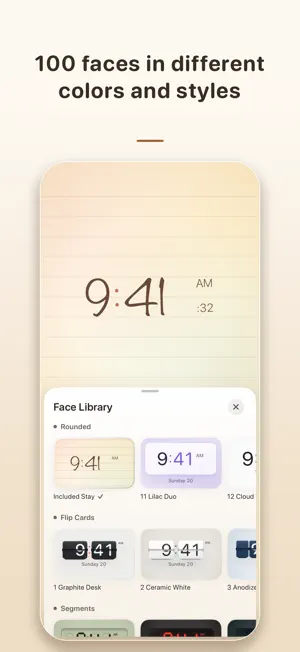
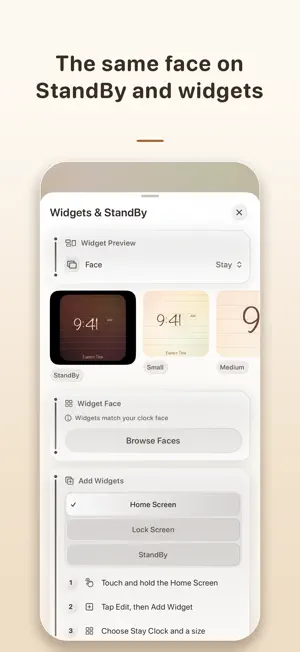
Stay Clock turns your iPhone or iPad into an always-on desk clock you can read from across the room. Big time, a calendar that fits each face, and one look that follows you to StandBy, the Lock Screen, Home Screen widgets and Apple Watch. Made for the desk, the shelf and the nightstand. Full screen time that stays readable from far away, in portrait or landscape, on iPhone and iPad. Keep Awake that understands charging. Stay on while charging, always on with a battery floor, or follow the system, so your clock never surprises you. Panel Care for OLED screens. Gentle pixel shifting, details that soften when idle, and a dim red night face on true black for the bedroom. One face everywhere. The face you pick appears on the full screen clock, StandBy, Lock Screen and Home Screen widgets and Apple Watch, and looks the same on every one. A calendar that suits each face. Choose Off, Simple with the date and weekday, or a full Month view separately for every face. Your language and your time zone. Switch the app language instantly, pick any city or time zone, and choose 12 or 24 hour time and your own digits. Private by design. No account, no ads, no tracking and no network. Everything stays on your device. A dock on the desk: your phone stays lit while it charges, showing the time in a face you chose. A bedroom at night: the screen dims to a quiet red clock on true black and saves your OLED panel. A day away from the desk: the same face sits on your Lock Screen, your Home Screen and your wrist. What Stay Clock does Full screen always-on clock with large, readable time One free face included, with a handwritten paper look Lifetime unlock adds 100 more faces in different colors, styles and fonts Off, Simple or Month calendar saved separately for each face StandBy, Lock Screen and Home Screen widgets that match the app Apple Watch face that follows the same design Keep Awake while charging, with battery floor and system options Night schedule, dim red face and pixel shifting for OLED screens Hourly chime and a simple alarm App language and time zone chosen inside the app iPhone and iPad layouts for every screen size Stay Clock is a free download with one complete face. One optional Lifetime purchase unlocks 100 more faces for good, with no subscription. Everything runs on your device. No account, no ads, no analytics and no tracking. Optimized for iPhone Duo.
What’s new
Version 1.0.6 · Updated October 9, 2026
This update refreshes our App Store information. Everything in the app works the same as before.
App privacy
The developer, Guan Feng Lai, reported these privacy practices to Apple.
Data Not Collected
The developer does not collect any data from this app.
Alternatives to Stay Clock: Flip Desk Clock
Looking for apps like Stay Clock: Flip Desk Clock? Here are 6 similar apps on the App Store.
-
 Long Lasting Clock: Fullscreen
-
 FlipClock Pro
-
 WizMark
-
 Amitis Clock
-
 デスクメイト
-
 Moon Clock: Phases & Widgets
| App | Rating | Price | Last updated | Compare |
|---|---|---|---|---|
| Stay Clock: Flip Desk Clock | – | Free | October 9, 2026 | |
| Long Lasting Clock: Fullscreen | – | Free | Oct 22, 2026 | Compare |
| FlipClock Pro | – | 0.99 USD | Oct 6, 2026 | Compare |
| WizMark | – | Free | Aug 21, 2026 | Compare |
| Amitis Clock | – | 2.89 USD | Jan 4, 2026 | Compare |
| デスクメイト | – | Free | Jun 24, 2026 | Compare |
| Moon Clock: Phases & Widgets | – | Free | Oct 13, 2026 | Compare |