

Moon Clock: Phases & Widgets
YI-WEN CHOU Utilities iPhoneiPadiPod touch
Moon Clock: Phases & Widgets is a free Utilities app for iPhone and iPad by YI-WEN CHOU. Requires iOS 18.0. Updated October 13, 2026.
- Price
- Free
- on the App Store
- Size
- 78 MB
- Age 4+
- Updated
- Oct 13
- 2026 · v1.1
Screenshots



About Moon Clock: Phases & Widgets
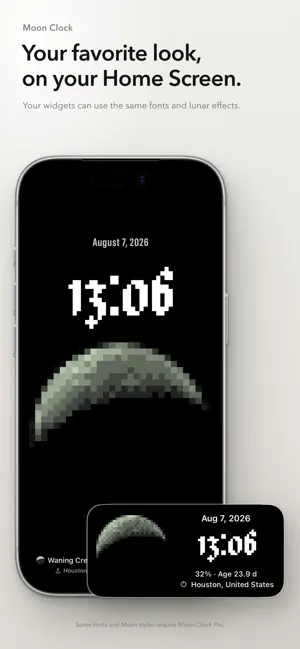
Moon Clock is a full-screen clock with Moon phase widgets. Check the time, and take a moment to look at today’s Moon. A Moon for your Home Screen Choose a small, medium, or large widget and put it where you’ll see it often. Check the time and lunar phase without opening the app. See the Moon in full screen Open Moon Clock to give the Moon and time room to fill your screen. The phase and lighting change with time, and you can choose an observing location to see the Moon from there. Find a look you like Keep the natural lunar surface, or try pixel, halftone, and CRT effects. Mix fonts, text effects, and Moon styles, then arrange your full-screen clock. Your widgets can follow your chosen fonts and Moon effects, so there’s no need to set them up again. Take a closer look The 3D Moon is built from real lunar imagery and elevation data. Zoom in to explore craters, ridges, and the shadows they cast. Rotate the Moon freely to see the far side, hidden from view on Earth. Free features and Moon Clock Pro The basic clock and widgets with the default look are free. Moon Clock Pro is a one-time purchase with a permanent unlock. No subscription. It includes: • Every font, text effect, and Moon style • Creating and saving your own text styles and freeform layouts • Zooming in on the lunar surface and viewing the Moon from any angle Unlocked fonts and Moon effects are also available in widgets, with no separate purchase. No account or sign-in is required. Location access is optional; you can choose an observing location manually.
What’s new
Version 1.1 · Updated October 13, 2026
Moon Clock now has Home Screen widgets. Keep today’s Moon where you’ll see it often. • Choose small, medium, or large widgets to see the time and lunar phase. • Use the fonts and Moon effects you’ve chosen in Clock. • Adjust the Moon’s position, text size, and information shown, with options tailored to each widget size. The default look is free. If you own Moon Clock Pro, your unlocked fonts and Moon effects are available in widgets at no extra cost.
App privacy
The developer, YI-WEN CHOU, reported these privacy practices to Apple.
Data Not Collected
The developer does not collect any data from this app.
Alternatives to Moon Clock: Phases & Widgets
Looking for apps like Moon Clock: Phases & Widgets? Here are 6 similar apps on the App Store. The highest rated is World Clock By On Station (5.0/5), and 5 of the 6 are free to download.
-
 Hora: Hourly Chime & Reminders
-
 World Clock: TimeShift
-
 RetroDotTimer
-
 Moon Phases: Lunar Tracker
-
 Showcase Clock
4.7
Showcase Clock
4.7
-
 World Clock By On Station
5.0
World Clock By On Station
5.0
| App | Rating | Price | Last updated | Compare |
|---|---|---|---|---|
| Moon Clock: Phases & Widgets | – | Free | October 13, 2026 | |
| Hora: Hourly Chime & Reminders | – | Free | Oct 19, 2026 | Compare |
| World Clock: TimeShift | – | Free | Jul 21, 2026 | Compare |
| RetroDotTimer | – | Free | Sep 22, 2026 | Compare |
| Moon Phases: Lunar Tracker | – | Free | Oct 9, 2026 | Compare |
| Showcase Clock | 4.7 / 5 (6) | Free | Oct 17, 2026 | Compare |
| World Clock By On Station | 5.0 / 5 (4) | 0.99 USD | Nov 11, 2024 | Compare |