

Pigment – Painting Studio
tommy colombet Graphics & Design iPhoneiPadiPod touch
Pigment – Painting Studio is a free Graphics & Design app for iPhone and iPad by tommy colombet. Requires iOS 15.0. Updated October 19, 2026.
- Price
- Free
- on the App Store
- Size
- 37 MB
- Age 4+
- Updated
- Oct 19
- 2026 · v1.0.7
Screenshots


About Pigment – Painting Studio
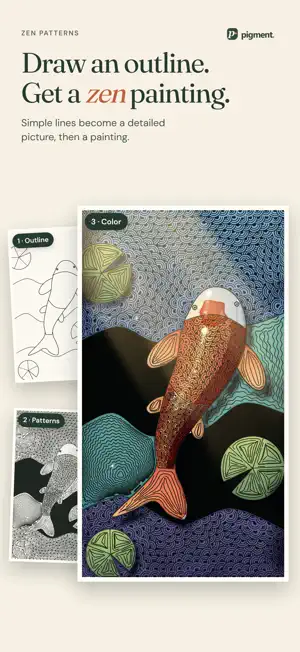
Pigment turns your drawings into paintings, even if you are just starting out. Draw a simple outline and fill it with zen patterns. Pose a 3D figure, turn a mountain, then give your drawing a material: stained glass, mosaic, embroidery, oil or watercolor. Everything is painted right on your device. ZEN PATTERNS: ONE TAP, ONE PATTERN Draw shapes, then tap an area: the pattern fills it and follows its curves. 117 patterns, from scales and waves to stars and woven bands. The pattern stays editable until you apply it, then add color with watercolor or your other tools. ONE SIMPLE DRAWING, THIRTEEN MATERIALS Impasto, Blended, Palette knife, Gouache, Watercolor, Ink wash, Dry pastel, Woven, Embroidered, Knit, Cross-stitch, Stained glass and Mosaic: Pigment remakes your drawing in the material you choose. Compare the results and fine-tune them, from paint thickness to the size of the glass pieces. 3D SHAPES TO COMPOSE WITHOUT DRAWING SKILLS A posable figure whose joints you turn with rotation rings, a 3D mountain that turns under its sun, trees, skies and elephants: 21 adjustable shapes to set up your scene. Each shape stays editable until you apply it. OIL THAT BLENDS, WATERCOLOR THAT FLOWS Oil brushes mix the wet color they cross and leave relief, down to the palette knife. Watercolor spreads wet-in-wet, glazes in transparent layers and settles into the paper grain. PENCIL, INK AND SO MUCH MORE Pencil, charcoal, pastel, marker, pen and airbrush: combine tools in a single composition. Work with fills, gradients and layers. Adjust hue, saturation and brightness to find the colors you want. START WITHOUT KNOWING HOW TO DRAW Draw on a free canvas, compose on a color grid or start from a photo. Follow the tutorial for your first painting and discover a new drawing idea every week, with a palette and an example. BEFORE / AFTER AND EXHIBITIONS Share how your drawing became a painting, as an image or a video. Hang your work on an exhibition wall: frames, settings, lighting. YOUR WORK STAYS WITH YOU No account, no ads. Your drawings and paintings stay on your device. Export your work to Photos to keep or share it. FREE, WITH THE FULL STUDIO AS AN OPTION Free: the Blended material, photo import, every shape, access to every tool with at least one tip or pattern, 12 creations, one exhibition wall with 2 paintings, and exports up to 1,024 px. Full Studio, a one-time purchase with no subscription: all thirteen materials, all 117 zen patterns, every tip and variant, no limit on the number of creations or exhibitions, up to 12 paintings per wall, and exports up to 4,096 px.
What’s new
Version 1.0.7 · Updated October 19, 2026
• Six new materials: Woven, Embroidered, Knit, Cross-stitch, Stained glass and Mosaic, for thirteen in all. • Adjustable shapes to compose without drawing skills, including a posable figure and a 3D mountain. • More realistic oil and watercolor: wet colors that blend, paint relief, palette knife, washes and drying. • Redesigned selection: an edit stays adjustable until you apply it. • Quick gestures, stroke smoothing and various improvements.
App privacy
The developer, tommy colombet, reported these privacy practices to Apple.
Data Not Linked to You
The following data, which may be collected but is not linked to your identity, may be used for the following purposes:
- Purchases: Purchase History
- Identifiers: User ID
Used for: App Functionality
Alternatives to Pigment – Painting Studio
Looking for apps like Pigment – Painting Studio? Here are 6 similar apps on the App Store. The highest rated is Ink Marbling (5.0/5), and 5 of the 6 are free to download.
-
 Light Animator
-
 Atelier — Draw & Animate
-
 Painter's Toolkit: Color Match
-
 Ink Marbling
5.0
Ink Marbling
5.0
-
 Animated Drawing-DigitalSketch
-
 Spritelife
5.0
Spritelife
5.0
| App | Rating | Price | Last updated | Compare |
|---|---|---|---|---|
| Pigment – Painting Studio | – | Free | October 19, 2026 | |
| Light Animator | – | 7.99 USD | Jun 24, 2026 | Compare |
| Atelier — Draw & Animate | – | Free | Sep 25, 2026 | Compare |
| Painter's Toolkit: Color Match | – | Free | Sep 15, 2026 | Compare |
| Ink Marbling | 5.0 / 5 (2) | Free | May 19, 2025 | Compare |
| Animated Drawing-DigitalSketch | – | Free | Sep 27, 2026 | Compare |
| Spritelife | 5.0 / 5 (1) | Free | Sep 17, 2026 | Compare |