

Atelier — Draw & Animate
jerome HOUIX Graphics & Design iPad
Atelier — Draw & Animate is a free Graphics & Design app for iPad by jerome HOUIX. Requires iOS 17.0. Updated September 25, 2026.
- Price
- Free
- on the App Store
- Size
- 92 MB
- Age 4+
- Updated
- Sep 25
- 2026 · v1.47
Screenshots

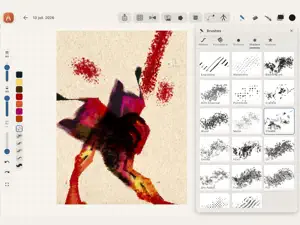


About Atelier — Draw & Animate
Atelier brings together drawing, vector, generative art, animation, comics, and video editing in one iPad app. Drawing • Brushes that respond to stylus pressure and tilt: pencil, charcoal, ink, pastel, engraving. • 60+ textures and stamps: charcoal, ink splatter, crosshatching, wood, canvas, comic screentone. • Layers: blend modes, alpha lock, masks, non-destructive filters. • Selection, lasso, fill, gradient, mirror symmetry, live kaleidoscope symmetry. • Perspective grids, isometric grid, paper textures. • Photo import, cutout, warp, collage. Vector • Pen tool, Bézier curves, geometric shapes, boolean operations, gradients. Generative art • Fractals: Mandelbrot, Julia, Newton, Phoenix. • Mathematical patterns, kaleidoscope symmetry, several coloring modes. Animation • Frame-by-frame with onion skinning, stop-motion style. • Characters rigged with an animatable skeleton, posed and chained into clips. • Path-based animation with easing curves. • Pixel art module: sprites, animation cycles, export to game engine. Comics • Panel grids, speech bubbles, sound effects. • Reading mode to flip through the finished comic book. Video editing • Multi-clip timeline, transitions. • Cinematic LUTs, green-screen chroma key, audio tracks and music. • Title cards, credits, video export. Organization • Notebooks with nested folders. • Personal reference-image library with built-in inspiration search. • Every drawing's history, replayable as a time-lapse and exportable as video. Export & backup • PNG, PDF, video (MP4), full project file, pixel art sprites. • Sync to your own Google Drive, restorable on a new iPad. • No ads, no advertising data collection.
What’s new
Version 1.47 · Updated September 25, 2026
What's New in version 1.47 Video Studio: a bigger sound library 56 new sounds, for more than 100 in total. A new "Ambiences" family: rain, storms, forest, river, seashore, wood fire, city… New effects: creatures and dragons, impacts, foley, interface sounds. New music themes: epic, cinematic, piano, synthwave. The menu has been redesigned in two columns: families and categories on the left, sounds on the right. Search finds sounds even when you type without accents. A "Loop" badge marks the sounds made to play continuously. Puppet: character animation takes a big step forward You can now have several puppets in the same drawing. Joints bend much more naturally: elbows and knees no longer collapse when bent sharply. Pull mode now drives a whole chain of bones, not just two. You can delete a bone or a joint. The bounce on release is more realistic, and the skin follows the skeleton when you drag a bone. Rotations always take the shortest path between two poses. Neighbouring limbs no longer steal each other's shape (arm and torso, for example). The panel has been redesigned: your puppets are listed at the top, and nothing is hidden. The timeline length is now saved. Brushes 25 new "Studio Tools" brushes. The brush panel has been redesigned, with categories grouped by medium. Five more brushes respond to stylus tilt (pencil flank). The halftone screen no longer shows a tiled pattern on thin strokes. Document menu It has been redesigned as a single view, with document types in a side rail. The choice between "new chapter" and "add" is clearer, and the Resume banner has been redesigned. "Book - Comic" now has its own illustration. Video mapping studio Scenes now have real thumbnails. The conflict with AirPlay is fixed, and the wall display is smoother. The studio is now fully translated into English. Fixes and performance An animated merged layer is no longer cropped to a small square. A merged layer is no longer distorted when you move several layers at once. Cutting a feathered selection is much faster. Various stability fixes.
App privacy
The developer, jerome HOUIX, reported these privacy practices to Apple.
Data Linked to You
The following data, which may be collected and linked to your identity, may be used for the following purposes:
- Contact Info: Email Address, Name
- User Content: Other User Content
- Identifiers: User ID
Used for: App Functionality
Alternatives to Atelier — Draw & Animate
Looking for apps like Atelier — Draw & Animate? Here are 6 similar apps on the App Store. The highest rated is SymmetriCAD: 2D Vector Art CAD (5.0/5), and 5 of the 6 are free to download.
-
 Sable: Pixel • Draw • Vector
-
 SymmetriCAD: 2D Vector Art CAD
5.0
SymmetriCAD: 2D Vector Art CAD
5.0
-
 Pistachio - Vector Art
5.0
Pistachio - Vector Art
5.0
-
 Pixbit Studio – Pixel Animator
4.3
Pixbit Studio – Pixel Animator
4.3
-
 Pic to Line Art - Lines Me
4.5
Pic to Line Art - Lines Me
4.5
-
 Morphin
3.8
Morphin
3.8
| App | Rating | Price | Last updated | Compare |
|---|---|---|---|---|
| Atelier — Draw & Animate | – | Free | September 25, 2026 | |
| Sable: Pixel • Draw • Vector | – | Free | Oct 26, 2026 | Compare |
| SymmetriCAD: 2D Vector Art CAD | 5.0 / 5 (1) | Free | Sep 13, 2026 | Compare |
| Pistachio - Vector Art | 5.0 / 5 (3) | Free | Dec 27, 2025 | Compare |
| Pixbit Studio – Pixel Animator | 4.3 / 5 (3) | Free | Jun 3, 2026 | Compare |
| Pic to Line Art - Lines Me | 4.5 / 5 (4) | Free | Jul 14, 2026 | Compare |
| Morphin | 3.8 / 5 (14) | 24.99 USD | May 30, 2026 | Compare |