

ProCam Instrument
SUKRU UTKU POYRAZ Photo & Video iPhoneiPadiPod touch
ProCam Instrument is a free Photo & Video app for iPhone and iPad by SUKRU UTKU POYRAZ. Requires iOS 18.0. Updated September 22, 2026.
- Price
- Free
- on the App Store
- Size
- 13 MB
- Age 4+
- Updated
- Sep 22
- 2026 · v1.0
Screenshots



About ProCam Instrument
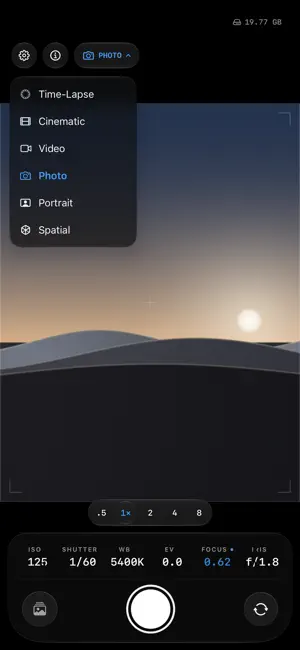
ProCam Instrument is a manual camera for people who already know what they want the picture to be. THE NUMBERS ARE THE INTERFACE ISO, shutter, white balance, exposure, focus and iris sit live above the shutter. Touch one and it comes off automatic onto a ruler that stops where the sensor stops — so what you dial is what the hardware can actually do. Pin the shutter and it is shutter priority; pin ISO too and it is manual, with the meter's needle showing how far off you are. WHAT IS WRITTEN IS YOUR CHOICE One control decides the file: HEIF, JPEG, Apple ProRAW, or Bayer RAW straight off the sensor with Apple's processing switched off. Or develop it with ProCam's own scene-linear pipeline — wavelet denoise, guided-filter tone mapping, halo-limited sharpening — and merge a bracket into one frame with multi-frame RAW fusion. MEASURE, DON'T GUESS Histogram, RGB parade, waveform, vectorscope, focus peaking, zebras and false colour all run on the GPU against the live signal. A focus magnifier punches the monitor in while you set focus. Frame guides, safe areas and anamorphic desqueeze change the viewfinder and never the file. FOR MOVING PICTURES Apple Log and Log 2, HLG, ProRes and ProRes RAW where the hardware offers them. Clip naming, QuickTime timecode, slate metadata, clip length and size limits that roll into the next clip, pause and resume, markers you can drop mid-take, a proxy copy, pre-roll that keeps the seconds before you pressed record, and a clean feed on a second screen. DRIVES A BODY WOULD HAVE Exposure and focus bracketing, focus stacking, an intervalometer, long exposure that builds in front of you, a night stack, and a star-trail mode that keeps the brightest each pixel has ever been. EVERY LENS, EVERY FEATURE The back lenses are one camera: changing focal length ramps the zoom instead of tearing the session down, so a lens change works mid-recording and nothing is gated on which lens you are on. Settings → System → Camera Capabilities reads every capability off the hardware at runtime and tells you what this iPhone can and cannot do — no guessing from the model name. THE REST A gallery with a metadata inspector that shows what the file actually says; a non-destructive editor with curves, HSL, colour grading, masks and lens corrections; Siri and Shortcuts; Lock Screen and Control Center capture; a second iPhone as a remote; and a hardware self-test that sets every control, reads it back from the sensor, and reports what passed. PRIVACY No accounts, no analytics, no advertising, no third-party SDKs. Nothing leaves your iPhone. Location is written into a photo's EXIF only when you switch Location Tagging on.
App privacy
The developer, SUKRU UTKU POYRAZ, reported these privacy practices to Apple.
Data Not Collected
The developer does not collect any data from this app.
Alternatives to ProCam Instrument
Looking for apps like ProCam Instrument? Here are 6 similar apps on the App Store. The highest rated is Knurl Camera (5.0/5), and all 6 are free to download.
-
 Knurl Camera
5.0
Knurl Camera
5.0
-
 DropCam Capsule Camera
-
 Posa Collage: vintage camera
-
 UltraScale
-
 iRAW
3.8
iRAW
3.8
-
 MultiCam - Priceless Memories
5.0
MultiCam - Priceless Memories
5.0
| App | Rating | Price | Last updated | Compare |
|---|---|---|---|---|
| ProCam Instrument | – | Free | September 22, 2026 | |
| Knurl Camera | 5.0 / 5 (1) | Free | Sep 1, 2026 | Compare |
| DropCam Capsule Camera | – | Free | Oct 12, 2026 | Compare |
| Posa Collage: vintage camera | – | Free | May 18, 2026 | Compare |
| UltraScale | – | Free | Jan 8, 2026 | Compare |
| iRAW | 3.8 / 5 (5) | Free | Dec 15, 2025 | Compare |
| MultiCam - Priceless Memories | 5.0 / 5 (1) | Free | Mar 2, 2025 | Compare |
Compare ProCam Instrument with the top alternatives: ratings, updates, ASO score and keyword gaps →