

Real ProCam
Rosen Ganev Photo & Video iPhoneiPadiPod touch
Real ProCam is a free Photo & Video app for iPhone and iPad by Rosen Ganev. Requires iOS 27.0. Updated November 11, 2026.
- Price
- Free
- on the App Store
- Size
- 1 MB
- Age 4+
- Updated
- Nov 11
- 2026 · v2.1
Screenshots



About Real ProCam
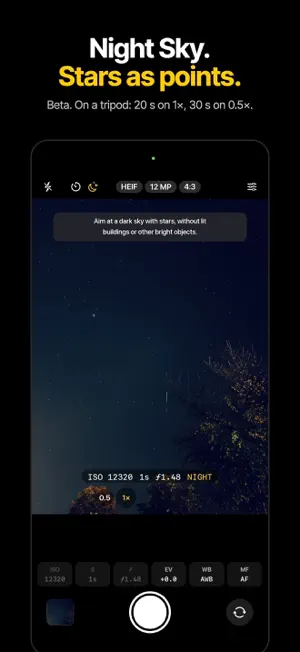
Real ProCam is a real pro camera for photographers who want to decide the exposure themselves. The exposure triangle is complete: ISO, shutter speed and aperture are all yours to set. Set one, two or all three by hand and leave the rest on Auto. REAL MANUAL CONTROL • Ultra Wide, main camera (1× and 2×) and Telephoto: a single frame with minimal processing and no filters. The ISO, shutter speed and aperture you set are exactly the values in the photo • 8×: a single frame with minimal processing and light noise reduction, at your values • Front camera: your manual values with balanced processing • Live viewfinder, histogram and exposure meter (Δ) that show how bright the photo will be; a dark photo shot on purpose stays dark • The photo is taken only once the camera has applied your values • RAW is a single untouched frame from the sensor THREE WAYS TO SHOOT • Manual: your ISO, shutter speed and f-stop are exactly the values in the photo • Visual: set it the same way and get the iPhone's full processing; the values in the file can differ slightly, and Photo Info shows the real ones • Auto: fully automatic, with extra noise reduction on 4× and 8× SLOW MODES ON A TRIPOD (BETA) • Waterfalls: smooth water in daylight without an ND filter, fully manual, about 600 frames in 20 seconds • Night Sky: stars as bright points and a deep blue sky, on 1× (20 s) and 0.5× (50 s) • Night Town: the city at night, fully manual, with light trails, real colours and noise reduction • Each mode checks the scene first and suggests the one that fits MANUAL CONTROLS • ISO: every 1/3 stop, from the lowest ISO each camera supports (down to ISO 25) to its maximum, or Auto • Shutter speed: 1/3-stop steps from the fastest speed of each camera (up to 1/32,000 s) to its longest, or Auto; at the very shortest speeds the sensor works in fixed steps, up to about 5 % off • f-stop (aperture): manual from ƒ/1.48 to ƒ/4 on iPhone models with a variable-aperture lens, or Auto • Exposure compensation (EV): 1/3-stop steps, also together with manual values • White balance: Auto, Sunny, Cloudy, Shade, Tungsten, Fluorescent, Flash • Focus: manual focus across the full lens range, or autofocus with tap to focus LENSES • A button for every rear lens: 0.5×, 1×, 2× and the telephoto (3×, 4× or 5×, depending on your iPhone) • 8× on iPhone 17 Pro and iPhone 18 Pro: a 12 MP crop of the 48 MP telephoto (200 mm) • 2×: a 12 MP crop of the 48 MP main camera (48 mm) • Front camera with optional mirroring • Every lens button remembers its own manual settings FORMATS • RAW (DNG): untouched sensor data, always 4:3, not on 2× and 8× • ProRAW (DNG): lossless – full resolution (48 MP on the main camera) with automatic exposure; with manual exposure a single untouched frame at 12 MP, so your values stay exact • TIFF: uncompressed • HEIF and JPEG: maximum quality No filters and no effects. Available formats depend on your iPhone and the selected lens. IMAGE SETTINGS • Resolution: the full resolution of the selected camera; 3:2, 16:9 and 1:1 are crops of 4:3, and the app always shows the real size • Aspect ratio: 4:3, 3:2, 16:9 or 1:1 SHOOTING TOOLS • Live ISO, shutter speed and aperture readout • Live histogram • Grid • Level (optional) • Self-timer: 3 or 7 seconds, one tap in the top bar • Flash: Off, Auto or On • Volume buttons and Camera Control release the shutter • In-app preview of your recent shots with Photo Info (the values you set next to the values in the file); delete one or all, or save a shot to Photos again • Photos are saved straight to your photo library WHICH IPHONE • Works on iPhone 13 and later with iOS 27 • Manual f-stop: iPhone models with a variable-aperture main camera (iPhone 18 Pro and iPhone 18 Pro Max) • 8×: iPhone 17 Pro, iPhone 17 Pro Max, iPhone 18 Pro, iPhone 18 Pro Max FREE No subscription, no in-app purchases, no ads. PRIVACY Real ProCam collects no data. There is no account and no tracking. Your photos stay on your device.
What’s new
Version 2.1 · Updated November 11, 2026
New in 2.1: • Waterfalls: a new finish measured on every photo, made from a photographer's own edits. White water with texture, deeper shadows, richer colours, light noise reduction and a soft vignette. • Waterfalls: at fast shutter speeds the gaps between frames are filled along the way the water moved, only where it moves, so the water is smooth and the stones beside it stay sharp. • Night Sky: a pale trail in the viewfinder shows where the Milky Way is, with an arrow when it is outside the picture. It uses your approximate location on this iPhone only. A new BRIGHT MILKY WAY switch makes it brighter on a dark sky. • Night Sky and Night Town on 0.5×: 50 seconds, for less noise.
App privacy
The developer, Rosen Ganev, reported these privacy practices to Apple.
Data Not Collected
The developer does not collect any data from this app.
Alternatives to Real ProCam
Looking for apps like Real ProCam? Here are 6 similar apps on the App Store. The highest rated is Unpinned: Photo Privacy (5.0/5), and all 6 are free to download.
-
 Duovid
-
 Verify Camera: Timestamp GPS
-
 Montavo: Video Editor
-
 ClipUnder: Video Compressor
-
 Unpinned: Photo Privacy
5.0
-
 Verso: Dual Film Camera
| App | Rating | Price | Last updated | Compare |
|---|---|---|---|---|
| Real ProCam | – | Free | November 11, 2026 | |
| Duovid | – | Free | Nov 15, 2026 | Compare |
| Verify Camera: Timestamp GPS | – | Free | Nov 8, 2026 | Compare |
| Montavo: Video Editor | – | Free | Nov 16, 2026 | Compare |
| ClipUnder: Video Compressor | – | Free | Nov 13, 2026 | Compare |
| Unpinned: Photo Privacy | 5.0 / 5 (6) | Free | Nov 10, 2026 | Compare |
| Verso: Dual Film Camera | – | Free | Nov 13, 2026 | Compare |
Compare Real ProCam with the top alternatives: ratings, updates, ASO score and keyword gaps →