

EMST Camera
Tomas Ourednik Photo & Video iPhoneiPadiPod touch
EMST Camera is a free Photo & Video app for iPhone and iPad by Tomas Ourednik. Requires iOS 26.0. Updated October 11, 2026.
- Price
- Free
- on the App Store
- Size
- 64 MB
- Age 4+
- Updated
- Oct 11
- 2026 · v1.2
Screenshots

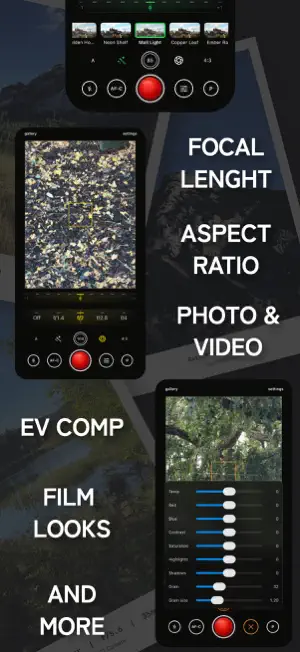

About EMST Camera
EMST Camera is a film-inspired camera app you operate like a camera. Not a filter you drop on afterwards. Pick a look, set your exposure, aperture and focal length, and shoot. Live preview of the settings directly in viewfinder. YOUR CONTROL • A dial-based shooting interface: one scroll wheel drives exposure, aperture, focal length and aspect ratio. • Aperture dial with depth-of-field rendering. • Focal length presets pinned to your iPhone's real lenses. • Mirrorless-style autofocus: a persistent AF box, tap to move it, AF lock to recompose. • Grid and level overlays when you want them, nothing when you don't. YOUR LOOK • Built-in film-inspired looks, from warm evening color to cool dusk tones and true monochrome + Natural for a clean, untouched capture. • Every look is tunable: grain, halation, vignette, clarity and color temperature. PRIVATE BY DESIGN • No account, no ads, everything happens on your device. Open the camera straight from control center or lock screen with shortcut extension. EMST Camera iOS app from Emaki Studio, a small independent photo toolkit.
What’s new
Version 1.2 · Updated October 11, 2026
Video has arrived, with your looks baked in. • Video mode: switch the mode button to V and the shutter records a clip with the selected look, grain, halation and vignette in the file, exactly as the viewfinder shows it. 1080p or 4K, with sound. • Zoom across all lenses while recording. The lens dial runs continuously in Video mode, ultra-wide to telephoto in one clip, and you can turn continuous zoom on for photos too. • Frame-rate dial in the shutter's slot: 24, 25, 30, 60 and 120 fps. Below 24 is a time-lapse, above 60 is slow motion. • Video stabilization in three steps and audio noise reduction, both in Settings. • Pinch the viewfinder to zoom and swipe for exposure. Bluetooth camera grips made for the built-in Camera work here too. • The front camera zooms, and the camera flip is now a button at the wide end of the lens dial. • Save into an EMST Camera album in Photos, switch it on in Settings. • Settings regrouped, with tap-for-help on any setting instead of notes.
App privacy
The developer, Tomas Ourednik, reported these privacy practices to Apple.
Data Not Collected
The developer does not collect any data from this app.
Alternatives to EMST Camera
Looking for apps like EMST Camera? Here are 6 similar apps on the App Store. The highest rated is Knurl Camera (5.0/5), and all 6 are free to download.
-
 Knurl Camera
5.0
Knurl Camera
5.0
-
 Rayon: Film Camera & Presets
1.0
Rayon: Film Camera & Presets
1.0
-
 Kelvin Camera: Manual Pro RAW
-
 Luxa RAW Camera
-
 ModCam
5.0
ModCam
5.0
-
 Manual Camera App: Pro Lens
| App | Rating | Price | Last updated | Compare |
|---|---|---|---|---|
| EMST Camera | – | Free | October 11, 2026 | |
| Knurl Camera | 5.0 / 5 (1) | Free | Sep 1, 2026 | Compare |
| Rayon: Film Camera & Presets | 1.0 / 5 (1) | Free | Sep 30, 2026 | Compare |
| Kelvin Camera: Manual Pro RAW | – | Free | Jul 19, 2026 | Compare |
| Luxa RAW Camera | – | Free | Oct 10, 2026 | Compare |
| ModCam | 5.0 / 5 (1) | Free | Oct 3, 2026 | Compare |
| Manual Camera App: Pro Lens | – | Free | Sep 16, 2026 | Compare |
Compare EMST Camera with the top alternatives: ratings, updates, ASO score and keyword gaps →