

ModCam
Eric Costello Photo & Video iPhoneiPad
ModCam is a free Photo & Video app for iPhone and iPad by Eric Costello. Rated 5.0/5 from 1 ratings. Requires iOS 26.0. Updated October 3, 2026.
- Rating
- 5.0
- 1 ratings
- Price
- Free
- on the App Store
- Size
- 8 MB
- Age 4+
- Updated
- Oct 3
- 2026 · v1.0.1
Screenshots

About ModCam
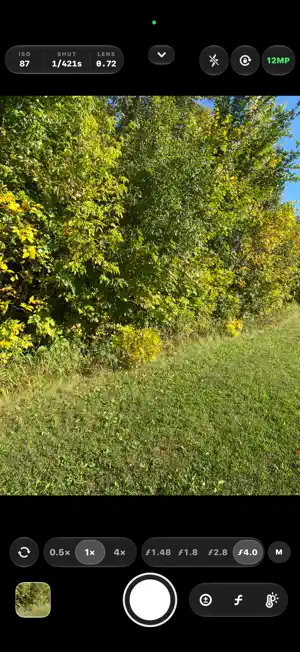
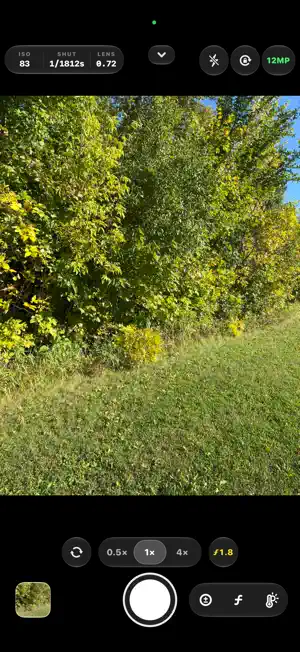
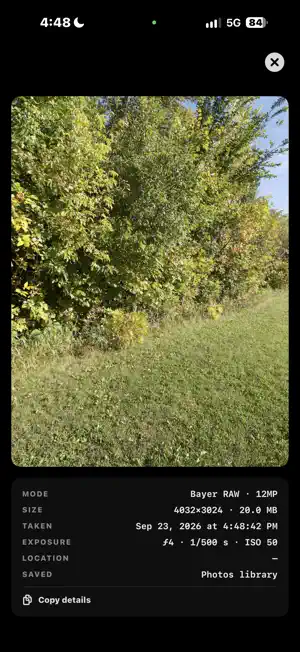
ModCam writes one file: a pure Bayer RAW DNG, straight from the sensor, with none of Apple's computational photography layered on top. In the default mode the app asks the camera for the sensor's own Bayer mosaic. Smart HDR tone fusion, Deep Fusion, the Photonic Engine, Night mode multi-frame stacking and Apple's color and tone rendering are all skipped. What lands in your photo library is a single-frame DNG that reflects what the sensor read, ready for whatever develop you choose. Here is the honest trade-off, because most apps do not say it out loud. The 48MP camera sensor is quad-Bayer. The un-remosaiced mosaic is about 12MP (4032 x 3024). A 48MP frame only exists after Apple's remosaic, which means it is ProRAW and it carries a computational baseline inside the DNG. ModCam does not pretend otherwise. It gives you both, as a visible mode switch: Bayer RAW, about 12MP, no Apple processing. ProRAW, 48MP, remosaiced, Apple's baseline included. The button at the top of the screen always shows which mode you are in. If the phone ever saves a 48MP shot at a lower resolution, a message pops up right away to tell you, and the gallery lists the real size of every photo. You find out on the spot, not a week later in your editor. MANUAL CONTROL ISO, shutter, white balance in Kelvin and focus are all yours. Each one is a ruler you scrub with your thumb: a fast swipe crosses the whole range, a slow one lands on a single step. What you set stays set, with no background auto correction quietly walking your exposure back while you compose. ISO and shutter speed each have an A/M button. A lets the camera set it, M keeps your value. ISO on M with shutter on A is ISO priority. Shutter on M with ISO on A is shutter priority. Both on M is full manual. A main A/M button switches both, and one tap on it takes you back to full auto. A live histogram and false color read the scene for you. A viewfinder can only approximate a RAW develop, so ModCam points you at the instruments for exposure rather than claiming the preview is the file. APERTURE The aperture (f-number) of the lens in use sits next to the lens buttons and updates when you switch lenses. On iPhone 18 Pro and 18 Pro Max, the 1x camera's aperture is adjustable. Yellow means automatic. Tap or swipe right to open the stops, f/1.48 to f/4, and tap or slide to pick one. Tap M or swipe left for automatic. Elsewhere it is shown for reference. THE REST OF IT Every rear lens plus the front camera, selected directly. Self-timer with a countdown that blinks a warning before the shutter fires. Grid and level guides you can hide for a clean frame. Hardware shutter: the volume buttons and Camera Control both fire. An in-app session gallery: each shot's real mode, size, exposure and time, without leaving for Photos. Optional location tagging, written into the DNG's own metadata on the device. A three-page first-run intro that shows you where everything lives. WHO IT IS FOR People who develop their own files. If you shoot for Lightroom, Capture One or another RAW editor and you would rather start from what the sensor read than from a rendered result, this is aimed at you. If you want a finished JPEG straight out of the phone, the built-in Camera app does that better. WHAT IT DOES NOT DO No account, no sign-in, no analytics, no advertising, no tracking. There is no networking code in the app at all; it behaves identically in Airplane Mode. The only outward links are the Privacy Policy and Support rows in Settings, which open in Safari, and the Maps button in the gallery, which hands a coordinate to the maps app you choose. DEVICE SUPPORT ModCam is built around the Pro camera systems: the 48MP main sensor, the full rear lens set, and the manual ranges those cameras expose. On other iPhones it still runs, reading the modes, lenses and ranges from whatever camera is there, and showing a one-time notice that says so. Nothing is blocked. Version 1.0 is completely free.
What’s new
Version 1.0.1 · Updated October 3, 2026
Fixes a crash that could happen when taking a 48MP photo right after switching lenses.
App privacy
The developer, Eric Costello, reported these privacy practices to Apple.
Data Not Collected
The developer does not collect any data from this app.
Alternatives to ModCam
Looking for apps like ModCam? Here are 6 similar apps on the App Store. The highest rated is Knurl Camera (5.0/5), and all 6 are free to download.
-
 Luxa RAW Camera
-
 Knurl Camera
5.0
Knurl Camera
5.0
-
 Kelvin Camera: Manual Pro RAW
-
 EMST Camera
-
 Moli Ai Camera
-
 Photo Spectra
1.0
Photo Spectra
1.0
| App | Rating | Price | Last updated | Compare |
|---|---|---|---|---|
| ModCam | 5.0 / 5 (1 rating) | Free | October 3, 2026 | |
| Luxa RAW Camera | – | Free | Oct 10, 2026 | Compare |
| Knurl Camera | 5.0 / 5 (1) | Free | Sep 1, 2026 | Compare |
| Kelvin Camera: Manual Pro RAW | – | Free | Jul 19, 2026 | Compare |
| EMST Camera | – | Free | Oct 11, 2026 | Compare |
| Moli Ai Camera | – | Free | Jun 23, 2026 | Compare |
| Photo Spectra | 1.0 / 5 (1) | Free | Apr 30, 2026 | Compare |
Compare ModCam with the top alternatives: ratings, updates, ASO score and keyword gaps →