

BlueTerm: Bluetooth Terminal
mint-soft Developer Tools iPhoneiPadiPod touch
BlueTerm: Bluetooth Terminal is a free Developer Tools app for iPhone and iPad by mint-soft. Requires iOS 15.0. Updated October 29, 2026.
- Price
- Free
- on the App Store
- Size
- 50 MB
- Age 4+
- Updated
- Oct 29
- 2026 · v1.2.0
Screenshots

About BlueTerm: Bluetooth Terminal
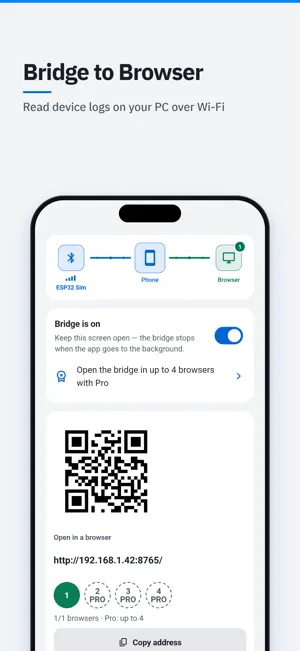
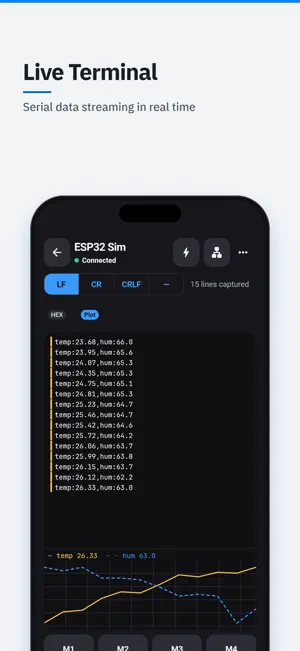
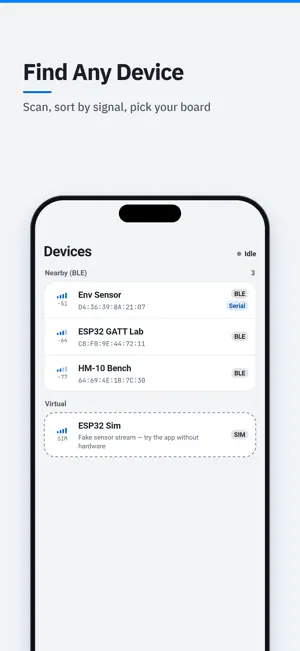
BlueTerm turns your phone into a bridge between a Bluetooth serial device and your computer's browser. Connect the device once on the phone, flip one switch, and any browser on the same Wi-Fi becomes a full terminal and live plotter for it. KEY FEATURES - Browser Bridge - one switch serves a terminal and a live plot to any browser on your Wi-Fi. No cable, no driver, nothing to install on the computer. - BLE (Bluetooth Low Energy) - Nordic UART devices connect automatically, and a built-in GATT explorer lets you pick the notify and write characteristics yourself when a device uses its own UUIDs. - A terminal that reads like one - timestamps, hex view, selectable line endings (LF / CRLF / CR / none) and one-tap command macros. - Live plotting - numbers your device sends (temp:23.5, rpm=1200, >speed:3.14 or plain CSV) are charted in real time, in the app and in the browser. - Export what you captured - CSV or JSON through the share sheet, so it lands in iCloud Drive, Google Drive or anywhere you choose. - Try it without hardware - a built-in simulator streams sample sensor data, so you can see the whole flow before you own a device. NEW IN 1.2 - AUTOMATION AND AI AGENTS - AI coding agents (MCP) - turn on MCP on the Bridge screen (open it from the terminal's top bar) and an MCP client on your computer, such as Claude Code or Cursor, can read the live log and channel values over the same Wi-Fi (free). With Pro it can also send commands to the device. MCP is off by default, needs its own key and works while BlueTerm is open. - Auto-reply rules and send sequences - reply to a matching line automatically, or send a list of commands with delays and repeats. Free: 1 rule and 1 sequence; Pro: 10 of each. - Trigger capture - when a value crosses a threshold or a pattern appears, the lines before and after are saved for review and export. Free: 1 trigger and 3 saved captures; Pro: 10 triggers and 100 captures. - Long recording (Pro) - write the whole session to files of up to 50 MB each, keeping the latest 20. - Session history - every connection is recorded on the device automatically: all received and sent lines with timestamps. Search it, share it as TXT or CSV, or delete it. Free keeps the last 5 sessions, Pro keeps 100. - Commands sent by a rule or an agent are marked in the phone and browser terminals. BlueTerm Pro is a one-time lifetime purchase, not a subscription. It also removes ads and raises the scrollback, macro and browser limits. WHY THIS APP? Every other Bluetooth serial app ends inside the phone screen. But the work - reading long logs, comparing graphs, copying values into your notes - happens on a computer, and computers have no standard way to open a Bluetooth serial port. Access to the bridge is protected by a password you set yourself, with a lockout after repeated failures, and the address is served on your local network only. Terms of Use (EULA): https://app.mint-soft.com/apps/blueterm/terms Privacy Policy: https://app.mint-soft.com/apps/blueterm/privacy
What’s new
Version 1.2.0 · Updated October 29, 2026
New in 1.2 • AI coding agents (MCP) can read your device log over Wi-Fi; sending commands needs Pro. The browser dashboard's new MCP tab shows how to connect Claude, Gemini, Codex, Cursor, VS Code and Windsurf. • New History tab saves every session to search, share or delete (free: last 5, Pro: 100). Automation and Captures open from the terminal. • Pick a device to open the terminal; open Bridge from its top bar. • Fewer ads in lists. The daily reminder notification was removed.
App privacy
The developer, mint-soft, reported these privacy practices to Apple.
Data Used to Track You
The following data may be used to track you across apps and websites owned by other companies:
- Location: Coarse Location
- Identifiers: Device ID
- Usage Data: Product Interaction, Advertising Data
Data Not Linked to You
The following data, which may be collected but is not linked to your identity, may be used for the following purposes:
- Location: Coarse Location
- Identifiers: Device ID
- Usage Data: Product Interaction, Advertising Data
- Purchases: Purchase History
- Diagnostics: Crash Data, Performance Data
- User Content: Customer Support
Used for: Third-Party Advertising, Analytics, App Functionality
Alternatives to BlueTerm: Bluetooth Terminal
Looking for apps like BlueTerm: Bluetooth Terminal? Here are 6 similar apps on the App Store. The highest rated is Apperture: Remote Desktop Apps (5.0/5), and all 6 are free to download.
-
 EditCode
-
 Murmur BLE Shell
-
 MCU BLE Terminal
-
 Mimi Remote
-
 TransparentBLE
-
 Apperture: Remote Desktop Apps
5.0
Apperture: Remote Desktop Apps
5.0
| App | Rating | Price | Last updated | Compare |
|---|---|---|---|---|
| BlueTerm: Bluetooth Terminal | – | Free | October 29, 2026 | |
| EditCode | – | Free | Oct 11, 2026 | Compare |
| Murmur BLE Shell | – | Free | Oct 2, 2026 | Compare |
| MCU BLE Terminal | – | Free | Mar 27, 2026 | Compare |
| Mimi Remote | – | Free | Oct 9, 2026 | Compare |
| TransparentBLE | – | Free | Jul 9, 2026 | Compare |
| Apperture: Remote Desktop Apps | 5.0 / 5 (1) | Free | Oct 20, 2026 | Compare |