

Apperture: Remote Desktop Apps
LAND MK 1 Developer Tools iPhoneiPadiPod touch
Apperture: Remote Desktop Apps is a free Developer Tools app for iPhone and iPad by LAND MK 1. Rated 5.0/5 from 1 ratings. Requires iOS 18.0.
- Rating
- 5.0
- 1 ratings
- Price
- Free
- on the App Store
- Size
- 13 MB
- Age 4+
- Updated
- Oct 20
- 2026 · v1.2.0
Screenshots


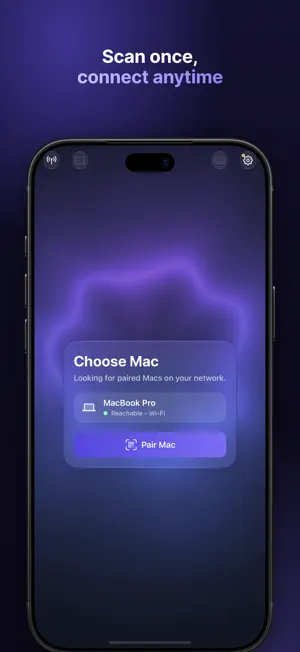
About Apperture: Remote Desktop Apps
Apperture lets you see and control one Mac app right from your iPhone — not your whole desktop. Apperture mirrors just the app that matters, full-screen on your phone, so it feels like the app is running in your hand. Traditional screen sharing puts a 27-inch desktop on a 6-inch screen and makes you pan, zoom, and hunt for windows. Apperture takes the opposite approach: pick a single running Mac app and it fills your iPhone with a sharp, low-latency live view sized for the screen you're actually holding. BUILT FOR DEVELOPERS • Mirror the iOS Simulator and it feels native: touches map directly, and rotating your phone rotates the simulated app. • Keep working while your Mac builds and runs. Perfect for agent-assisted coding — let Claude Code or your favorite agent build and launch the app on your Mac, then review and interact with the result from anywhere in the house. • Stream any Xcode-launched Mac app with its real window chrome intact. FULL CONTROL, NOT JUST A VIEW • Tap, drag, long-press for right-click, two-finger scroll — touch input translated naturally to the Mac. • Type with the iPhone keyboard, including full Unicode text entry. • Browse and run the Mac app's real menu bar commands from a searchable, touch-friendly palette. • Send clipboard text securely between devices. • Fit-width, fit-height, and readable-zoom layout modes in portrait and landscape. PRIVATE BY DESIGN • No accounts. No cloud relay. Your screen never touches our servers. • Pairing starts with a short-lived QR code on your Mac, and the Mac owner must explicitly approve every phone. • Connections work only over private networks — your Wi-Fi or your own VPN such as Tailscale. Public endpoints are rejected by design. • Every session is encrypted. Pairing trust is stored in the device Keychain and never synced to the cloud. • Review or revoke paired devices anytime. The Mac keeps a local 30-day session history — device, time, and app names only, never keystrokes or screen contents. GOOD TO KNOW • Apperture requires the free companion Mac app from runapperture.com. It's notarized by Apple and distributed directly because it uses Screen Recording and Accessibility permissions the Mac App Store doesn't allow. • Away from home, you'll need a VPN to reach your Mac — Tailscale takes about five minutes to set up, works beautifully, and is free for personal use. • Your Mac does all the work, so it needs to be on, awake, and logged in. Apperture is a viewer and controller for your own Mac, not a way to run Mac apps on iPhone. • Apperture streams one selected window at a time — that focus is the point. Terms of Use: https://www.apple.com/legal/internet-services/itunes/dev/stdeula/
What’s new
Version 1.2.0 · Updated October 20, 2026
Apperture 1.2 makes getting to the right app faster and gives you control over how it fits your phone. Type to find any app, open one that isn't running yet, and resize the Mac window from your phone so it fills the screen you're holding. New: - Hand off from your Mac: press ⌃⌥⌘H as you step away and your iPhone gets a notification. Tap it to keep working in the same window - Search the app switcher: type a few letters and the running apps filter as you go - Open apps that aren't running: installed apps appear in a Not Running section and launch with a tap - Resize the Mac window from your phone, with a live silhouette of how it will fit; Fit to Phone does it in one tap and Apperture remembers it for each session. - Pair by pasting the Mac's code when you can't scan the QR Improved: - Improved support for Xcode 27's Device Hub. - Better support for Liquid Glass on iOS 26 and higher. - Smoother, spring-based transitions between the switcher and the stream - iPhone Duo support Fixed: - Taps in the app switcher were sometimes ignored - Terminal apps stay put while you type instead of recentering on every keypress - The expanded keyboard row no longer covers the bottom of the window - The connection status in the gear menu wrapped to two lines - Log headers now line up with their rows The Mac companion is now called Apperture Host.
App privacy
The developer, LAND MK 1, reported these privacy practices to Apple.
Data Not Linked to You
The following data, which may be collected but is not linked to your identity, may be used for the following purposes:
- Usage Data: Product Interaction
- Diagnostics: Crash Data, Performance Data, Other Diagnostic Data
Used for: Analytics, App Functionality
Alternatives to Apperture: Remote Desktop Apps
Looking for apps like Apperture: Remote Desktop Apps? Here are 6 similar apps on the App Store. The highest rated is ShellRelay (5.0/5), and all 6 are free to download.
-
 Teletype: SSH & Remote Desktop
-
 Opensteer
-
 ShellRelay
5.0
ShellRelay
5.0
-
 farcrew: terminal for agents
-
 dev1ce
5.0
dev1ce
5.0
-
 MobileCo Client
| App | Rating | Price | Last updated | Compare |
|---|---|---|---|---|
| Apperture: Remote Desktop Apps | 5.0 / 5 (1 rating) | Free | October 20, 2026 | |
| Teletype: SSH & Remote Desktop | – | Free | Oct 13, 2026 | Compare |
| Opensteer | – | Free | Jul 22, 2026 | Compare |
| ShellRelay | 5.0 / 5 (1) | Free | May 5, 2026 | Compare |
| farcrew: terminal for agents | – | Free | Sep 7, 2026 | Compare |
| dev1ce | 5.0 / 5 (1) | Free | Sep 9, 2026 | Compare |
| MobileCo Client | – | Free | Oct 7, 2026 | Compare |