

Teletype: SSH & Remote Desktop
Sergio Fernandez Duran Developer Tools iPhoneiPadiPod touchMac
Teletype: SSH & Remote Desktop is a free Developer Tools app for iPhone and iPad by Sergio Fernandez Duran. Requires iOS 26.0. Updated October 13, 2026.
- Price
- Free
- on the App Store
- Size
- 102 MB
- Age 4+
- Updated
- Oct 13
- 2026 · v2.2.0
Screenshots

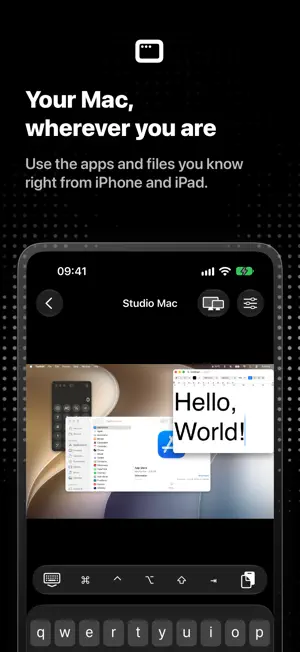
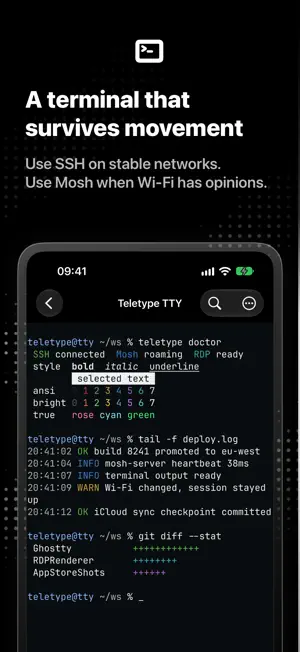
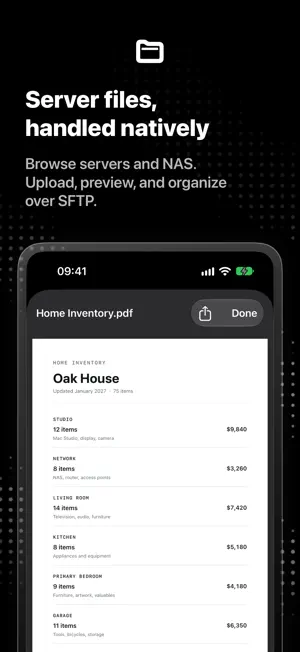
About Teletype: SSH & Remote Desktop
Connect to servers and desktops from one native iPhone and iPad app. Use SSH and Mosh terminals, manage SFTP files, and control RDP or VNC desktops without switching tools. Start free with one saved connection. Teletype is built for developers, sysadmins, and homelab users who need remote access wherever a machine needs attention. What you can do: - Open SSH terminal sessions with native keyboard controls. - Use Mosh for resilient terminal work on changing networks. - Browse, upload, download, rename, remove, and create folders over SFTP. - Preview supported remote files before sharing or saving them. - Control RDP desktops with touch pointer input, keyboard controls, and certificate trust options. - Control VNC desktops with gestures and remote display selection. - Keep supported sessions visible with Picture in Picture. - Sync connections, settings, themes, and eligible credentials with iCloud when enabled. - Customize terminal appearance, input controls, and app icons. Teletype Pro unlocks unlimited saved connections, Picture in Picture, iCloud sync, custom terminal themes, and custom app icons. Choose a monthly or annual subscription, or a lifetime purchase. Prices and any eligible trial are shown before purchase. Remote connections require a reachable server with the selected protocol enabled. Privacy Policy: https://teletype.sh/privacy Terms of Use (EULA): https://www.apple.com/legal/internet-services/itunes/dev/stdeula/
What’s new
Version 2.2.0 · Updated October 13, 2026
Your computers, closer than ever. Enjoy clearer remote audio, more natural iPad keyboard controls, and a refreshed workspace across iPhone and iPad. • Connect to compatible Macs with High Performance, one or two virtual displays, and flexible desktop sizing. • Hear remote audio more clearly, with fewer interruptions and playback artifacts. • Move and select text by word, use familiar Mac keyboard shortcuts, and work more comfortably with an iPad keyboard and trackpad. • Send images to your Mac’s clipboard with improved transfer reliability. • Keep sessions in sight with more consistent Picture in Picture when leaving and returning to a session. • Work comfortably on iPhone Duo with layouts that adapt as you fold, unfold, and rotate. • Find your controls more easily with refined session settings, monochrome icons, and clearer grouped sections. Also includes improvements to remote cursors, keyboard input source detection, desktop resizing, and connection switching.
App privacy
The developer, Sergio Fernandez Duran, reported these privacy practices to Apple.
Data Not Collected
The developer does not collect any data from this app.
Alternatives to Teletype: SSH & Remote Desktop
Looking for apps like Teletype: SSH & Remote Desktop? Here are 6 similar apps on the App Store. The highest rated is Apperture: Remote Desktop Apps (5.0/5), and all 6 are free to download.
-
 YoloShell-SSH Terminal VNC RDP
-
 Apperture: Remote Desktop Apps
5.0
Apperture: Remote Desktop Apps
5.0
-
 SSHive: SSH, SFTP & Terminal
5.0
SSHive: SSH, SFTP & Terminal
5.0
-
 teletype computer
5.0
teletype computer
5.0
-
 dev-mux: AI coding fleet mgmt
-
 RepoRoute
| App | Rating | Price | Last updated | Compare |
|---|---|---|---|---|
| Teletype: SSH & Remote Desktop | – | Free | October 13, 2026 | |
| YoloShell-SSH Terminal VNC RDP | – | Free | Oct 29, 2026 | Compare |
| Apperture: Remote Desktop Apps | 5.0 / 5 (1) | Free | Oct 20, 2026 | Compare |
| SSHive: SSH, SFTP & Terminal | 5.0 / 5 (1) | Free | Oct 24, 2026 | Compare |
| teletype computer | 5.0 / 5 (1) | Free | Apr 21, 2026 | Compare |
| dev-mux: AI coding fleet mgmt | – | Free | Oct 1, 2026 | Compare |
| RepoRoute | – | Free | Apr 18, 2026 | Compare |