

EditCode
Daniel Kaliski Developer Tools iPadMac
EditCode is a free Developer Tools app for iPad and Mac by Daniel Kaliski. Requires iOS 26.0. Updated October 11, 2026.
- Price
- Free
- on the App Store
- Size
- 35 MB
- Age 4+
- Updated
- Oct 11
- 2026 · v1.0.2
Screenshots


About EditCode
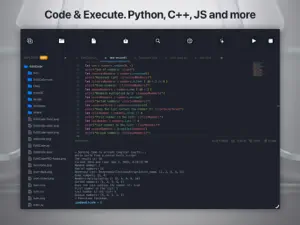
EditCode is a modern Integrated Development Environment (IDE) designed to fully unlock the potential of your iPad and Mac. Whether you are learning to code or a professional writing advanced scripts, EditCode provides the tools you need in a clean, lightning-fast interface. Core Editor Features: • Advanced Coding: Syntax highlighting for dozens of formats, auto-completion, code minimap, and multi-tab support. • Project Management: Seamless iOS and macOS integration. Open and securely edit entire folders while preserving the file tree structure. • Optimized for iPad: Excellent support for hardware keyboards, popular shortcuts (Cmd+S, Cmd+R), and native gestures. Unlock Full Power with EditCode PRO: • Cloud Compiler: Run your code in Python, C++, Swift, Java, Go, Rust, Ruby, and more, directly from the app. • 50 daily requests to a powerful cloud compiler for the most popular programming languages. • Built-in Terminal: Receive and analyze program outputs (and compilation errors) in a dedicated console. • AI Assistant: Stuck on a problem? An intelligent code generator powered by robust cloud models will help you write missing functions on the fly. • Cloud Integration: Log in and securely edit files stored directly on your GitHub, Google Drive, and OneDrive accounts. Take your development environment to the next level with EditCode. Privacy Policy: https://danielkaliski.com.pl/editcode/privacy Terms of Use: https://www.apple.com/legal/internet-services/itunes/dev/stdeula/
What’s new
Version 1.0.2 · Updated October 11, 2026
• New Compiler Languages: Added full support for Kotlin and SQL (SQLite) execution in the cloud runner. • Improved HTML Preview: Resolved HTML preview issues when opening files in Safari on macOS and improved preview rendering across iPadOS. • Cleaner Terminal Output: Filtered out redundant JVM warnings from the compiler output to provide a cleaner log view. • Bug Fixes & Improvements: General stability enhancements and performance optimizations across the editor. Full list of supported languages: https://editcode.app/doc#technologies
App privacy
The developer, Daniel Kaliski, reported these privacy practices to Apple.
Data Not Collected
The developer does not collect any data from this app.
Alternatives to EditCode
Looking for apps like EditCode? Here are 6 similar apps on the App Store. The highest rated is MiniBench: Packs for Minecraft (5.0/5), and all 6 are free to download.
-
 JavaScript Editor: JS IDE
-
 MiniBench: Packs for Minecraft
5.0
MiniBench: Packs for Minecraft
5.0
-
 Pad Code AI: Code Editor & IDE
4.0
Pad Code AI: Code Editor & IDE
4.0
-
 Kodo: AI Code Editor & IDE
5.0
Kodo: AI Code Editor & IDE
5.0
-
 Happier - Remote Claude, Codex
4.4
Happier - Remote Claude, Codex
4.4
-
 HTML Viewer : Editor & Creator
4.5
HTML Viewer : Editor & Creator
4.5
| App | Rating | Price | Last updated | Compare |
|---|---|---|---|---|
| EditCode | – | Free | October 11, 2026 | |
| JavaScript Editor: JS IDE | – | Free | Oct 20, 2026 | Compare |
| MiniBench: Packs for Minecraft | 5.0 / 5 (1) | Free | Oct 9, 2026 | Compare |
| Pad Code AI: Code Editor & IDE | 4.0 / 5 (2) | Free | Oct 26, 2026 | Compare |
| Kodo: AI Code Editor & IDE | 5.0 / 5 (10) | Free | Oct 26, 2026 | Compare |
| Happier - Remote Claude, Codex | 4.4 / 5 (16) | Free | Oct 23, 2026 | Compare |
| HTML Viewer : Editor & Creator | 4.5 / 5 (102) | Free | Oct 6, 2026 | Compare |
Compare EditCode with the top alternatives: ratings, updates, ASO score and keyword gaps →