

RPad: Remote Trackpad & Mouse
Nurhak Altin Utilities iPhoneiPadiPod touchMacApple Watch
RPad: Remote Trackpad & Mouse is a free Utilities app for iPhone and iPad by Nurhak Altin. Requires iOS 17.0. Updated October 21, 2026.
- Price
- Free
- on the App Store
- Size
- 14 MB
- Age 4+
- Updated
- Oct 21
- 2026 · v1.1
Screenshots


About RPad: Remote Trackpad & Mouse
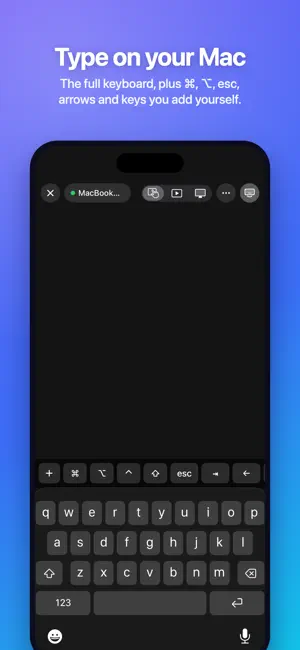
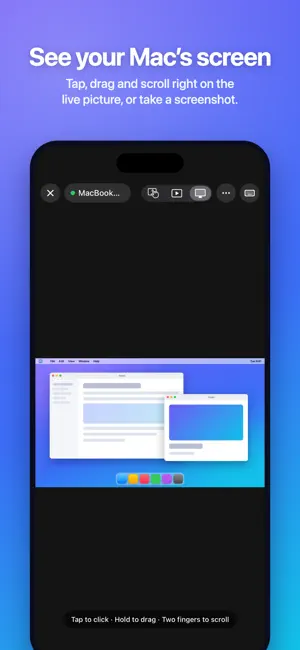
RPad turns your iPhone into a wireless trackpad, keyboard and remote for your Mac. Free to try for 7 days, then one purchase for iPhone, iPad, Apple Watch and Mac. No subscription. Lean back on the couch, run a presentation from across the room, or control the Mac connected to your TV — without reaching for a mouse. Move the pointer with one finger, tap to click and scroll with two fingers, just like the trackpad you already know. FEELS LIKE A REAL TRACKPAD • Your whole screen is the trackpad — no tiny touch area • Smart acceleration: precise when you move slowly, across the entire display in one swipe • Tap to click, double-tap to double-click, two-finger tap to right-click • Tap and drag to move windows and files — lift your finger and keep dragging • Two-finger scrolling with natural momentum • Haptic feedback on every click, and a resting thumb is ignored DRAW WITH APPLE PENCIL ON IPAD • Turn your iPad into a drawing tablet for your Mac • Pressure and tilt reach apps that support Mac tablet input • Hover to position the pointer before you draw (on supported iPads) PRESENTATION REMOTE AND MEDIA KEYS • Present mode: tap or swipe for the next or previous slide in Keynote, PowerPoint and Google Slides • Touch and hold to point at your slides, with a presentation timer • Play, pause, skip tracks and change the volume on your Mac • Change slides from Apple Watch, including double tap on Series 9 and later • Three-finger swipes for Mission Control and spaces; customize every gesture and watch control on your Mac • Connect by IP address on networks where your Mac doesn't appear automatically SEE AND CONTROL YOUR MAC FROM ANYWHERE IN THE ROOM • Screen mode shows your Mac's display live on your iPhone or iPad — tap to click, drag, scroll • Take a screenshot of the Mac and share it • Open, switch and quit apps from a list with icons • Run your Shortcuts on the Mac • Lock, sleep, restart or shut down the Mac, and wake it with Wake-on-LAN • Siri and Shortcuts actions: "Next slide with RPad", "Lock the screen with RPad", "Sleep the computer with RPad" • Custom keys: put ⌘Space, ⌘Tab, screenshots or any shortcut on the keyboard bar TYPE ON YOUR MAC • Use the iPhone keyboard to type into any app, including accents and emoji • Return, delete, esc, tab and arrow keys • ⌘ ⌥ ⌃ ⇧ modifiers for shortcuts like ⌘C, ⌘V and ⌘Z • Works with your Mac's keyboard layout PRIVATE AND SECURE BY DESIGN • Pair once with a 6-digit code shown on your Mac • Every connection is end-to-end encrypted, and only paired devices can control your Mac • Works entirely on your local Wi‑Fi: no account, no cloud, no tracking, no ads • See and remove paired devices from the Mac menu bar at any time SIMPLE SETUP 1. Install RPad on your Mac. It lives quietly in the menu bar. 2. Allow RPad in System Settings › Privacy & Security › Accessibility so it can move the pointer. 3. Open RPad on your iPhone, tap your Mac and enter the code. ONE PRICE, EVERY DEVICE • Free to try for 7 days with everything included • Then unlock RPad once with a single in-app purchase — no subscription, ever • Family Sharing included; the Mac app is always free REQUIREMENTS • RPad for Mac on macOS 14 Sonoma or later — included with RPad • iPhone or iPad with iOS 17 or later • Both devices on the same Wi‑Fi network
What’s new
Version 1.1 · Updated October 21, 2026
• Clearer help when RPad can't find or reach your computer • Rate RPad anytime from the bottom of the list • Smoother connections and other improvements
App privacy
The developer, Nurhak Altin, reported these privacy practices to Apple.
Data Not Collected
The developer does not collect any data from this app.
Alternatives to RPad: Remote Trackpad & Mouse
Looking for apps like RPad: Remote Trackpad & Mouse? Here are 6 similar apps on the App Store. The highest rated is MiniBridge: Portable Display (5.0/5), and 5 of the 6 are free to download.
-
 Pocket Board: Keyboard & Mouse
-
 PointerDeck: Trackpad for Mac
-
 MiniBridge: Portable Display
5.0
-
 Handpad
-
 СкИнвентар
-
 Experience网络浏览器
| App | Rating | Price | Last updated | Compare |
|---|---|---|---|---|
| RPad: Remote Trackpad & Mouse | – | Free | October 21, 2026 | |
| Pocket Board: Keyboard & Mouse | – | Free | Oct 26, 2026 | Compare |
| PointerDeck: Trackpad for Mac | – | Free | Sep 4, 2026 | Compare |
| MiniBridge: Portable Display | 5.0 / 5 (2) | Free | Oct 23, 2026 | Compare |
| Handpad | – | Free | Jun 10, 2026 | Compare |
| СкИнвентар | – | Free | Oct 13, 2025 | Compare |
| Experience网络浏览器 | – | 0.99 USD | Oct 1, 2024 | Compare |