

PointerDeck: Trackpad for Mac
Eliyahu Mechtcheriakov Utilities iPhoneiPadiPod touch
PointerDeck: Trackpad for Mac is a free Utilities app for iPhone and iPad by Eliyahu Mechtcheriakov. Requires iOS 17.0. Updated September 4, 2026.
- Price
- Free
- on the App Store
- Size
- 2 MB
- Age 4+
- Updated
- Sep 4
- 2026 · v1.0
Screenshots


About PointerDeck: Trackpad for Mac
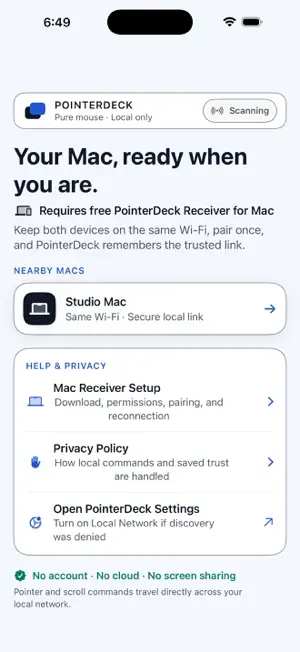
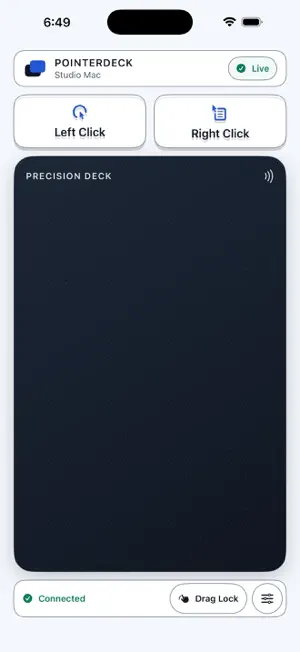
PointerDeck turns your iPhone or iPad into a focused wireless trackpad for your Mac. The free PointerDeck Receiver for Mac is required, and both devices must be on the same local network. SET UP ONCE Open Add Device on the Mac and create an 8–12 digit Connection PIN. PointerDeck rejects repeated or sequential patterns; use at least five different digits. Then select that Mac on your iPhone or iPad and enter the PIN. After pairing, PointerDeck remembers the trusted connection and reconnects when both apps are open and reachable. TRACKPAD CONTROLS • Move the pointer with one finger • Scroll with two fingers • Tap or use the dedicated Left Click button • Two-finger tap or use the dedicated Right Click button • Use Drag Lock for click-and-drag TUNE THE FEEL • Adjust pointer sensitivity and scrolling speed • Choose Natural or Reversed scrolling • Turn tap-to-click on or off • Switch to a left-handed button layout DIRECT BY DESIGN PointerDeck does not stream or display your Mac screen. The release has no account, advertisements, subscription, analytics SDK, or cloud service. Controller traffic travels directly between your devices and is encrypted on the local network. REQUIREMENTS • iPhone or iPad running iOS/iPadOS 17 or later • Apple silicon or Intel Mac running macOS 14 or later • Free PointerDeck Receiver from the Mac download page • Both devices on the same local network • Accessibility permission enabled for PointerDeck Receiver on the Mac Guest, corporate, public, or client-isolated networks may prevent devices from discovering each other.
App privacy
The developer, Eliyahu Mechtcheriakov, reported these privacy practices to Apple.
Data Not Collected
The developer does not collect any data from this app.
Alternatives to PointerDeck: Trackpad for Mac
Looking for apps like PointerDeck: Trackpad for Mac? Here are 6 similar apps on the App Store. The highest rated is Entangle - Remote trackpad (4.0/5), and all 6 are free to download.
-
 ProntoNotion
-
 CursorBeam
-
 KuruLog - Car Cost & Drives
-
 Oslyn Tabs
-
 MicroProjects: Big Goals
-
 Entangle - Remote trackpad
4.0
Entangle - Remote trackpad
4.0
| App | Rating | Price | Last updated | Compare |
|---|---|---|---|---|
| PointerDeck: Trackpad for Mac | – | Free | September 4, 2026 | |
| ProntoNotion | – | Free | Jun 11, 2026 | Compare |
| CursorBeam | – | Free | Jun 26, 2026 | Compare |
| KuruLog - Car Cost & Drives | – | Free | Mar 31, 2026 | Compare |
| Oslyn Tabs | – | Free | Feb 21, 2025 | Compare |
| MicroProjects: Big Goals | – | Free | Mar 10, 2026 | Compare |
| Entangle - Remote trackpad | 4.0 / 5 (1) | Free | Oct 14, 2026 | Compare |