

MiniBridge: Portable Display
超 张 Utilities iPhoneiPadiPod touch
MiniBridge: Portable Display is a free Utilities app for iPhone and iPad by 超 张. Rated 5.0/5 from 2 ratings. Requires iOS 17.0. Updated October 23, 2026.
- Rating
- 5.0
- 2 ratings
- Price
- Free
- on the App Store
- Size
- 3 MB
- Age 4+
- Updated
- Oct 23
- 2026 · v1.0.4
Screenshots

About MiniBridge: Portable Display
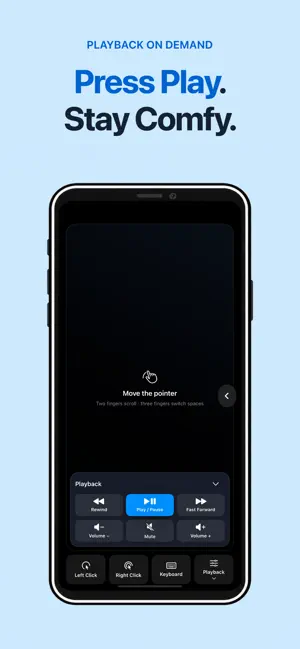
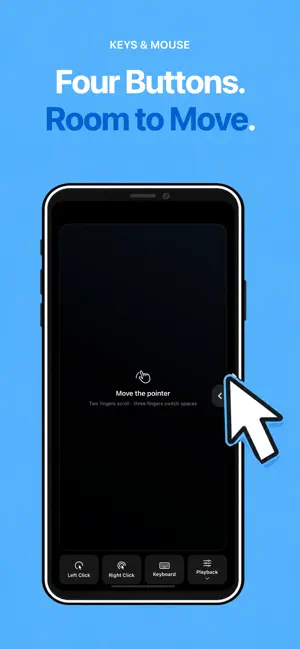
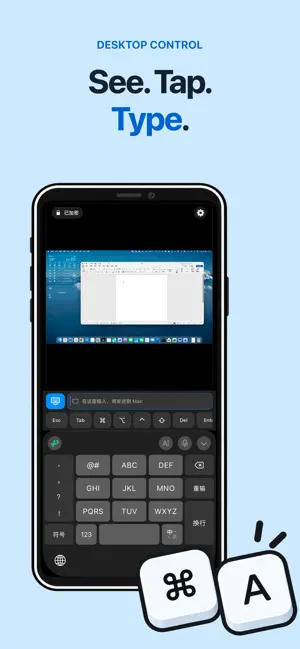
Use your iPhone or iPad as a portable display, trackpad, and keyboard for your Mac mini. Connect over USB or local Wi-Fi to view the desktop and control apps, with one less monitor to carry when travelling. After initial setup, you can use your Mac without an attached conventional monitor. Initial Mac setup and FileVault pre-boot unlock still require a physical monitor. MiniBridge does not provide remote access over the internet. THREE WAYS TO USE YOUR MAC • Display: use iPhone or iPad as the screen, with your external mouse and keyboard • Keys & Mouse: already have a monitor? Use a large trackpad with Left Click, Right Click, Keyboard, and Playback buttons • Desktop: see the Mac screen, tap to interact, and bring up the on-screen keyboard together • All three modes support iPhone and iPad in portrait and landscape PLAYBACK AT YOUR FINGERTIPS Open Playback when you need it: rewind, play/pause, fast forward, volume down, mute, and volume up. Hide it to return to the full trackpad. Playback controls require MiniBridge 1.0.0 or later on the Mac. They send macOS media keys; support depends on the active player and audio output. Seeking does not promise a fixed number of seconds. Audio stays on the Mac or its connected output. SEE AND CONTROL YOUR MAC • Click, drag, right-click, and scroll with two fingers • Use multi-finger gestures to move between Mac desktops • Desktop mode retains navigation keys, modifier keys, and common text shortcuts • View the Mac desktop with hardware H.264 decoding • On compatible macOS versions, create a virtual desktop for a headless Mac mini after one-time setup • Mirror an attached display when virtual-display mode is unavailable CONNECT BY USB OR WI-FI • Use USB for a direct, low-latency local connection • Pair over encrypted Wi-Fi when a cable is not convenient • Keep screen, keyboard, and pointer traffic between your devices, with no MiniBridge cloud relay ONE-CABLE MODE The same USB cable can carry MiniBridge display and control data while your Mac uses the iPhone Personal Hotspot connection that you enable in Settings. MiniBridge reports USB control and Mac network status separately and never changes your network route automatically. PRIVATE BY DESIGN • No MiniBridge account • No advertising or third-party analytics SDK • No cloud screen relay • No automatic diagnostic upload • Paired Wi-Fi credentials are stored in Apple Keychain GET STARTED MiniBridge requires the free Mac companion. First use requires “Trust This Computer” on iPhone or iPad, plus Screen Recording and Accessibility permissions on Mac. A physical monitor is still required for initial Mac setup and FileVault pre-boot unlock. MiniBridge is free to download. Choose a monthly subscription or a one-time lifetime Full Unlock, both with all features. Eligible new subscribers can start a 7-day full-feature trial after confirming the subscription with Apple. It automatically renews at the displayed monthly price unless canceled. To avoid a charge, cancel at least 24 hours before the trial or current period ends. Manage or cancel in your Apple subscription settings. Lifetime purchases are charged once and do not renew; existing lifetime purchases remain valid. Previously started app-managed trials keep their original end date without automatic charges. Prices are shown by the App Store. The Mac companion is free; there is no per-Mac fee. Requires iOS/iPadOS 17 or later and macOS 14 or later. Personal Hotspot must be enabled by you in Settings, and availability depends on your carrier and plan. Mac companion and setup: https://minibridge.tinytiny.cn/download.html Support: https://minibridge.tinytiny.cn/troubleshooting.html Privacy Policy: https://minibridge.tinytiny.cn/privacy.html Terms of Use (Apple Standard EULA): https://www.apple.com/legal/internet-services/itunes/dev/stdeula/
What’s new
Version 1.0.4 · Updated October 23, 2026
Monthly subscriptions are now available alongside lifetime access. Eligible new subscribers can try all features free for 7 days, then continue with automatic monthly renewal unless canceled. Both purchase options are available after a legacy trial ends. Existing lifetime purchases and previously started trial deadlines are preserved. Manage subscriptions or restore purchases in Settings.
App privacy
The developer, 超 张, reported these privacy practices to Apple.
Data Not Collected
The developer does not collect any data from this app.
Alternatives to MiniBridge: Portable Display
Looking for apps like MiniBridge: Portable Display? Here are 6 similar apps on the App Store. The highest rated is Tappio: Computer Remote (5.0/5), and 4 of the 6 are free to download.
-
 RPad: Remote Trackpad & Mouse
-
 Pocket Board: Keyboard & Mouse
-
 WhiteSail: Live Internet Check
-
 Dealer Push
-
 WeBe Bluetooth Mouse for Mac
1.8
WeBe Bluetooth Mouse for Mac
1.8
-
 Tappio: Computer Remote
5.0
Tappio: Computer Remote
5.0
| App | Rating | Price | Last updated | Compare |
|---|---|---|---|---|
| MiniBridge: Portable Display | 5.0 / 5 (2 ratings) | Free | October 23, 2026 | |
| RPad: Remote Trackpad & Mouse | – | Free | Oct 21, 2026 | Compare |
| Pocket Board: Keyboard & Mouse | – | Free | Oct 25, 2026 | Compare |
| WhiteSail: Live Internet Check | – | 2.99 USD | Sep 10, 2026 | Compare |
| Dealer Push | – | Free | Jul 4, 2026 | Compare |
| WeBe Bluetooth Mouse for Mac | 1.8 / 5 (12) | 1.99 USD | Mar 2, 2026 | Compare |
| Tappio: Computer Remote | 5.0 / 5 (2) | Free | Oct 23, 2026 | Compare |