

Expense Tracker - Spendy
丽 江 Finance iPhoneiPadiPod touch
Expense Tracker - Spendy is a free Finance app for iPhone and iPad by 丽 江. Requires iOS 17.0. Updated September 24, 2026.
- Price
- Free
- on the App Store
- Size
- 2 MB
- Age 4+
- Updated
- Sep 24
- 2026 · v1.0
Screenshots
Save to Pinterest


About Expense Tracker - Spendy
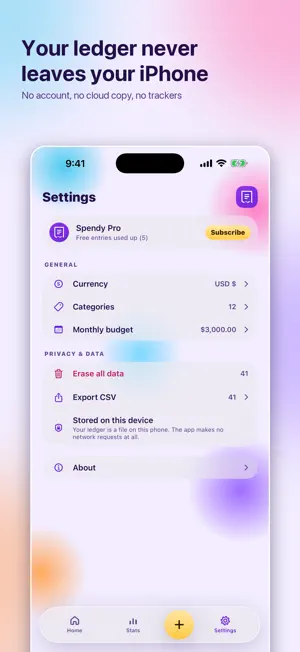
Spendy is a plain, fast expense tracker. Open it, tap the amount, pick a category, done. No sign-up, no bank linking, no cloud. THREE TAPS PER ENTRY A full-screen keypad, fourteen categories and an optional note. Logging a coffee takes about four seconds, which is the only reason anyone keeps doing it past the first week. NOTHING LEAVES YOUR IPHONE Spendy makes no network requests at all. There is no account, no server, no analytics and no advertising SDK. Your ledger is a file on your phone and nowhere else. Turn on Airplane Mode and everything still works. SEE WHERE IT WENT A monthly budget with a live "left to spend" figure, six months of spending as a bar chart, and a category breakdown with percentages. YOURS TO TAKE AWAY Export the whole ledger to CSV at any time and open it in Numbers or Excel. WHAT'S INSIDE • Expenses and income, both with categories • 14 categories out of the box, or make your own • Monthly budget with progress ring • Six-month chart and category breakdown • 12 currency symbols • Edit or delete any entry • CSV export SAMPLE DATA The app opens with a set of sample entries so you can see how it works straight away. They are marked SAMPLE and are never counted in any total, chart or free-entry quota. The first time you add an entry of your own, Spendy clears them all, so every figure from then on is only yours. FREE TO TRY Log your first 5 entries free, with no time limit. After that, Spendy Pro keeps it going — an auto-renewing subscription, monthly or yearly. Everything you already logged stays readable, chartable and exportable whether or not you subscribe. Payment is charged to your Apple Account at confirmation of purchase. The subscription renews automatically at the same price unless auto-renew is turned off at least 24 hours before the current period ends. Manage or cancel in Settings > Apple Account > Subscriptions, or from the Settings screen inside the app. Privacy Policy: https://spendy.comedev.com/privacy.html Terms of Use (EULA): https://www.apple.com/legal/internet-services/itunes/dev/stdeula/ Support: [email protected]
App privacy
The developer, 丽 江, reported these privacy practices to Apple.
Data Not Collected
The developer does not collect any data from this app.
Alternatives to Expense Tracker - Spendy
Looking for apps like Expense Tracker - Spendy? Here are 6 similar apps on the App Store. The highest rated is CENTRIS: Finance Tracker (5.0/5), and all 6 are free to download.
-
 CENTRIS: Finance Tracker
5.0
-
 Covered: Budget by Paycheck
-
 Payfin: Debt Payoff Planner
-
 PayAnchor: Paycheck Budget
5.0
-
 Ledger: AI Money Tracker
-
 Expense Tracker: Daily Money
| App | Rating | Price | Last updated | Compare |
|---|---|---|---|---|
| Expense Tracker - Spendy | – | Free | September 24, 2026 | |
| CENTRIS: Finance Tracker | 5.0 / 5 (1) | Free | Jul 3, 2026 | Compare |
| Covered: Budget by Paycheck | – | Free | Nov 24, 2026 | Compare |
| Payfin: Debt Payoff Planner | – | Free | Jul 24, 2026 | Compare |
| PayAnchor: Paycheck Budget | 5.0 / 5 (2) | Free | Nov 14, 2026 | Compare |
| Ledger: AI Money Tracker | – | Free | Aug 26, 2026 | Compare |
| Expense Tracker: Daily Money | – | Free | Sep 21, 2026 | Compare |