

Posté: Glass Photo Art
Yi-Jou Su Photo & Video iPhoneiPadiPod touch
Posté: Glass Photo Art is a free Photo & Video app for iPhone and iPad by Yi-Jou Su. Requires iOS 18.0. Updated October 1, 2026.
- Price
- Free
- on the App Store
- Size
- 7 MB
- Age 4+
- Updated
- Oct 1
- 2026 · v1.1
Screenshots



About Posté: Glass Photo Art
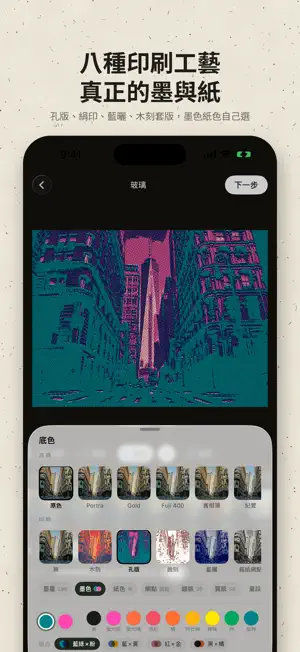
Posté turns an ordinary photo into a piece of glass with light, texture and depth. It is not a filter. The photo goes behind the glass. Fluted, pressed floral, iron grille, prism, bubble, dune, silk — 17 glass textures, each with its own refraction and highlights. Stack several layers, let only one region show through the glass, and drag with a finger to decide where the light comes from. Video works the same way: put glass on the timeline and let it appear, fade in and fade out. What you make is not an image. It is an object placed on paper. GLASS • 17 glass textures with physical refraction and two-lobe highlights • Multi-layer glass with circle, rectangle, band, and automatic sky / subject masks • Drag the light direction, or let it flow as you tilt the phone • Video timeline: move segments, trim, fade in and out PRINT • 8 print processes: woodblock, Risograph, etching, cyanotype, newsprint, screen print, photocopy, linocut • Six real press variables: ink density, ink colour, paper, halftone screen, misregistration, texture • 16 named Riso inks, translucent, multiplying where they overlap • 4 classic ink pairings in one tap PAPER AND FORMATS • 6 paper stocks: cream, kraft, dot grid, lined, clay tile, pastel, plus 14 card colours • 8 output formats: original, postcard, stamp, poster, ticket, journal page, colour story, field notes • Place, date and time filled in from the photo, typewriter corner marks • Story 9:16, post 4:5, square 1:1 in one tap SHARE AND COLLECT • Save as a transparent sticker for Instagram Stories • Stick it onto other photos or videos • Stamp Book: every stamp collects in your Stamp Book, piled by place • Drafts save automatically Everything is computed on your phone. Photos are never uploaded. No account, no tracking.
What’s new
Version 1.1 · Updated October 1, 2026
A polish pass across the whole app. • See it before you start: a short demo plays photos through different kinds of glass — drag to compare before and after • Cleaner glass: shadows no longer go hazy, and Strength now works on every glass • Smoother sliders, and tilt-to-move light uses less battery • Reorganised output screen: Artwork and Canvas are separate, your current settings are shown at a glance, and tapping the preview jumps to the right controls • A next step after saving: save a Story version, make a moving video, make a sticker, or start the next photo • Passport is now the Stamp Book: stamps and tickets you save collect there by place • Finish now has five presets plus Strength, with every slider under Custom • Most deletions can be undone, and a failed save now tells you clearly
App privacy
The developer, Yi-Jou Su, reported these privacy practices to Apple.
Data Not Collected
The developer does not collect any data from this app.
Alternatives to Posté: Glass Photo Art
Looking for apps like Posté: Glass Photo Art? Here are 6 similar apps on the App Store. The highest rated is Nostalgia Cam (5.0/5), and all 6 are free to download.
-
 PictOrb Movable Lens Camera
-
 Tone Cam — Printed Photos
-
 Nostalgia Cam
5.0
Nostalgia Cam
5.0
-
 Inkling: Riso Print
5.0
Inkling: Riso Print
5.0
-
 PRINT DOT - Halftone Risograph
-
 Dwell Poetically
3.7
Dwell Poetically
3.7
| App | Rating | Price | Last updated | Compare |
|---|---|---|---|---|
| Posté: Glass Photo Art | – | Free | October 1, 2026 | |
| PictOrb Movable Lens Camera | – | Free | Sep 25, 2026 | Compare |
| Tone Cam — Printed Photos | – | Free | Aug 30, 2026 | Compare |
| Nostalgia Cam | 5.0 / 5 (3) | Free | May 28, 2026 | Compare |
| Inkling: Riso Print | 5.0 / 5 (2) | Free | Oct 24, 2026 | Compare |
| PRINT DOT - Halftone Risograph | – | Free | Sep 26, 2026 | Compare |
| Dwell Poetically | 3.7 / 5 (3) | Free | Oct 28, 2026 | Compare |