

PRINT DOT - Halftone Risograph
kazunari aoki Photo & Video iPhoneiPadiPod touch
PRINT DOT - Halftone Risograph is a free Photo & Video app for iPhone and iPad by kazunari aoki. Requires iOS 17.0. Updated September 26, 2026.
- Price
- Free
- on the App Store
- Size
- 7 MB
- Age 4+
- Updated
- Sep 26
- 2026 · v1.1.2
Screenshots


About PRINT DOT - Halftone Risograph
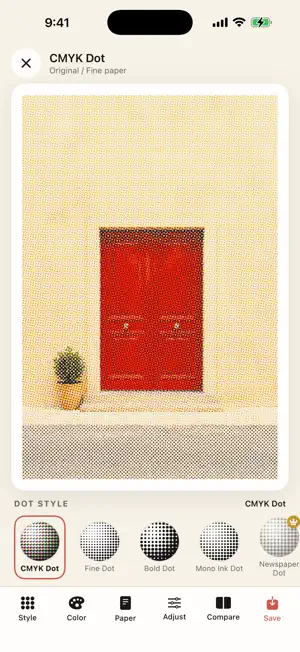
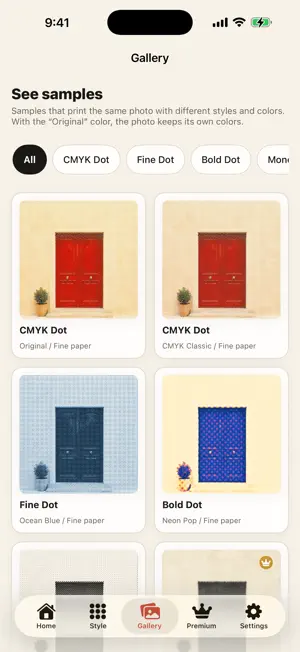
Your photo, freshly printed. PRINT DOT is a small print shop for your photos. The halftone dots you see up close, the color plates sitting slightly off register, the way ink sinks into paper: PRINT DOT rebuilds that feel on top of a picture you already have. ■ Eight dot styles Fine Dot for a delicate screen. Bold Dot for big, poppy dots. Newspaper Dot for coarse monochrome. CMYK Dot for overlapping plates and misregistration. Soft Fade Dot for a gentle bleed. Grain Dot for film-like texture. Line Screen Dot for a poster look. Mono Ink Dot for one clean ink. The same photo comes out differently in every one. ■ Choose the ink Eleven ink palettes, including Vintage Red, Café Brown, Ocean Blue and Mono Black. Quiet one- and two-color runs, or something loud and neon. ■ Choose the paper Seven paper textures: smooth, rough, matte, recycled, newsprint, kraft and aged. Each one changes how the ink settles. ■ Tune it by hand Dot size, screen angle, contrast, ink bleed, paper character. Move the sliders until it looks right, and compare against the original photo at any time. ■ Keep your prints Saved work lines up in the in-app gallery. Favorite it, export it to Photos, or share it straight from there. ■ Everything stays on your iPhone All rendering happens on your device. Your photos are never uploaded. No account, no sign-in, and it works in airplane mode. ■ What's free Four dot styles, five inks and three papers. Pick a photo, adjust it and save it without paying anything. ■ PRINT DOT Premium (one-time purchase) One purchase unlocks all of this: · All eight dot styles · All eleven ink palettes · All seven paper textures · Export at a larger size · No watermark on your work It is not a subscription. You pay once, and on the same Apple ID you can bring it back with Restore Purchases after switching devices.
What’s new
Version 1.1.2 · Updated September 26, 2026
• While editing, tapping a locked style, color, paper, or save size now opens the purchase screen • After you buy, the one you tapped is applied to your photo right away
App privacy
The developer, kazunari aoki, reported these privacy practices to Apple.
Data Not Collected
The developer does not collect any data from this app.
Alternatives to PRINT DOT - Halftone Risograph
Looking for apps like PRINT DOT - Halftone Risograph? Here are 6 similar apps on the App Store. The highest rated is Dottre: Halftone Print Lab (5.0/5), and 5 of the 6 are free to download.
-
 Dottre: Halftone Print Lab
5.0
Dottre: Halftone Print Lab
5.0
-
 Press Paper
-
 Inkling: Riso Print
3.7
Inkling: Riso Print
3.7
-
 DotMatrix Studio
-
 Tone Cam — Printed Photos
-
 Pressed: Risograph & Halftone
5.0
Pressed: Risograph & Halftone
5.0
| App | Rating | Price | Last updated | Compare |
|---|---|---|---|---|
| PRINT DOT - Halftone Risograph | – | Free | September 26, 2026 | |
| Dottre: Halftone Print Lab | 5.0 / 5 (1) | 2.99 USD | Sep 23, 2026 | Compare |
| Press Paper | – | Free | Sep 1, 2026 | Compare |
| Inkling: Riso Print | 3.7 / 5 (3) | Free | Oct 13, 2026 | Compare |
| DotMatrix Studio | – | Free | Aug 24, 2026 | Compare |
| Tone Cam — Printed Photos | – | Free | Aug 30, 2026 | Compare |
| Pressed: Risograph & Halftone | 5.0 / 5 (2) | Free | Oct 11, 2026 | Compare |