

AI Photographer: On Location
E Flores Photo & Video iPhoneiPadiPod touch
AI Photographer: On Location is a free Photo & Video app for iPhone and iPad by E Flores. Requires iOS 17.0. Updated October 23, 2026.
- Price
- Free
- on the App Store
- Size
- 20 MB
- Age 4+
- Updated
- Oct 23
- 2026 · v1.0.1
Screenshots


About AI Photographer: On Location
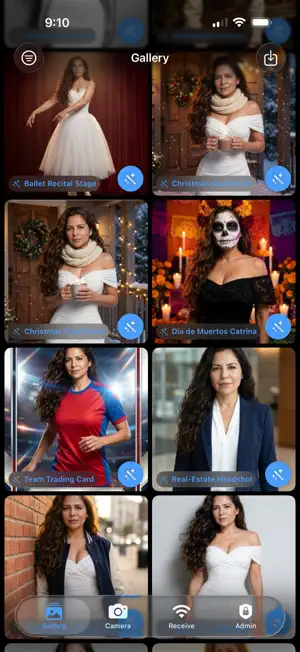
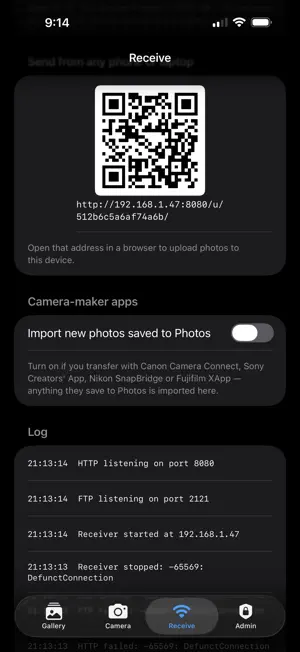
AI Photographer turns an iPhone or iPad into a complete on-location photo studio for working photographers. SHOOT ANY WAY YOU LIKE • Built-in camera at full resolution with every lens of your device — ultra-wide, main and telephoto — or pinch to zoom. • Receive photos wirelessly from your Canon, Nikon, Sony, Fujifilm or Panasonic camera over Wi‑Fi — each shot appears in the gallery within seconds. • Anyone can send you a photo from their phone by scanning a QR code. 110 AI SCENES YOUR CLIENTS WILL LOVE Pick a scene and watch the portrait transform while keeping the real face, hairstyle and body: • World landmarks — Paris, Santorini, Tokyo, New York, Dubai, Machu Picchu, Giza, Petra… • Mexico & Latin America — Chichén Itzá, Guanajuato, Oaxaca Día de Muertos, Cabo, Cartagena, Havana… • Epic nature, original superheroes, sketch & art styles, fine-art studio lighting, movie looks, fantasy & sci‑fi, sports, celebrations. • Client sessions — quinceañera, maternity, newborn, senior portrait, pet royal portrait, real-estate headshot, team trading card, Christmas card, ballet recital. • Optional beauty retouch, and your own custom scenes. KEEPSAKE NEWSPAPERS, PORTRAITS & CARITAS • One-page newspaper with the guest's photo for weddings, quinceañeras, graduations and corporate events: places with maps and QR codes, program, event colors and a sponsor or poster on every copy. • Portraits & collages from 8×10 to 16×20, and Caritas kids' templates made on the device. DELIVER ON THE SPOT • QR code the client scans to download. • WhatsApp, SMS and email — automatic with your own Twilio / email account, or through the native apps. • AirDrop, AirPrint to any wireless printer, save to Photos. PHOTO STRIPS AND CUSTOM STRIPS • Ready layouts: classic 2×6 strip (3 or 4 photos), double strip for cutting, postcard, 4-up grid and polaroid — with your logo, event name and date. • Custom strip designer: your own strip or 4×6 design with photo slots, background, frames, text and stickers, saved as a template. • Print on any AirPrint printer (dye-sub printers like Canon SELPHY or DNP are ideal); 2×6 strips go two-up on a 4×6 sheet for cutting. RUN IT AS A KIOSK Self-service welcome screen with your branding, guest modes (photo / AI / strip), slideshow, inactivity return, fixed zoom for guests, PIN-protected admin. BUILT FOR THE JOB • Event profiles: save the whole setup (branding, scenes, designs) and load it on site in seconds. • Contact database of everyone who received a photo, with export to Excel. • Factory reset to start fresh on a new device or for a new client. • Bilingual guest screens (English / Spanish). • Works offline for capture, receive, QR and print; AI needs an internet connection. FREE AND PRO The free version includes the camera, wireless receiving, all 110 AI scenes with your own key, Caritas, QR, AirDrop, Photos and basic printing; AI results carry a small "AI Photographer" mark. AI Photographer Pro removes the mark and adds kiosk mode with your branding, automatic sending, the contact database with Excel export, the strip & layout designer, portraits & collages, the keepsake newspaper, custom scenes, event profiles and the sample generator. Pro is available monthly, yearly (7-day free trial) or as a one-time lifetime purchase. Subscriptions renew automatically unless cancelled at least 24 hours before the end of the period; manage them in Settings › Apple ID › Subscriptions. Terms of Use: https://www.apple.com/legal/internet-services/itunes/dev/stdeula/ Privacy Policy: https://aiphotographerapp.com/privacy.html ABOUT AI AI scenes use leading AI image services with your own API key, entered once in the app — choose the service you prefer, and add a second one as automatic backup. Generations are billed by the service directly to you; the app sells no credits and collects no data, and it asks permission before any photo is sent. Results are stylized composites of your own photo.
What’s new
Version 1.0.1 · Updated October 23, 2026
• Zoom and every lens: tap 0.5×, 1×, 2×, 3× or 5× (the lenses your iPhone or iPad has) or pinch the picture. In kiosk mode you can lock the zoom for guests. • Keepsake newspaper (Pro): wedding, quinceañera, baptism and graduation newspapers with places, maps and QR codes — now with a sponsor or event poster on the page and sliders to size the sponsor and the client's photo. • More AI services to choose from, with automatic fallback if one is busy. The permission screen always lists exactly where photos are sent. • Factory reset in Admin: erase keys, settings and photos to start fresh with a new client or a new device. • Easier-to-read tab bar over the camera on iOS 17 and 18. • Stability and printing improvements.
App privacy
The developer, E Flores, reported these privacy practices to Apple.
Data Not Collected
The developer does not collect any data from this app.
Alternatives to AI Photographer: On Location
Looking for apps like AI Photographer: On Location? Here are 6 similar apps on the App Store. The highest rated is Fotozap Booth App (5.0/5), and all 6 are free to download.
-
 SnapBite - AI Photo Editor
-
 Photoboo
-
 AI Photo Booth Pro: Software
-
 Fotozap Booth App
5.0
-
 Animator Face Dance
4.5
-
 BoothLab: Video & Photo Booth
4.6
| App | Rating | Price | Last updated | Compare |
|---|---|---|---|---|
| AI Photographer: On Location | – | Free | October 23, 2026 | |
| SnapBite - AI Photo Editor | – | Free | Oct 17, 2026 | Compare |
| Photoboo | – | Free | Oct 30, 2026 | Compare |
| AI Photo Booth Pro: Software | – | Free | Oct 23, 2026 | Compare |
| Fotozap Booth App | 5.0 / 5 (8) | Free | Sep 28, 2026 | Compare |
| Animator Face Dance | 4.5 / 5 (476) | Free | Jun 3, 2026 | Compare |
| BoothLab: Video & Photo Booth | 4.6 / 5 (509) | Free | Aug 28, 2026 | Compare |