

Photoboo
David Yehuda Cardoso Photo & Video iPhoneiPadiPod touch
Photoboo is a free Photo & Video app for iPhone and iPad by David Yehuda Cardoso. Requires iOS 17.0. Updated September 24, 2026.
- Price
- Free
- on the App Store
- Size
- 144 MB
- Age 17+
- Updated
- Sep 24
- 2026 · v4.3
Screenshots


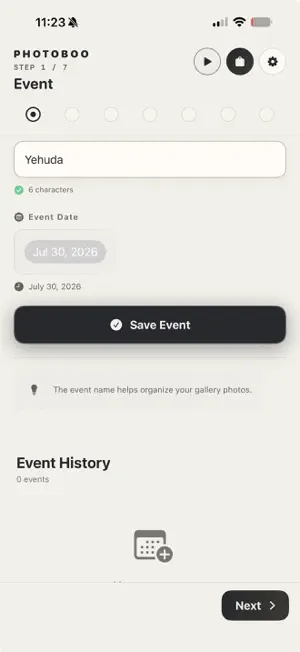
About Photoboo
Your guest picks a style and walks away as a magazine cover star, a collectible vinyl figure or a rider on a roller coaster — with the printed photo in hand. Photoboo turns your iPad into a professional photo booth: classic prints and AI portraits in one app, built for event photographers and photo booth rental businesses. CLASSIC PHOTO BOOTH • 2×6 strips, 4×6 prints, square formats and photo magnets — one setup prints every size. • Print over local Wi-Fi with the free Photoboo Print Assistant for Mac and Windows. It packs two 2×6 strips on one 4×6 sheet to cut media costs. • Connect a Canon EOS R camera by cable for full optical quality, or use the iPad camera. • Background replacement runs on the iPad itself — no internet needed. AI PHOTO BOOTH • 100+ AI styles: magazine covers, vinyl figures, red carpet, roller coaster, New Year's Eve, sports cards, couples and more — rebuilt to keep every guest's real face. • Guests pick a style on a full-screen grid and watch their photo revealed with a cinematic animation. • Choose the quality per event: Lite, Standard or Detail 2K. • Modest mode: modest outfits for everyone, keeping any head covering a guest already wears. YOUR BRAND ON EVERY SCREEN • Design the welcome screen right on the iPad: backgrounds, logo, style cards and start buttons. • Import your own overlay and Photoboo finds the photo slots automatically. MORE THAN PHOTOS • Online gallery: every photo in one elegant gallery with your cover. Guests scan the QR code to download and share. Optional PIN and private links. • Phone Booth: guests leave audio or video messages, saved on the iPad and organized by event — nothing goes to the cloud. • Photographer Mode on iPhone and iPad: review, reframe and print on the spot. • Six languages — English, Português, Español, Français, עברית and العربية — with full right-to-left support. • Pause the booth with a passcode-protected "Be right back" screen. ONE ACCOUNT, EVERY DEVICE Use the same subscription and AI credits on your iPads and iPhone signed in with the same Apple Account. If an AI photo fails, the credit comes back automatically. Every event is a showcase for your next booking. Don't miss the chance to grow your business with Photoboo. SUBSCRIPTION AND AI CREDITS A subscription unlocks the booth. AI photos use credits, sold separately in packs: Lite ½ credit, Standard 1 credit, Detail 2K 1½ credits per photo. New subscribers get a free trial with AI credits included. • Monthly License: $19.99 per month • Yearly License: $179.99 per year Payment is charged to your Apple Account at confirmation. Subscriptions renew automatically unless cancelled at least 24 hours before the end of the current period. Manage or cancel in your App Store account settings. Terms of Use (EULA): https://www.apple.com/legal/internet-services/itunes/dev/stdeula/ Privacy Policy: https://photoboophotobooth.com/photoboo-privacy-policy/ Support: https://photoboophotobooth.com/photoboo-support/
What’s new
Version 4.3 · Updated September 24, 2026
WHAT'S NEW IN VERSION 4.3 AI STYLES • 100+ styles, with the classics rebuilt: truer faces, a different pose for each person and studio lighting. • New: Magazine Cover, Vinyl Figure, Roller Coaster, Rooftop New Year, Milkshake Bar, Popcorn Showtime, Midnight Express, Road Trip and Haunted Castle. • Cartoon Body: the guest's real head on a cartoon body, made right on the iPad. • New AI Style Store: before-and-after for every style, trending picks up front and 1K or 2K output. • Modest mode: modest outfits for everyone, never adds a head covering, and keeps any scarf or kippah a guest already wears. FOR GUESTS • Countdown, flash and photo reveal with cinematic animation. • See all: guests swipe up to pick a style full screen. • Start button in glass, neon, outline or shutter style. • Phone Booth: audio or video messages, saved on the iPad and organized by event, with no cloud. FOR OPERATORS • New online gallery: cover photo, photo order, PIN, download count and QR code. • Reprint any gallery photo in a different size. • New print sizes: 8×6, 6×8, 4×4 and 10×10. • Photographer Mode: review, reframe, choose a template and size, set copies and print. Pinch to zoom on iPhone. • Booth pause: a password-protected "Be right back" screen. • Your event saves itself as you type. • Faster first photo and menus. • Shared credits: credits you buy on one device work on every device with the same Apple Account. The first time 4.3 opens, each device's balance is added to the total. TIP: want a second iPad as a Phone Booth? Sign in with the same Apple Account to use the same subscription and credits.
App privacy
The developer, David Yehuda Cardoso, reported these privacy practices to Apple.
Data Linked to You
The following data, which may be collected and linked to your identity, may be used for the following purposes:
- Contact Info: Email Address
- Identifiers: User ID
Used for: App Functionality
Data Not Linked to You
The following data, which may be collected but is not linked to your identity, may be used for the following purposes:
- User Content: Photos or Videos
Used for: App Functionality
Alternatives to Photoboo
Looking for apps like Photoboo? Here are 6 similar apps on the App Store. The highest rated is Pivot Booth (5.0/5), and all 6 are free to download.
-
 Pivot Booth
5.0
Pivot Booth
5.0
-
 Kio Cam
5.0
Kio Cam
5.0
-
 Boothkin: Photo Strip Camera
-
 BOOTH: LIVE EVENT PHOTOBOOTH
4.0
BOOTH: LIVE EVENT PHOTOBOOTH
4.0
-
 Landmark Photo Booth
-
 Photoboothify - Photo Booth
5.0
Photoboothify - Photo Booth
5.0
| App | Rating | Price | Last updated | Compare |
|---|---|---|---|---|
| Photoboo | – | Free | September 24, 2026 | |
| Pivot Booth | 5.0 / 5 (1) | Free | Aug 27, 2026 | Compare |
| Kio Cam | 5.0 / 5 (1) | Free | May 24, 2026 | Compare |
| Boothkin: Photo Strip Camera | – | Free | Oct 16, 2026 | Compare |
| BOOTH: LIVE EVENT PHOTOBOOTH | 4.0 / 5 (1) | Free | Sep 15, 2026 | Compare |
| Landmark Photo Booth | – | Free | May 6, 2025 | Compare |
| Photoboothify - Photo Booth | 5.0 / 5 (4) | Free | Oct 12, 2026 | Compare |
Compare Photoboo with the top alternatives: ratings, updates, ASO score and keyword gaps →