

SnapBite - AI Photo Editor
SEOK JU KANG Photo & Video iPhoneiPadiPod touchApple Watch
SnapBite - AI Photo Editor is a free Photo & Video app for iPhone and iPad by SEOK JU KANG. Requires iOS 17.0. Updated October 17, 2026.
- Price
- Free
- on the App Store
- Size
- 12 MB
- Age 4+
- Updated
- Oct 17
- 2026 · v1.1.1
Screenshots
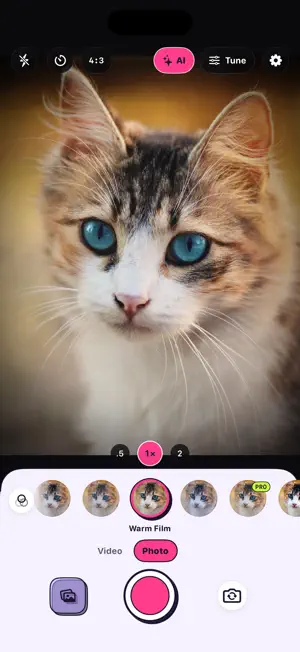


About SnapBite - AI Photo Editor
SnapBite is the camera that's as fun to use as it is to look at: a bright, playful viewfinder, 89 live filters one tap away, and a pro panel for the moments you want full control. POP CAMERA • A clean layout: flash, timer and ratio on top, your filters right under the picture • Tap a look to see it live, tap it again to set its strength • Photo and Video modes • An AI button on the camera's top bar opens AI Edit • Silent shutter for selfies: it works with the front camera only, and the back camera always plays the shutter sound • Hold the shutter, or a volume button, to shoot a burst • Light, Dark or Auto theme 89 LOOKS IN 18 PACKS • Y2K Digicam, Pastel Dream, Skin Glow, Neon City, Golden Hour and Retro Roll, plus Film Lab, B&W, Cinematic, Vintage, Portrait, Food, Street, Seasonal, Minimal, Night Life, Mood Film and Cine FX • 3 looks are free; the rest are Pro. Try any Pro look in the viewfinder before you unlock it • Real-time GPU preview, adjustable strength, favorites • Cinematic LUTs, and bring your own .cube LUTs • 200 camera presets for every situation A MUCH STRONGER EDITOR • Auto enhance and 15 adjustments: exposure, contrast, highlights, shadows, vibrance, warmth, tint, clarity, fade, grain, vignette, glow and more • Color mixer for eight colors, and an AI background blur that finds your subject on-device (Pro) • Crop with 10 ratios, rotate, flip and straighten • Blur brush, text in 10 fonts, handwriting with pen, marker, neon, pencil and watercolor • 7 sticker packs, date stamps, collage and double exposure • Press and hold to compare with the original, and reset everything in one tap PRO CONTROLS WHEN YOU WANT THEM Open the Tune panel for ISO, shutter speed, EV, white balance and manual focus with peaking, each explained in plain words. Everything stays automatic until you touch it. Shoot JPEG, HEIF or RAW, record video up to 4K, and export any video as a GIF. With Pro, adjust several controls at once. AI EDIT (PRO) Tap the AI button at the top of the camera, pick a photo, and edit it with AI right on your iPhone: erase an object with a brush or a tap, lift the subject off its background, paint the photo in a style, or redraw it in ten looks such as comic, watercolor, pixel art and sticker. Free to try, Pro to keep. Some tools fetch their model once, the first time you use them. Redraw needs an iPhone that supports Apple Intelligence. Nothing is uploaded. AI RECOMMENDATIONS (PRO) Learns the looks and settings you reach for, by scene, light and time of day, and when it's sure, offers one quiet suggestion. Nothing changes until you tap it. Everything is learned on your device and never leaves it. AI PHOTO NOTES SnapBite recognizes what's in each photo, such as food, pets or the sky, right on your iPhone, and writes those tags into the file as keywords that Photos on a Mac and other apps can read. Tap a tag to file the photo into an album, spot the best shot of a burst at a glance, and translate the text in a photo. With Pro, Apple Intelligence writes a caption for each photo, and "Remember this photo" suggests a line and hashtags to put on it. Captions and phrases need an iPhone that supports Apple Intelligence. Nothing is uploaded. APPLE WATCH REMOTE (PRO) A live viewfinder on your wrist while SnapBite is open on your iPhone. Fire the shutter, zoom and focus with the Digital Crown, switch filters, and flip through your latest shots. PRIVATE BY DESIGN SnapBite never collects, stores or transmits your data. Your photos stay on your device. No tracking, no ads, no account required. Built natively for iPhone with SwiftUI and Metal: light, fast and ready to snap. Terms of Use (EULA): https://www.apple.com/legal/internet-services/itunes/dev/stdeula/
What’s new
Version 1.1.1 · Updated October 17, 2026
Small refinements and stability improvements. Thanks for all your feedback!
App privacy
The developer, SEOK JU KANG, reported these privacy practices to Apple.
Data Not Collected
The developer does not collect any data from this app.
Alternatives to SnapBite - AI Photo Editor
Looking for apps like SnapBite - AI Photo Editor? Here are 6 similar apps on the App Store. The highest rated is PoseCap (5.0/5), and all 6 are free to download.
-
 AI Photographer: On Location
-
 Shake Photo - Fun Effects
-
 Berry Cam - Korean Film Camera
-
 PoseCap
5.0
PoseCap
5.0
-
 Camera Editor Beauty: AI Photo
5.0
Camera Editor Beauty: AI Photo
5.0
-
 Mocha Frame - Photo Frame
3.4
Mocha Frame - Photo Frame
3.4
| App | Rating | Price | Last updated | Compare |
|---|---|---|---|---|
| SnapBite - AI Photo Editor | – | Free | October 17, 2026 | |
| AI Photographer: On Location | – | Free | Oct 23, 2026 | Compare |
| Shake Photo - Fun Effects | – | Free | Sep 19, 2026 | Compare |
| Berry Cam - Korean Film Camera | – | Free | Oct 25, 2026 | Compare |
| PoseCap | 5.0 / 5 (1) | Free | Jan 9, 2026 | Compare |
| Camera Editor Beauty: AI Photo | 5.0 / 5 (2) | Free | Oct 4, 2026 | Compare |
| Mocha Frame - Photo Frame | 3.4 / 5 (8) | Free | Sep 6, 2026 | Compare |