

PixDoc: Photo to PDF Converter
Mehmet Deniz Productivity iPhoneiPadiPod touch
PixDoc: Photo to PDF Converter is a free Productivity app for iPhone and iPad by Mehmet Deniz. Requires iOS 17.0. Updated October 1, 2026.
- Price
- Free
- on the App Store
- Size
- 17 MB
- Age 4+
- Updated
- Oct 1
- 2026 · v1.0
Screenshots


About PixDoc: Photo to PDF Converter
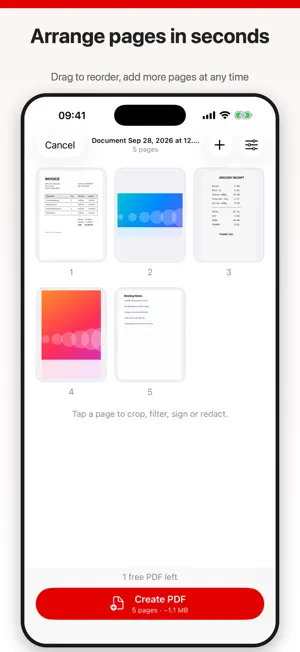
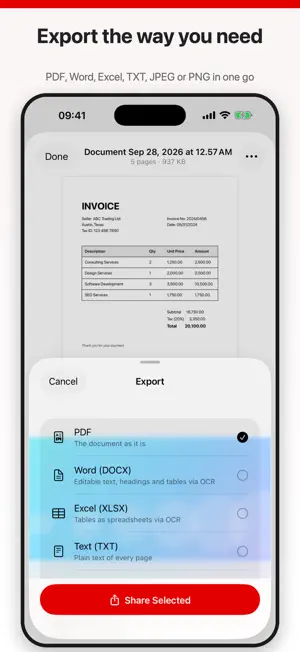
PixDoc turns photos, screenshots and existing PDFs into clean, shareable documents. No account and no upload: every page is processed on your device. CREATE • Pick photos, take a picture, import from Files or open an existing PDF • ID card mode puts both sides of a card on one page • Drag to reorder pages and add more at any time CLEAN UP EVERY PAGE • Crop, rotate, flip and straighten • Enhance, grayscale and black and white filters; brightness, contrast and saturation • Draw, add text, sign and redact sensitive parts DOCUMENT OPTIONS • Page size (A4, Letter or automatic), orientation, margins and quality • Page numbers, watermark and password protection • Templates for receipts, contracts, ID copies and photo albums READ, EDIT AND SEARCH • Built-in reader with pinch zoom • Edit the PDF: draw, text, images, signatures, links and highlights • Find text inside a document or across your whole library EXPORT AND ORGANIZE • Share as PDF, print or save to Files • Export to Word, Excel, TXT, JPEG or PNG • Extract, split and merge documents; keep them in folders PIXDOC PRO Your first PDF is free. PixDoc Pro removes the limit and unlocks text recognition (OCR), watermark and password protection, and Word, Excel and TXT export. Subscriptions: $1.99/week, $4.99/month, $19.99/year (prices may vary by region). Payment is charged to your Apple account; the subscription renews automatically unless cancelled at least 24 hours before the end of the current period. Manage or cancel it in your App Store account settings. Privacy Policy: https://aigf-3481a.web.app/privacy-policy.html Terms of Use: https://aigf-3481a.web.app/terms-of-use.html
App privacy
The developer, Mehmet Deniz, reported these privacy practices to Apple.
Data Linked to You
The following data, which may be collected and linked to your identity, may be used for the following purposes:
- Usage Data: Product Interaction
- Identifiers: User ID
- Contact Info: Email Address
Used for: Analytics, App Functionality, Other Purposes
Data Not Linked to You
The following data, which may be collected but is not linked to your identity, may be used for the following purposes:
- Diagnostics: Crash Data
Used for: App Functionality
Alternatives to PixDoc: Photo to PDF Converter
Looking for apps like PixDoc: Photo to PDF Converter? Here are 6 similar apps on the App Store.
-
 Scanner App: PDF Scanner .
-
 LayoutPro: Batch Photos to PDF
-
 Simple Photos to PDF Converter
-
 NGIE: Gaming AI Assistant
-
 Focusito: AI Focus Timer
-
 Image to excel sheet - xlsx
| App | Rating | Price | Last updated | Compare |
|---|---|---|---|---|
| PixDoc: Photo to PDF Converter | – | Free | October 1, 2026 | |
| Scanner App: PDF Scanner . | – | Free | Oct 14, 2026 | Compare |
| LayoutPro: Batch Photos to PDF | – | Free | Mar 25, 2026 | Compare |
| Simple Photos to PDF Converter | – | Free | Nov 21, 2023 | Compare |
| NGIE: Gaming AI Assistant | – | Free | Sep 28, 2026 | Compare |
| Focusito: AI Focus Timer | – | Free | Aug 18, 2026 | Compare |
| Image to excel sheet - xlsx | – | Free | Sep 20, 2026 | Compare |