

Scanner App: PDF Scanner .
Hurapps Dijital Hizmetler Limited Şirketi Productivity iPhoneiPadiPod touch
Scanner App: PDF Scanner . is a free Productivity app for iPhone and iPad by Hurapps Dijital Hizmetler Limited Şirketi. Requires iOS 18.0.
- Price
- Free
- on the App Store
- Size
- 15 MB
- Age 4+
- Updated
- Oct 14
- 2026 · v1.4
Screenshots


About Scanner App: PDF Scanner .
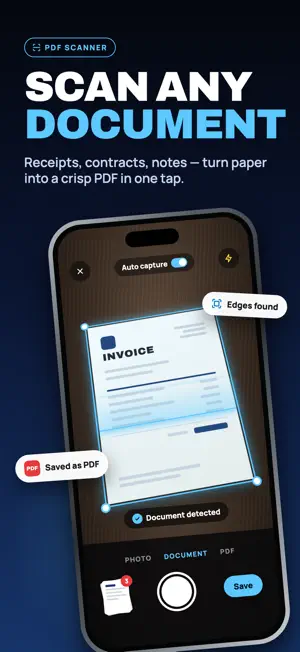
Scanner App scans paper into a PDF and converts the files you already have. Use the camera on a document, turn a photo into a PDF, or convert Word, Excel, and PowerPoint on iPhone and iPad. Export a PDF to Word, Excel, PowerPoint, images, or text. Fill and sign forms, then merge, split, compress, protect, or translate the file. No printer. No computer. Scan, convert, sign, and organize in one native app. SCAN • PDF Scanner — camera to clean PDF pages • Photo to PDF — pictures and screenshots • Scan documents — receipts, notes, and multi-page files CONVERT TO PDF • Word to PDF — DOCX documents • Excel to PDF — XLSX and CSV • PowerPoint to PDF — PPTX presentations • Text to PDF • Web to PDF — save a page as PDF • Merge PDF — combine multiple files into one • Split PDF — extract pages CONVERT FROM PDF • PDF to Word (DOCX) • PDF to Excel (XLSX) • PDF to PowerPoint (PPTX) • PDF to Image • PDF to Text — extract selectable text PDF TOOLS • Fill & Sign — complete forms without printing • Compress PDF — smaller files for email and sharing • Protect PDF — lock with a password • Redact — hide sensitive information • Comments — notes on the page • Manage Pages — reorder and rotate • New PDF — start from a blank document • Translate PDF FILES Create folders, star favorites, search, open Recents, and restore Recently Deleted. Share PDFs into the app from Mail, Files, and other apps. Rename, read, and send whenever you need. Built for iPhone and iPad with Light, Dark, and System appearance. Adjust compression quality in Settings. This app offers auto-renewable subscriptions (Weekly and Yearly). Prices vary by region and are shown in the app before you buy. Payment is charged to your Apple ID account at confirmation of purchase. Subscriptions renew automatically unless canceled at least 24 hours before the end of the current period. Your account is charged for renewal within 24 hours prior to the end of the current period. Manage or cancel in Settings > [your name] > Subscriptions. Any unused portion of a free trial, if offered, is forfeited when you purchase a subscription. Privacy Policy: https://hurapps.com/privacy_policy.html Terms of Use: https://hurapps.com/terms_of_use.html Apple EULA: https://www.apple.com/legal/internet-services/itunes/dev/stdeula/
What’s new
Version 1.4 · Updated October 14, 2026
We're continuing to improve Scanner App for a smoother, more reliable experience. Stay up to date.
App privacy
The developer, Hurapps Dijital Hizmetler Limited Şirketi, reported these privacy practices to Apple.
Data Not Linked to You
The following data, which may be collected but is not linked to your identity, may be used for the following purposes:
- Purchases: Purchase History
- Identifiers: Device ID
- Usage Data: Advertising Data
- Diagnostics: Crash Data
Used for: Analytics, App Functionality
Alternatives to Scanner App: PDF Scanner .
Looking for apps like Scanner App: PDF Scanner .? Here are 6 similar apps on the App Store. The highest rated is Graph to Excel Converter: XLSX (5.0/5), and all 6 are free to download.
-
 Frosty Tasks
-
 Tablo: Scan PDF & Photo to XLS
-
 PDF to Excel Converter: OCR
1.0
-
 ScanToExcel - Document Scanner
-
 Graph to Excel Converter: XLSX
5.0
-
 Convert to PDF - PDFOn
2.0
| App | Rating | Price | Last updated | Compare |
|---|---|---|---|---|
| Scanner App: PDF Scanner . | – | Free | October 14, 2026 | |
| Frosty Tasks | – | Free | Sep 30, 2026 | Compare |
| Tablo: Scan PDF & Photo to XLS | – | Free | Jul 17, 2026 | Compare |
| PDF to Excel Converter: OCR | 1.0 / 5 (1) | Free | Oct 24, 2026 | Compare |
| ScanToExcel - Document Scanner | – | Free | Sep 26, 2026 | Compare |
| Graph to Excel Converter: XLSX | 5.0 / 5 (1) | Free | Aug 8, 2026 | Compare |
| Convert to PDF - PDFOn | 2.0 / 5 (1) | Free | Feb 22, 2026 | Compare |