
ScanToExcel - Document Scanner
REPHRASY Productivity iPhoneiPadiPod touch
ScanToExcel - Document Scanner is a free Productivity app for iPhone and iPad by REPHRASY. Requires iOS 17.0. Updated September 26, 2026.
- Price
- Free
- on the App Store
- Size
- 1 MB
- Age 4+
- Updated
- Sep 26
- 2026 · v1.0.6
Screenshots


About ScanToExcel - Document Scanner
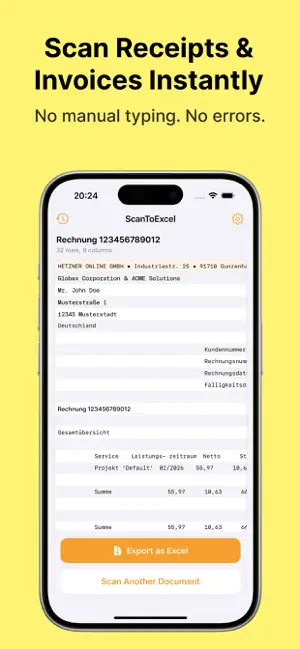
Turn any document into a spreadsheet in seconds. ScanToExcel uses AI to extract tables and data from photos, scans, and PDFs — and converts them into clean, organized Excel files. Whether you're digitizing invoices, receipts, financial reports, inventory lists, or handwritten tables — ScanToExcel handles it all. No manual data entry, no copy-pasting. Just point, scan, and export. HOW IT WORKS 1. Scan a document with your camera, pick a photo from your library, or import a PDF 2. AI automatically detects rows, columns, headers, and values 3. Review the extracted data in a clean table preview 4. Export as Excel (.xlsx), CSV, or JSON — share via email, save to Files, AirDrop, or open in Numbers, Google Sheets, or any spreadsheet app KEY FEATURES • Smart AI table extraction — accurately reads printed and handwritten tables, invoices, receipts, reports, and lists • Multiple input options — use your camera, choose from photo library, or import PDF documents • Multi-page scanning — process multiple pages in one go • Three export formats — Excel (.xlsx), CSV (.csv), and JSON (.json) • Instant sharing — send files via email, AirDrop, save to iCloud, Google Drive, Dropbox, or any cloud service • Scan history — access all your previous scans and re-export anytime • Works offline — your data stays on your device • Clean, fast interface — no clutter, no ads, no watermarks WHO IS IT FOR? • Accountants & bookkeepers — digitize receipts and financial documents • Business professionals — convert reports and invoices to spreadsheets • Students & researchers — extract data from printed tables • Small business owners — organize inventory and order lists • Anyone who needs paper data in digital format FLEXIBLE PLANS • Free: 10 pages per month to get started • Page Pack 50: one-time purchase of 50 pages — never expires • Page Pack 200: one-time purchase of 200 pages — never expires • Weekly: 200 pages per week for regular users • Pro: 1,000 pages per month for heavy users SUBSCRIPTION DETAILS • Weekly plan ($9.99/week) renews automatically every 7 days • Pro plan ($39.99/month) renews automatically every month • Payment is charged to your Apple ID account at confirmation of purchase • Subscription automatically renews unless cancelled at least 24 hours before the end of the current period • Your account will be charged for renewal within 24 hours prior to the end of the current period • You can manage and cancel your subscriptions in your Apple ID account settings after purchase Privacy Policy: https://scantoexcel.ai/privacy Terms of Use: https://scantoexcel.ai/terms
What’s new
Version 1.0.6 · Updated September 26, 2026
Bump scanning API version
App privacy
The developer, REPHRASY, reported these privacy practices to Apple.
Data Not Collected
The developer does not collect any data from this app.
Alternatives to ScanToExcel - Document Scanner
Looking for apps like ScanToExcel - Document Scanner? Here are 6 similar apps on the App Store. The highest rated is Image to Excel Converter: OCR (3.0/5), and all 6 are free to download.
-
 Tablo: Scan PDF & Photo to XLS
-
 Image to Excel Converter: OCR
3.0
-
 Scan to Sheets: Scan & Export
-
 Xcelify: Scan Tables to Sheets
-
 Image to excel sheet - xlsx
-
 Gridshot: Scan to Spreadsheet
| App | Rating | Price | Last updated | Compare |
|---|---|---|---|---|
| ScanToExcel - Document Scanner | – | Free | September 26, 2026 | |
| Tablo: Scan PDF & Photo to XLS | – | Free | Jul 17, 2026 | Compare |
| Image to Excel Converter: OCR | 3.0 / 5 (2) | Free | Sep 24, 2026 | Compare |
| Scan to Sheets: Scan & Export | – | Free | Oct 12, 2026 | Compare |
| Xcelify: Scan Tables to Sheets | – | Free | Jun 17, 2026 | Compare |
| Image to excel sheet - xlsx | – | Free | Sep 20, 2026 | Compare |
| Gridshot: Scan to Spreadsheet | – | Free | Sep 5, 2026 | Compare |