

LayoutPro: Batch Photos to PDF
Ana Florencia Rovirosa Productivity iPhoneiPadiPod touch
LayoutPro: Batch Photos to PDF is a free Productivity app for iPhone and iPad by Ana Florencia Rovirosa. Requires iOS 15.6. Updated March 25, 2026.
- Price
- Free
- on the App Store
- Size
- 81 MB
- Age 4+
- Updated
- Mar 25
- 2026 · v1.1
Screenshots



About LayoutPro: Batch Photos to PDF
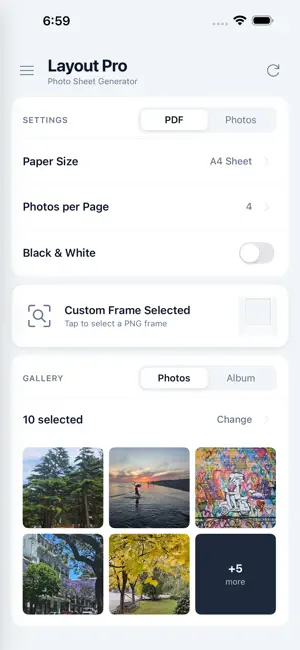
LayoutPro: From Photos to PDF in Batch Convert your photos into print-ready sheets — instantly. LayoutPro combines custom frames and automation to generate professional PDF files in a simple workflow, with full control over every detail. Ideal for photographers, studios, and event organizers who need to deliver perfect prints efficiently. How it works: • Configure your layout: Choose paper size and photos per page. • Personalize: Upload your custom PNG frame (with transparency support). • Select: Choose your photos and LayoutPro does the rest. Two ways to work: • Automatic Flow: One tap and done. The app automatically organizes and fits every image into your frame. PDF ready in seconds. • Advanced Mode: Manual control to zoom, move, and rotate each photo within its frame until it's exactly how you want it. Key Features: • Custom Frames: Full support for transparent PNGs of any size. • Batch Processing: Work with dozens of photos or entire albums at once. • Professional Formats: A4, Letter, Legal, Tabloid, and more. • Flexible Layouts: From 1 to 16 photos per page. • Page Optimization: Automatic rotation and trimming-ready output (no wasted paper). • Quick Tools: One-tap Black and White conversion for the entire sheet. • Instant Share: Send via AirDrop, email, or direct print. Built for Real Use: Whether you're a professional photographer preparing prints for an event or capturing family memories, LayoutPro removes the technical complexity. Generate PDFs compatible with any home or professional printer: open, print at 100% scale, and you're ready.
What’s new
Version 1.1 · Updated March 25, 2026
What’s New in Version 1.1 • Visual Themes: Choose the look of your app with 8 new options: Light, Dark, High Contrast, Sakura, Kawaii, Sunset, Sand, and Aurora. Each theme updates colors, buttons, and the entire interface. • Redesigned Settings & About: Completely revamped screens for a better experience. • Smoother Photo Selection: Improvements to the selection process for a more fluid workflow. • Stability & Fixes: General bug fixes and performance improvements
App privacy
The developer, Ana Florencia Rovirosa, reported these privacy practices to Apple.
Data Not Linked to You
The following data, which may be collected but is not linked to your identity, may be used for the following purposes:
- Usage Data: Product Interaction
- Diagnostics: Performance Data, Other Diagnostic Data
Used for: Analytics
Alternatives to LayoutPro: Batch Photos to PDF
Looking for apps like LayoutPro: Batch Photos to PDF? Here are 6 similar apps on the App Store. The highest rated is teramoby tera (tt) (5.0/5), and all 6 are free to download.
-
 Telepromptly - Script Prompt
-
 PageCut: Long Image to PDF
-
 teramoby tera (tt)
5.0
teramoby tera (tt)
5.0
-
 Litho: Screenshot to Obsidian
5.0
Litho: Screenshot to Obsidian
5.0
-
 Calendar Insights: Time Stats
5.0
Calendar Insights: Time Stats
5.0
-
 Worksheet Generator
| App | Rating | Price | Last updated | Compare |
|---|---|---|---|---|
| LayoutPro: Batch Photos to PDF | – | Free | March 25, 2026 | |
| Telepromptly - Script Prompt | – | Free | Jun 16, 2026 | Compare |
| PageCut: Long Image to PDF | – | Free | Jul 15, 2026 | Compare |
| teramoby tera (tt) | 5.0 / 5 (2) | Free | Sep 23, 2026 | Compare |
| Litho: Screenshot to Obsidian | 5.0 / 5 (2) | Free | Jun 20, 2026 | Compare |
| Calendar Insights: Time Stats | 5.0 / 5 (2) | Free | Oct 8, 2026 | Compare |
| Worksheet Generator | – | Free | Oct 13, 2026 | Compare |