

Daywright: Personal Planner
Jason Grant Productivity iPhoneiPadiPod touch
Daywright: Personal Planner is a free Productivity app for iPhone and iPad by Jason Grant. Requires iOS 17.0. Updated October 26, 2026.
- Price
- Free
- on the App Store
- Size
- 9 MB
- Age 4+
- Updated
- Oct 26
- 2026 · v1.0.1
Screenshots

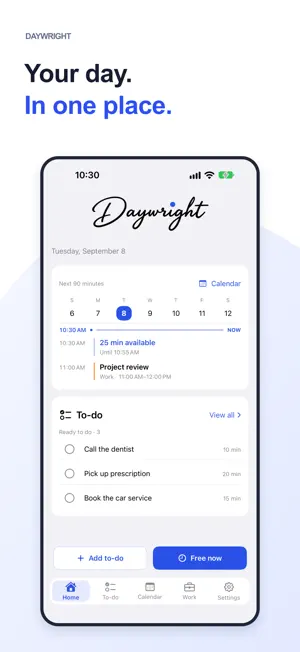
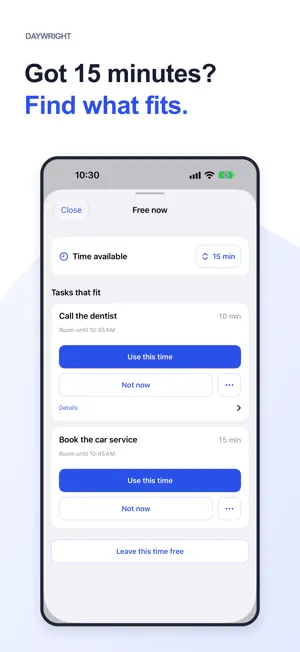

About Daywright: Personal Planner
Something to do. Time to do it. Bring your to-dos, calendars and work shifts together with Daywright. Find something that fits the time you have, keep your place when you stop, and send someone a private copy they can read in a browser. START WITH A NAME AND AN ESTIMATE Return a parcel. Book the car service. Add a to-do and say how long it might take. Free includes five active personal to-dos, basic editing, manual scheduling, ordinary repeats and reminders. Completed to-dos and received copies do not count toward that allowance. Share text or a web link from another app to review as a draft. FIND SOMETHING THAT FITS A gap before work? Twenty minutes between appointments? With Plus, Free now finds to-dos that fit your available time. Choose one and use that time. You decide what gets scheduled. PICK UP WHERE YOU STOPPED With Plus, record what you did and estimate what remains. Mark a to-do as waiting for a reply, delivery or something else, with an optional follow-up date. Search titles and notes, filter by status, and revisit completed work. A scheduled time ending never marks a to-do done for you. SHIFTS, HOURS AND PAY Add manual shifts with Free. Plus adds shift templates and rotations, actual hours, and gross-pay estimates using your rates and overtime rules. Pay figures are personal estimates, not payroll or take-home pay. REMEMBER IT NEAR THE RIGHT PLACE Save a place with a to-do. With Plus, enable a Nearby reminder for the parcel shop, pharmacy or another saved place. Reminders are optional and depend on location and notification permissions and device settings. SHARE A PRIVATE COPY With Plus, send an encrypted private link for a to-do or shift, including only the optional details you choose. For to-do links, choose expiry and viewing limits. Checking or stopping an existing link stays Free. Stopping or expiry prevents future retrieval; it cannot recall a copy someone already saved. Sharing a shift does not confirm coverage. RECEIVE A TO-DO IN YOUR BROWSER Open a private to-do link and choose View to-do. Read the shared details without installing Daywright. Install the app if you want to review and save your own independent copy for free. CLOSE AT HAND Use Siri and Shortcuts to add a to-do or show today with Free; finding something to do uses Plus. Choose immediate adding or review first. Free Home Screen and Lock Screen widgets keep work in view. Plus adds Live Activities. Widget and Live Activity titles have separate privacy controls. On iOS 18 or later, use Add to-do or Plus Free now from Control Center or a supported iPhone's Action button. YOUR CALENDARS STAY YOURS Choose the device calendars Daywright can read. Calendar access is optional; Daywright does not change source events. Your to-dos are stored on your device. Private sharing sends an encrypted copy you choose to share. No separate Daywright account, advertising or third-party analytics SDKs. System features and backups have their own data considerations, explained in the privacy policy. MAKE IT YOURS Follow your device’s appearance or choose light or dark, with Daywright Blue, Sage, Plum or Amber accents. The built-in Using Daywright guide helps you get started. START WITH FREE. GO FURTHER WITH PLUS. Plus removes the active personal to-do limit and adds the Plus features above. Choose a monthly or annual plan. Prices and eligible introductory trials are shown before you confirm. If Plus expires, saved information and Free actions remain available, including reading existing progress and waiting details. Subscriptions renew automatically unless canceled at least 24 hours before the current period ends. Manage or cancel in your Apple Account settings. Privacy Policy: https://aroundfindout.com/daywright/privacy/ Terms of Use: https://www.apple.com/legal/internet-services/itunes/dev/stdeula/
What’s new
Version 1.0.1 · Updated October 26, 2026
A cleaner, more consistent look throughout Daywright. Clearer private to-do sharing, from sending a link to reading it in a browser.
App privacy
The developer, Jason Grant, reported these privacy practices to Apple.
Data Not Linked to You
The following data, which may be collected but is not linked to your identity, may be used for the following purposes:
- User Content: Other User Content
Used for: App Functionality
Alternatives to Daywright: Personal Planner
Looking for apps like Daywright: Personal Planner? Here are 6 similar apps on the App Store. The highest rated is Eisenhour: Daily Planner (5.0/5), and all 6 are free to download.
-
 Passion Planner by Aaesha
-
 Planish: ADHD Day Planner
-
 Dailybook | Planner
-
 Next Seven
-
 Monthly Calendar & Agenda
-
 Eisenhour: Daily Planner
5.0
Eisenhour: Daily Planner
5.0
| App | Rating | Price | Last updated | Compare |
|---|---|---|---|---|
| Daywright: Personal Planner | – | Free | October 26, 2026 | |
| Passion Planner by Aaesha | – | Free | Sep 11, 2026 | Compare |
| Planish: ADHD Day Planner | – | Free | Oct 25, 2026 | Compare |
| Dailybook | Planner | – | Free | Feb 18, 2026 | Compare |
| Next Seven | – | Free | Apr 23, 2026 | Compare |
| Monthly Calendar & Agenda | – | Free | Oct 16, 2026 | Compare |
| Eisenhour: Daily Planner | 5.0 / 5 (4) | Free | Oct 13, 2026 | Compare |