

Eisenhour: Daily Planner
PEDRAM JAHANGIRY Productivity iPhoneiPadiPod touch
Eisenhour: Daily Planner is a free Productivity app for iPhone and iPad by PEDRAM JAHANGIRY. Rated 5.0/5 from 4 ratings. Requires iOS 16.4.
- Rating
- 5.0
- 4 ratings
- Price
- Free
- on the App Store
- Size
- 46 MB
- Age 4+
- Updated
- Oct 13
- 2026 · v1.0.4
Screenshots


About Eisenhour: Daily Planner
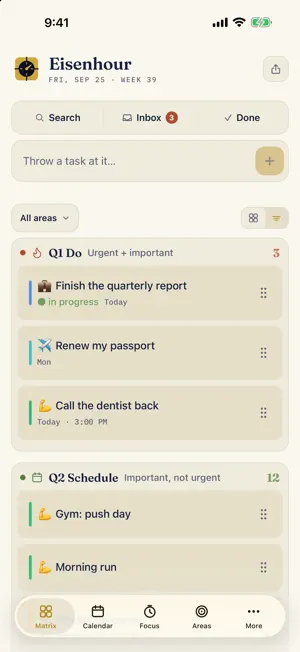
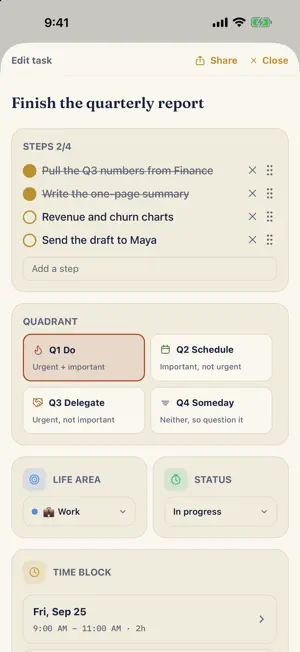
Most to-do apps make lists. Eisenhour makes decisions. It starts with two questions the Eisenhower method has asked for seventy years: is it important, and is it urgent? Four quadrants sort everything: do it now, schedule it, delegate it, or let it go. Then Eisenhour does what matrix apps never do: it turns those decisions into hours. DECIDE WHAT MATTERS • Capture tasks in seconds; triage them into quadrants when you're ready • Steps, due dates and a focus timer on every task • Q2, important but not urgent, is where the app gently pushes you: planning before deadlines, health before symptoms, family before repair BLOCK THE TIME • Drag tasks onto a real day timeline in 15-minute steps • Your Google, work, and iCloud calendars appear beside your plan. Eisenhour reads the calendars already on your iPhone, nothing to connect • Copy a block out to one of those calendars as a real event, repeats and all, so your plan shows up wherever you already check your day (Pro) • A Next Block card always shows what's coming SEE WHERE YOUR LIFE GOES • A focus timer that logs every session (and honest manual logging for the hours you forgot to time) • A contribution-style heatmap of your focused hours • Life areas with weekly targets and streaks, so work doesn't quietly swallow health, family, and learning A CARD YOU CAN HAND TO SOMEONE • Build a business or personal card inside the app: name, title, phone, email, links with names that read as names • Share it as an image, or as a PDF whose phone, email, and links are genuinely tappable • Keep several: work, personal, side business (one card free, more with Pro) • Send any task the same way, steps and all, as plain text MADE FOR SCATTERED DAYS If your to-do list keeps growing and the week goes somewhere without asking you, this is built for that. For people with ADHD or a tired executive function, the four boxes, one next block, and a timer that rings on a locked phone are what make a plan hold. Nothing nags: no streak guilt, no nagging for ratings, no red badges. REMINDERS AND THE SMALL THINGS • A notification when a block starts, or any number of minutes before, if you switch it on • Swipe right to finish a task, swipe left to delete, one Undo for both • Add a task straight into a quadrant, or long-press a tile to do it • Yesterday's unfinished blocks offered back each morning: move them to today, or let them go • Share today's matrix as an image or a PDF • Repeating blocks are free. So is the matrix, the calendar and the timer YOURS ALONE Eisenhour is local-first. Your tasks, your focus history, your card: all of it lives on your iPhone and rides your normal iCloud backup. No account to create, no login, no server to trust, no tracking. The privacy label says "Data Not Collected" because there is nothing to collect. The one thing that can ever leave is a block you choose to copy to a calendar, and that goes out through your own calendar account, not through us. FREE AND PRO The method is free forever: the matrix, capture, steps, time blocking with repeats, reading your real calendars beside your plan, the focus timer, a card to share, and two life areas. One purchase, Eisenhour Pro, with no subscription, unlocks planning any day past or future, copying a block out to one of those calendars as a real event, your full year of focus history, performance reports over any range, unlimited life areas with targets and streaks, unlimited cards, the dark theme, and export/import. New users can try all of Pro free for 7 days, with nothing to cancel. Built by a professor who has run his working life on this exact system, first as a private tool, now as the app it deserved to be. Decide what matters. Block the time. See where your life goes.
What’s new
Version 1.0.4 · Updated October 13, 2026
Fixes from a full review of the code, a place for your notes, a status filter and a way to delete logged time. • Filter the matrix by status as well as by area. A second menu beside All areas shows only To do, In progress or Blocked, and one tap clears both. • Delete a session you logged. Focus now has a Logged time list: swipe a session left to remove it, with Undo. A deletion also carries over when you Merge another phone’s export. • Delete an area is a clear button at the bottom of its editor. • Notes. Every task has a Notes field under its steps. Notes you brought in with Import were saved but hidden; now you can read and change them, and they go along to the calendar copy. • Moving to a new phone with Import and Merge keeps your life areas’ targets, colors and emoji. The Import sheet says how many areas the file will update. • Merging between two phones no longer drops an edit made on the other phone after you only reordered a task or copied it to a calendar. • A custom focus length with seconds, like 4:10, shows a clean clock and ends on time. • Choosing a new emoji for a life area replaces the old one, and emoji made of several parts, like a runner with a skin tone, stay whole. • Exports are named with the day, so a folder of backups shows which is newest. Saving a shared image to Photos works. • Smaller fixes: a silent phone no longer rings the lock-screen alarm when Sound is off, a finished session shows its own length, Log time stamps time as just ended, the date picker opens on the block’s month, a repeat can’t end before it starts, the matrix’s blocks left stay current, the intro replay reads in dark mode, and VoiceOver can read steps and the matrix toggle.
App privacy
The developer, PEDRAM JAHANGIRY, reported these privacy practices to Apple.
Data Not Collected
The developer does not collect any data from this app.
Alternatives to Eisenhour: Daily Planner
Looking for apps like Eisenhour: Daily Planner? Here are 6 similar apps on the App Store. The highest rated is Lokin - Reclaim Life (5.0/5), and all 6 are free to download.
-
 My NameGame
-
 Morganize
-
 Eisenhower Matrix: Planner
-
 Lokin - Reclaim Life
5.0
Lokin - Reclaim Life
5.0
-
 AI DREAM TEAM
5.0
AI DREAM TEAM
5.0
-
 Fletamos Generadores
| App | Rating | Price | Last updated | Compare |
|---|---|---|---|---|
| Eisenhour: Daily Planner | 5.0 / 5 (4 ratings) | Free | October 13, 2026 | |
| My NameGame | – | Free | Oct 11, 2026 | Compare |
| Morganize | – | Free | May 12, 2026 | Compare |
| Eisenhower Matrix: Planner | – | Free | Sep 16, 2026 | Compare |
| Lokin - Reclaim Life | 5.0 / 5 (4) | Free | Jul 9, 2025 | Compare |
| AI DREAM TEAM | 5.0 / 5 (1) | Free | May 23, 2026 | Compare |
| Fletamos Generadores | – | Free | Nov 5, 2025 | Compare |