

Planish: ADHD Day Planner
INNOFUN DIGITAL Productivity iPhoneiPadiPod touch
Planish: ADHD Day Planner is a free Productivity app for iPhone and iPad by INNOFUN DIGITAL. Requires iOS 17.0. Updated October 20, 2026.
- Price
- Free
- on the App Store
- Size
- 38 MB
- Age 4+
- Updated
- Oct 20
- 2026 · v1.2.0
Screenshots



About Planish: ADHD Day Planner
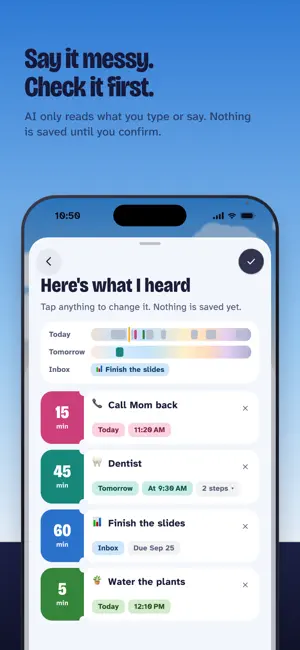
Planish is a day planner for ADHD brains, and for anyone whose day rarely goes to plan. See your day as a timeline under a real sky, do one thing at a time, and replan the rest without guilt. MADE FOR IPHONE DUO • Open it sideways: Today stays on the left, your Inbox, Days or Me on the right, split at the fold. • Fold it shut: the tabs and buttons move into the strip at the side, and the sky still fills the screen. • iPad held sideways works the same way. SEE YOUR DAY, NOT A LIST • Your day runs from when you wake up to when you go to sleep, under a sky that follows the real sun. • Each task takes up as much room as the time it needs, so you can see how full the day really is. • Events from your device's calendar show up as fixed blocks. Planish reads them on your device and never changes or uploads them. SAY IT MESSY. CHECK IT FIRST. • Type or say everything on your mind. Planish turns it into tasks with times and small steps. • AI only reads what you type or say. Nothing is saved until you confirm, and you can change or remove any task first. • Rather do it by hand? Everything works without AI. ONE THING AT A TIME • Now shows the task in front of you, its steps one at a time, and the time it has left. On iPhone you'll also see it on the Lock Screen and in the Dynamic Island. • Need longer? Add 5, 10 or 15 minutes and the rest of the day moves along. DAY WENT SIDEWAYS? REPLAN THE REST. • Replan fits what's left into the time that's left. You see the before and after, and nothing changes until you say so. • Unfinished tasks wait in a gentle card the next morning. No red, no overdue. ROUTINES AND REMINDERS • Save a routine, like your morning, as timed steps. Put it into any day, or let it repeat. • A reminder when each task starts, and an optional "keep reminding me" until you begin. • A Now & Next widget on your Home Screen. NO STREAKS • Every day you used Planish is pressed flat into a band of color. Nothing to break, nothing to lose. YOUR PLAN STAYS YOURS • Without an account, your plan lives only on your device. • Sign in with Apple to use it on more than one device. Sync is free. • Your calendar never leaves your device. THE BASICS ARE FREE. FOREVER. Timeline, Inbox, reminders, repeating tasks, routines, calendar import, Now, Replan and sync are free, and will stay free. AI planning comes with a free allowance; Planish Pro adds more AI planning and step breakdowns. Planish Pro is available monthly, yearly (with a 14-day free trial) or as a one-time purchase. Payment is charged to your Apple Account. Subscriptions renew automatically unless canceled at least 24 hours before the end of the current period. You can manage or cancel them in your Apple Account settings. Terms of Use: https://planish.innofun.digital/terms Privacy Policy: https://planish.innofun.digital/privacy
What’s new
Version 1.2.0 · Updated October 20, 2026
Ready for iPhone Duo from day one. • Open it and hold it sideways: Today stays on the left, your Inbox, Days or Me on the right, split at the fold. • Fold it shut: the tabs and page buttons move into the strip at the side, and the sky still fills the screen. • Held upright, each page moves up into the band at the top instead of leaving it empty. Also new in 1.2 • iPad held sideways works the same way: Today on the left, the rest on the right. Upright, it's laid out like iPhone. • On iPhone with iOS 26 or later, the tabs are the system's own Liquid Glass tab bar, with + on its own to the right. A short note shows you once where things went. • Inbox, Days and Me each have their own sky. Swipe the sky on Today to look at another day. • Now grows out of its card and folds back into it. After Replan, cards slide to their new times. • Twelve starter routines, from waking up to winding down.
App privacy
The developer, INNOFUN DIGITAL, reported these privacy practices to Apple.
Data Linked to You
The following data, which may be collected and linked to your identity, may be used for the following purposes:
- Purchases: Purchase History
- Contact Info: Email Address, Name
- User Content: Other User Content
- Identifiers: User ID
Used for: App Functionality
Data Not Linked to You
The following data, which may be collected but is not linked to your identity, may be used for the following purposes:
- Usage Data: Product Interaction
- Identifiers: Device ID
- Diagnostics: Crash Data
Used for: Analytics, App Functionality
Alternatives to Planish: ADHD Day Planner
Looking for apps like Planish: ADHD Day Planner? Here are 6 similar apps on the App Store. The highest rated is Ebbi: ADHD Focus Planner Timer (5.0/5), and all 6 are free to download.
-
 尚书阁-藏书看书阅读记录神器
-
 Anew: AI ADHD Planner & Focus
-
 Torki: AI Chat, Image & Photo
-
 我的物品管理
-
 Ebbi: ADHD Focus Planner Timer
5.0
Ebbi: ADHD Focus Planner Timer
5.0
-
 Penna: ADHD Visual Schedule
| App | Rating | Price | Last updated | Compare |
|---|---|---|---|---|
| Planish: ADHD Day Planner | – | Free | October 20, 2026 | |
| 尚书阁-藏书看书阅读记录神器 | – | Free | Oct 22, 2026 | Compare |
| Anew: AI ADHD Planner & Focus | – | Free | Sep 2, 2026 | Compare |
| Torki: AI Chat, Image & Photo | – | Free | Jul 15, 2026 | Compare |
| 我的物品管理 | – | Free | Mar 17, 2026 | Compare |
| Ebbi: ADHD Focus Planner Timer | 5.0 / 5 (8) | Free | Oct 18, 2026 | Compare |
| Penna: ADHD Visual Schedule | – | Free | Oct 14, 2026 | Compare |