

Recly: Record for Your AI
Hyungrok Kim Productivity iPhoneiPadiPod touchApple Watch
Recly: Record for Your AI is a free Productivity app for iPhone and iPad by Hyungrok Kim. Requires iOS 17.0. Updated October 3, 2026.
- Price
- Free
- on the App Store
- Size
- 37 MB
- Age 4+
- Updated
- Oct 3
- 2026 · v0.1.3
Screenshots

About Recly: Record for Your AI
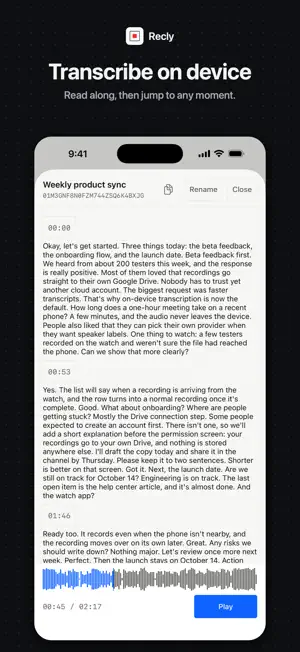
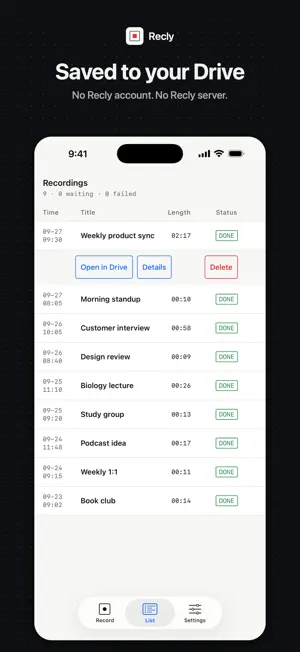
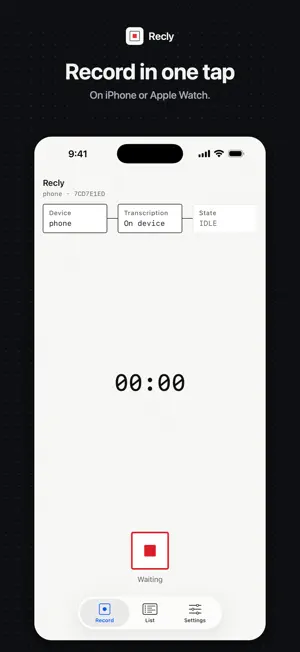
Record voice notes, interviews, lectures and meetings with Recly. Record, save and play audio on your iPhone without signing in. Connect your own Google Drive when you want to upload recordings. RECORD AND PLAY BACK Record on iPhone or Apple Watch, from the app, a widget or a shortcut. Add titles, read the transcript and play back from any moment. SAVE TO YOUR OWN GOOGLE DRIVE Recordings and transcripts go to a Recly folder in your own Drive, so you can open them anywhere and bring them to the AI tools you already use. There is no Recly account and no Recly server. TRANSCRIBE YOUR WAY Transcribe on device on supported iPhone models, or use a supported speech-to-text provider with your own API key. Recly asks for your permission before sending recordings to a provider, and you can withdraw it in Settings. CONTROL YOUR CONNECTIONS Google authorization is used only to access the files Recly creates in your Drive. Transcription in this version requires a Google Drive connection, because each recording is uploaded before it is transcribed. You can disconnect Drive in Settings and keep your recordings and settings. Available in 12 languages. Transcription provider availability varies by region. Third-party accounts may be required, and provider charges may apply.
What’s new
Version 0.1.3 · Updated October 3, 2026
You can now keep your recordings in iCloud instead of Google Drive. - In Settings → Storage, choose Google Drive (still the default) or iCloud. With iCloud, recordings go to the Recly folder in your own iCloud Drive, and there is nothing to sign in to. - If iCloud Drive or Recly is turned off in your iCloud settings, Settings shows "iCloud not connected" and where to turn it on. - Recordings in iCloud also appear in Recly on your other iPhone or Mac signed in to the same Apple ID. - Apple Watch recordings go wherever your iPhone stores them. Recordings already uploaded stay where they are.
App privacy
The developer, Hyungrok Kim, reported these privacy practices to Apple.
Data Linked to You
The following data, which may be collected and linked to your identity, may be used for the following purposes:
- User Content: Audio Data, Other User Content
Used for: App Functionality
Alternatives to Recly: Record for Your AI
Looking for apps like Recly: Record for Your AI? Here are 6 similar apps on the App Store.
-
 Tenoa: Your Visual Library
-
 TokTokTok Presentation Remote
-
 ChiroNote
-
 Toki: Live Translator
-
 Prayon
-
 Meeting Transcriber: AI Notes
| App | Rating | Price | Last updated | Compare |
|---|---|---|---|---|
| Recly: Record for Your AI | – | Free | October 3, 2026 | |
| Tenoa: Your Visual Library | – | Free | Oct 4, 2026 | Compare |
| TokTokTok Presentation Remote | – | Free | Sep 11, 2026 | Compare |
| ChiroNote | – | Free | Aug 25, 2026 | Compare |
| Toki: Live Translator | – | Free | Sep 28, 2026 | Compare |
| Prayon | – | Free | Aug 7, 2026 | Compare |
| Meeting Transcriber: AI Notes | – | Free | Oct 7, 2026 | Compare |