

MindPass: App Blocker
Zyur Productivity iPhoneiPadiPod touch
MindPass: App Blocker is a free Productivity app for iPhone and iPad by Zyur. Rated 5.0/5 from 7 ratings. Requires iOS 18.0. Updated October 15, 2026.
- Rating
- 5.0
- 7 ratings
- Price
- Free
- on the App Store
- Size
- 19 MB
- Age 4+
- Updated
- Oct 15
- 2026 · v1.5.3
Screenshots


About MindPass: App Blocker
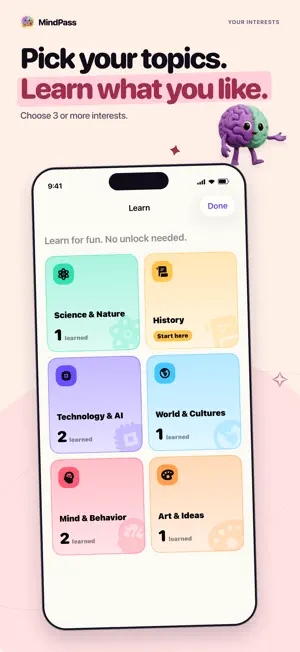
Learn something before you scroll. MindPass blocks the apps you choose. To use one, read a short fact and answer one quick question. Then the app unlocks for 5 minutes. TRY IT FIRST Start with a quick sample. Then pick your apps, your interests, and when to block: all day or on a schedule. 30 SHORT FACTS, WORKS OFFLINE Lava lamps help protect internet traffic. Tattoos last longer than the skin you shed. An angry customer’s complaint was kept on a clay tablet for nearly 4,000 years. MindPass comes with 30 facts on ten subjects, and they work offline. Some facts are just for reading. Others have one question about the idea, not about names and dates. Optional quizzes bring back some facts later. You can skip them. HOW UNLOCKING WORKS When you open a blocked app, you see the MindPass block screen. On iOS 26.5 or later, tap “Answer a question” to go to MindPass. On earlier versions, close the app and open MindPass from your Home Screen. Answer correctly to earn an unlock. Use it within 15 minutes, keep reading, or choose not to open the app at all. Your 5 minutes start when you use the unlock, not when you earn it. The time keeps running even if you leave the app. When time is up, the app is blocked again while your blocking schedule is on and Screen Time access stays turned on. STRICT MODE (OPTIONAL) Strict mode makes you wait 24 hours before you can turn it off or loosen your settings. You can make blocking stricter right away. Strict mode is off by default. Screen Time access can still be turned off in Settings. FREE AND PRO App blocking, schedules, strict mode, standard facts and unlocks are free. Optional MindPass Pro subscriptions add up to 10 personalized topics per UTC calendar month, with six facts per topic. Trial and paid access share the monthly topic allowance, with no rollover. Created topics remain readable after Pro ends. Prices and renewal terms are shown before purchase. Manage or cancel subscriptions in your Apple Account settings. GOOD TO KNOW Screen Time permission is required for app blocking. The interface and learning content are currently in English. Online learning features, including creating personalized topics, require an internet connection. Try your first fact.
Ratings & reviews
5.0
7 ratings
What’s new
Version 1.5.3 · Updated October 15, 2026
Discover your next topic with a compact mix of popular picks and fresh ideas. See five suggestions at a time, with more when you want them. Completed topics now have a clear finish, and it’s easier to return Home after creating a topic.
App privacy
The developer, Zyur, reported these privacy practices to Apple.
Data Not Collected
The developer does not collect any data from this app.
Alternatives to MindPass: App Blocker
Looking for apps like MindPass: App Blocker? Here are 6 similar apps on the App Store. The highest rated is ServiceArchive (5.0/5), and 4 of the 6 are free to download.
-
 ClassLog: Attendance Tracker
-
 ServiceArchive
5.0
ServiceArchive
5.0
-
 DoTask: Plan & Focus & Review
-
 AtelierRecords for Collectors
-
 NoteQuick: Notas y Dictado IA
-
 HabitMkr: Habit Tracker
| App | Rating | Price | Last updated | Compare |
|---|---|---|---|---|
| MindPass: App Blocker | 5.0 / 5 (7 ratings) | Free | October 15, 2026 | |
| ClassLog: Attendance Tracker | – | 1.99 USD | Sep 22, 2026 | Compare |
| ServiceArchive | 5.0 / 5 (1) | Free | Oct 7, 2026 | Compare |
| DoTask: Plan & Focus & Review | – | Free | Oct 15, 2026 | Compare |
| AtelierRecords for Collectors | – | Free | Oct 14, 2026 | Compare |
| NoteQuick: Notas y Dictado IA | – | Free | Oct 20, 2026 | Compare |
| HabitMkr: Habit Tracker | – | 0.99 USD | Oct 21, 2026 | Compare |