

DoTask: Plan & Focus & Review
承金 洪 Productivity iPhoneiPadiPod touch
DoTask: Plan & Focus & Review is a free Productivity app for iPhone and iPad by 承金 洪. Requires iOS 18.0. Updated September 7, 2026.
- Price
- Free
- on the App Store
- Size
- 80 MB
- Age 4+
- Updated
- Sep 7
- 2026 · v1.1.0
Screenshots
About DoTask: Plan & Focus & Review
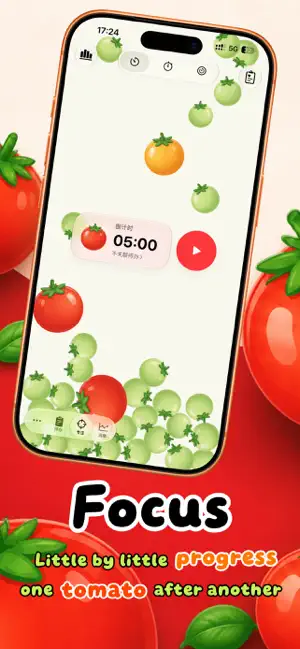
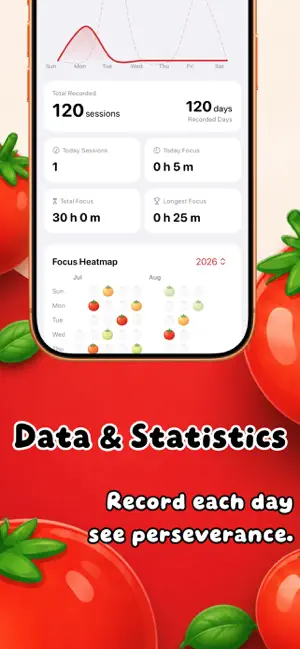
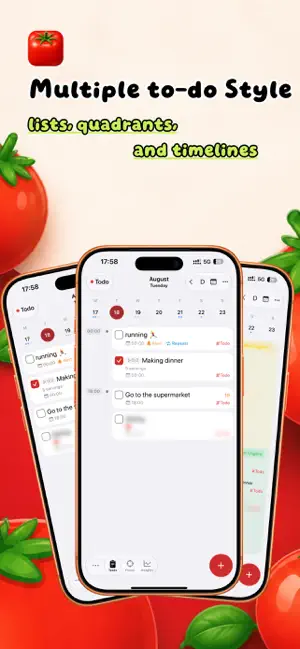
Turn Apple Reminders into a complete productivity system. DoTaskreads and writes your native reminders — iCloud-synced, created by Siri, ready to use — and adds focus timers, widgets, insights, and daily reviews. YOUR DAY, ALL IN ONE PLACE • See today's reminders, overdue tasks, and calendar events in a single view • Switch between list, timeline, and Eisenhower matrix (four quadrants) views • Overdue reminders grouped together, so nothing slips through the cracks FOCUS ON WHAT MATTERS • Countdown, stopwatch, and Pomodoro modes, linked to a specific task • Live Activity and Dynamic Island keep your session progress in view • Add a quick note after each session to capture how it went SEE YOUR PROGRESS CLEARLY • Insights with heatmaps, trend charts, and distribution graphs for completions and focus time • Daily, weekly, monthly, and yearly reviews, with a mood calendar to track how you feel • Turn busy days into growth you can actually see BUILT FOR APPLE'S ECOSYSTEM • 10 home screen widgets: today's tasks, focus stats, mood heatmap, and more • 8 Siri shortcuts: create and complete reminders, start and end focus sessions — hands-free • Reads and writes native Reminders data. No import or export needed • Mark reminders as private to keep them off widgets and Siri 「Subscription Cancellation Instructions」 1. The subscription is an auto-renewing service. After purchase confirmation, the fee will be charged to the user’s iTunes account. 2. Within 24 hours before the membership period ends, the system will automatically charge the account and extend the membership service by 1 month. 3. To cancel the subscription, please manually turn off auto-renewal at least 24 hours before the current subscription period ends. 4. Cancellation path: Open iPhone「Settings」> go to「iTunes Store & App Store」> tap「Apple ID」> select「View Apple ID」> tap「Subscriptions」under「Account Settings」> find and cancel “Recurring Subscription”. 「Privacy Policy & Terms of Service」 * Privacy Policy: https://logspot.hocgin.top/RemindersPlus/?active=privacy-policy * Terms of Service: https://logspot.hocgin.top/RemindersPlus/?active=terms-of-service
What’s new
Version 1.1.0 · Updated September 7, 2026
This update brings new Home Screen widgets and several experience improvements. * New widgets for tasks, focus, and weekly overview * Focus Live Activities now sync paused time * Pomodoro supports auto-starting the next session * Tasks can now be unscheduled with one tap * New app icons, illustrations, and interaction refinements
App privacy
The developer, 承金 洪, reported these privacy practices to Apple.
Data Not Linked to You
The following data, which may be collected but is not linked to your identity, may be used for the following purposes:
- Diagnostics: Crash Data
Used for: Analytics, App Functionality
Alternatives to DoTask: Plan & Focus & Review
Looking for apps like DoTask: Plan & Focus & Review? Here are 6 similar apps on the App Store. The highest rated is Quick Reminder 3: Tasks & ToDo (5.0/5), and 5 of the 6 are free to download.
-
 Quick Reminder 3: Tasks & ToDo
5.0
Quick Reminder 3: Tasks & ToDo
5.0
-
 LightLife-ai timeline, todo
-
 Again_最纯净的稍后阅读器
3.4
Again_最纯净的稍后阅读器
3.4
-
 Moki AI日历,AI日程,AI规划, AI时间管理助手
-
 Task & Habit Tracker
5.0
Task & Habit Tracker
5.0
-
 Planist - Planner & Check List
5.0
Planist - Planner & Check List
5.0
| App | Rating | Price | Last updated | Compare |
|---|---|---|---|---|
| DoTask: Plan & Focus & Review | – | Free | September 7, 2026 | |
| Quick Reminder 3: Tasks & ToDo | 5.0 / 5 (1) | Free | Mar 25, 2026 | Compare |
| LightLife-ai timeline, todo | – | Free | Sep 13, 2025 | Compare |
| Again_最纯净的稍后阅读器 | 3.4 / 5 (5) | Free | Sep 4, 2026 | Compare |
| Moki AI日历,AI日程,AI规划, AI时间管理助手 | – | Free | Sep 18, 2026 | Compare |
| Task & Habit Tracker | 5.0 / 5 (6) | 0.99 USD | Apr 11, 2026 | Compare |
| Planist - Planner & Check List | 5.0 / 5 (2) | Free | Jun 9, 2026 | Compare |