

View3D Pro
昂 熊 Graphics & Design iPhoneiPadiPod touch
View3D Pro is a paid Graphics & Design app for iPhone and iPad by 昂 熊. Requires iOS 16.4. Updated September 13, 2026.
- Price
- 0.99 USD
- on the App Store
- Size
- 41 MB
- Age 4+
- Updated
- Sep 13
- 2026 · v1.0.0
Screenshots


About View3D Pro
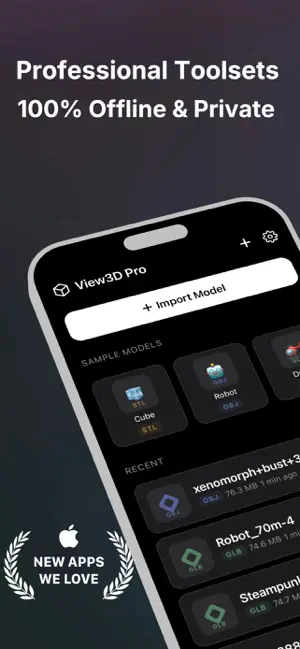
View3D Pro — Open, Inspect, and Share 3D Models — Fully Offline, Private & Blazing Fast View3D Pro is a professional-grade 3D model viewer built for creators, engineers, students, and makers. Open STL, OBJ, GLB, and GLTF files instantly — no cloud, no account, no compromise. [100% Offline & Private] • Works entirely on your device — zero internet connection required. • Your models never leave your device. No servers, no telemetry, no tracking. • No account sign-up. Just open, view, and go. • All files are stored securely in the app's sandbox and are completely erased when you uninstall the app. [Fast & Smooth Rendering] • Optimized native engine opens files in seconds, even large models. • High-fidelity rendering with accurate lighting, materials, and textures. • Smooth 3D rotation, zoom, and pan — respond instantly to a single finger. • Your data stays local, so performance stays fast whether you're online or on a plane. [Professional Toolsets] • Precision one-tap 3D inspect: rotate, orbit, zoom, and pan with intuitive gestures. • Clear wireframe & solid view modes for engineering review and 3D printing checks. • Open models directly from Files, AirDrop, Mail, Safari, or any sharing app. • Keeps your recently opened models one tap away for quick reload. • A curated library of sample models to test every feature right away. [Universal 3D Format Support] • STL, OBJ, GLB, and GLTF — the standard file types for 3D printing, CAD, game, and AR workflows. • Smart format detection reads the actual file content, so mislabeled files still open correctly. • Dark mode and light mode that follow your system appearance. • Multi-language support for a global audience. [Why View3D Pro?] • Private by design: your files stay yours. Perfect for confidential or pre-release designs. • Always available: no network, no subscription, no waiting — your viewer is always on. • Professional quality: built with the same rendering technology trusted by engineers and designers. • Respects your device: lightweight, no account, no background data usage. Whether you're reviewing a CAD export, checking a print-ready STL, presenting a GLB concept, or sharing a model with a teammate, View3D Pro gives you a fast, secure, and professional 3D viewing experience — entirely offline. Download now and bring professional 3D viewing to your pocket. View3D Pro requires no permissions beyond opening files you choose. Your data never leaves your device.
App privacy
The developer, 昂 熊, reported these privacy practices to Apple.
Data Not Collected
The developer does not collect any data from this app.
Alternatives to View3D Pro
Looking for apps like View3D Pro? Here are 6 similar apps on the App Store. The highest rated is Open3D: STL & 3D Model Viewer (4.8/5), and all 6 are free to download.
-
 GLB & GLTF Viewer - 3D Files
-
 STL Viewer - 3D Mesh
-
 Viewport 3D
4.0
Viewport 3D
4.0
-
 Open3D: STL & 3D Model Viewer
4.8
Open3D: STL & 3D Model Viewer
4.8
-
 ModelPlay-3D Model Viewer
3.0
ModelPlay-3D Model Viewer
3.0
-
 JigSpace
4.8
JigSpace
4.8
| App | Rating | Price | Last updated | Compare |
|---|---|---|---|---|
| View3D Pro | – | 0.99 USD | September 13, 2026 | |
| GLB & GLTF Viewer - 3D Files | – | Free | Aug 13, 2026 | Compare |
| STL Viewer - 3D Mesh | – | Free | Sep 28, 2026 | Compare |
| Viewport 3D | 4.0 / 5 (2) | Free | Jul 17, 2026 | Compare |
| Open3D: STL & 3D Model Viewer | 4.8 / 5 (22) | Free | Oct 15, 2026 | Compare |
| ModelPlay-3D Model Viewer | 3.0 / 5 (8) | Free | Oct 2, 2026 | Compare |
| JigSpace | 4.8 / 5 (8,454) | Free | Oct 7, 2026 | Compare |
Compare View3D Pro with the top alternatives: ratings, updates, ASO score and keyword gaps →