

ModelPlay-3D Model Viewer
俊卿 吴 Graphics & Design iPhoneiPadiPod touchMac
ModelPlay-3D Model Viewer is a free Graphics & Design app for iPhone and iPad by 俊卿 吴. Rated 3.0/5 from 8 ratings. Requires iOS 15.0.
- Rating
- 3.0
- 8 ratings
- Price
- Free
- on the App Store
- Size
- 255 MB
- Age 17+
- Updated
- Oct 2
- 2026 · v1.3.7
Screenshots


About ModelPlay-3D Model Viewer
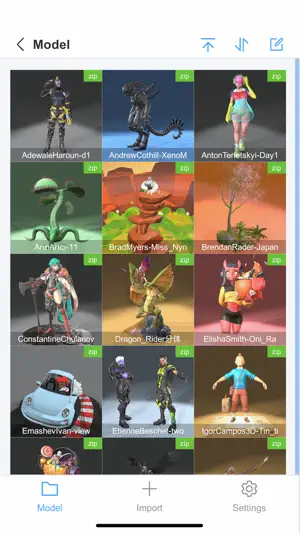
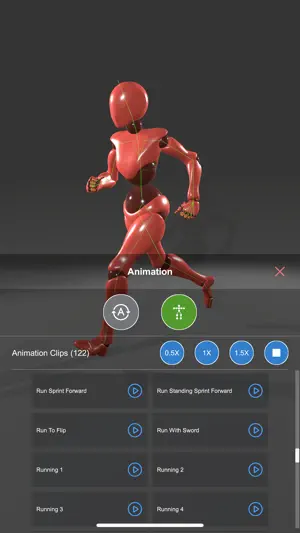
ModelPlay supports 3D model classification and viewing, 3D model import and export, and users can personalize each 3D model and save the settings. When using ModelPlay, users don't need to have professional 3D knowledge, just through simple operation, you can get very stunning 3D effects. -3D Model Import and Export Supports import and export of many common 3D format files such as GLB, FBX, OBJ, STL, PLY, 3MF, and so on. -3D Model Categorization Categorize 3D models through folders, support both list and grid display, sorting and editing, and setting image size. -3D Model Lighting Settings Support to set the lighting of the scene where the 3D model is located: support preset lighting combination settings, light color, light intensity, light shadow settings, ambient light color settings, and halo intensity settings. You can create colorful lighting effects through multiple combination settings. 3D Model Background Settings Supports setting the background of the scene where the 3D model is located: supports solid color background and sky box background. You can set “whether to show the ground” to get different scene atmosphere effects. 3D Model Material Settings Support to set the material of 3D model: support default texture material, line material, metal material, transparent material and other material switching. Support to view the original material and texture. -3D Model Animation Settings Support 3D model skeleton display, support animation play and pause, support auto rotate, support dynamic skeleton, support multiple animation clips switch play. -3D Model Position Setting Support 3D model position offset and rotation setting. Support camera view angle setting, you can set different optimal display view angles for different 3D models. -3D Model Mesh Settings Count the number of sub-mesh and mesh vertices of the 3D model, support whether the sub-mesh is visible or not setting, support component separation, and support putting the sub-mesh as the center. -3D Model Cover Settings The 3D model cover will be automatically generated when the 3D model is opened for the first time, support to modify the cover. Note: Updates and Feedback ModelPlay will make continuous updates to provide more 3D setting effects in the subsequent releases. Feel free to provide suggestions to ModelPlay via comments!
Ratings & reviews
3.0
8 ratings
What’s new
Version 1.3.7 · Updated October 2, 2026
Fixed known issues.
App privacy
The developer, 俊卿 吴, reported these privacy practices to Apple.
Data Not Collected
The developer does not collect any data from this app.
Alternatives to ModelPlay-3D Model Viewer
Looking for apps like ModelPlay-3D Model Viewer? Here are 6 similar apps on the App Store. The highest rated is 3dMaster (5.0/5), and all 6 are free to download.
-
 Khronos glTF Viewer
3.2
Khronos glTF Viewer
3.2
-
 3dMaster
5.0
3dMaster
5.0
-
 3D Model Maker: ImgTo3D
4.3
3D Model Maker: ImgTo3D
4.3
-
 Pro Poser 3D Model Poses
4.3
Pro Poser 3D Model Poses
4.3
-
 Naomi Animation
3.2
Naomi Animation
3.2
-
 Reality OBJ: USDZ Converter
4.2
Reality OBJ: USDZ Converter
4.2
| App | Rating | Price | Last updated | Compare |
|---|---|---|---|---|
| ModelPlay-3D Model Viewer | 3.0 / 5 (8 ratings) | Free | October 2, 2026 | |
| Khronos glTF Viewer | 3.2 / 5 (6) | Free | Dec 6, 2023 | Compare |
| 3dMaster | 5.0 / 5 (1) | Free | Mar 26, 2025 | Compare |
| 3D Model Maker: ImgTo3D | 4.3 / 5 (322) | Free | Sep 27, 2026 | Compare |
| Pro Poser 3D Model Poses | 4.3 / 5 (315) | Free | Aug 17, 2024 | Compare |
| Naomi Animation | 3.2 / 5 (235) | Free | Sep 7, 2026 | Compare |
| Reality OBJ: USDZ Converter | 4.2 / 5 (5) | Free | Oct 21, 2026 | Compare |