

MindShift: AI Mind Map
腾 骆 Productivity iPhoneiPadiPod touchMac
MindShift: AI Mind Map is a free Productivity app for iPhone and iPad by 腾 骆. Requires iOS 17.0. Updated November 17, 2026.
- Price
- Free
- on the App Store
- Size
- 3 MB
- Age 4+
- Updated
- Nov 17
- 2026 · v2.2.1
Screenshots
Save to Pinterest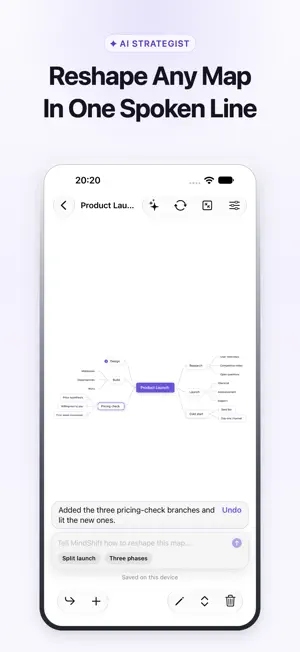


About MindShift: AI Mind Map
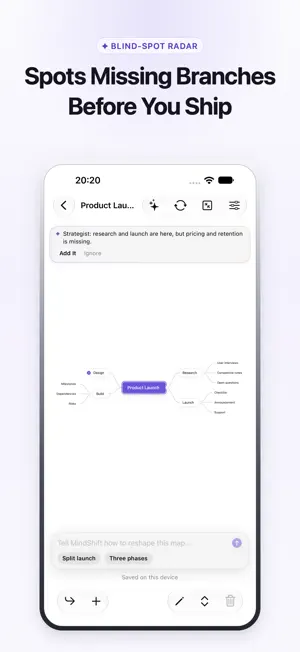
MindShift is a mind map with a strategist on the whiteboard. Say one line in the bar and it rewrites the whole tree. Branches grow, redundant ones drop, and the new nodes land with a glow. One undo puts the map back. It also looks for what you skipped. A note in the corner names the blind spot and can add that branch for you. Start from a mess. Paste rough notes and get a map, then switch the same idea across three views: an action roadmap, a devil's advocate pass, and a MECE split. Take the work with you. Copy the map as Markdown, paste an outline back in, or export a sharp image. Maps stay on this device and in your private cloud. No account. No ads. Optional Cloud AI is off until you turn it on in Settings. Only then is the text of that one action sent, through a stateless relay, to the DeepSeek API. It is not stored and it is not linked to you. Leave it off and the strategist still works on device, including the blind-spot note. Editing stays direct. Tab adds a child, Return adds a sibling, arrows move, and a drag re-parents a branch. Mind map or logic chart. Classic or compact. One app for iPhone, unfolded iPhone Duo, iPad, and Mac.
What’s new
Version 2.2.1 · Updated November 17, 2026
- Say one line in the strategist bar to reshape the whole tree. New nodes glow. One undo steps back. - A blind-spot note in the corner names a missing branch. Add it in one tap, or leave it. - Turn messy notes into a map. Switch among Action Roadmap, Devil's Advocate, and MECE. - Unfolded iPhone Duo shows the list and the map side by side. Folding and unfolding keeps the draft and undo. - Tap empty canvas to dismiss the keyboard. Editing a node keeps the card above the keyboard. - Closing the main window on Mac saves and quits. Compact windows keep the map usable. - Copy as Markdown, paste Markdown back, and export a sharp image. - Optional Cloud AI stays off until you enable it. Maps sync privately across your devices. No account and no ads.
App privacy
The developer, 腾 骆, reported these privacy practices to Apple.
Data Not Collected
The developer does not collect any data from this app.
Alternatives to MindShift: AI Mind Map
Looking for apps like MindShift: AI Mind Map? Here are 6 similar apps on the App Store.
-
 PureCodex: Notes by Life Area
-
 Routines – AI Meeting Notes
-
 ExpandNote
-
 WatchNotes — Wrist Checklists
-
 NodeSketch: Draw and Mind Map
-
 Drypoint - Markdown Notes
| App | Rating | Price | Last updated | Compare |
|---|---|---|---|---|
| MindShift: AI Mind Map | – | Free | November 17, 2026 | |
| PureCodex: Notes by Life Area | – | Free | Nov 15, 2026 | Compare |
| Routines – AI Meeting Notes | – | Free | Oct 21, 2026 | Compare |
| ExpandNote | – | Free | Sep 8, 2026 | Compare |
| WatchNotes — Wrist Checklists | – | Free | Jul 21, 2026 | Compare |
| NodeSketch: Draw and Mind Map | – | Free | Nov 6, 2026 | Compare |
| Drypoint - Markdown Notes | – | Free | Oct 17, 2026 | Compare |