
Drypoint - Markdown Notes
Vanhux UG Productivity iPhoneiPadiPod touchMacApple Watch
Drypoint - Markdown Notes is a free Productivity app for iPhone and iPad by Vanhux UG. Requires iOS 18.0. Updated October 17, 2026.
- Price
- Free
- on the App Store
- Size
- 29 MB
- Age 4+
- Updated
- Oct 17
- 2026 · v1.14.1
Screenshots

About Drypoint - Markdown Notes
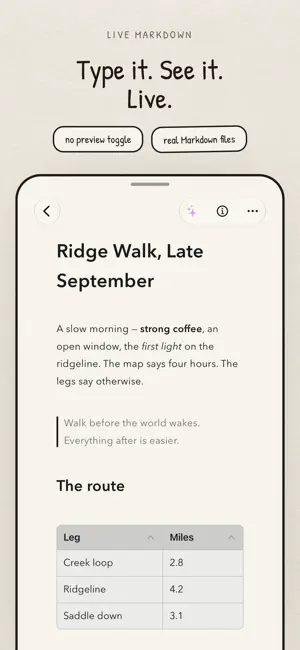
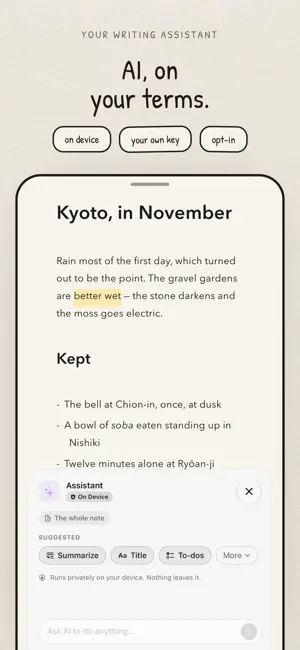
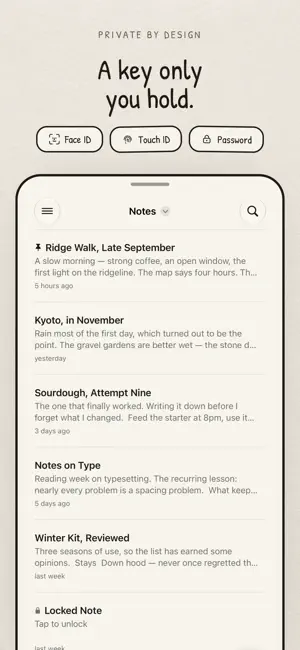
Drypoint is a calm, beautiful Markdown editor for people who love to write. What you type is what you see — headings, bold, links, and lists style themselves live as you go, with no edit-and-preview toggle to break your flow. Your words stay yours. Every note is plain Markdown text on disk — never a locked-in proprietary format — so you can read, back up, or move your writing anywhere, for as long as you like. WRITE IN TRUE LIVE PREVIEW • One distraction-free surface — Markdown styles itself as you type • Full Markdown: headings, bold, italic, links, quotes, code, tables, task lists • Opens even huge notes instantly and stays smooth however much you write • Beautiful themes and refined typography, tuned for long writing sessions EVERYWHERE YOU WRITE • Native apps for iPhone, iPad, and Mac — designed for each, not ported • Optional iCloud sync keeps every note in step across your devices • Home Screen and Lock Screen widgets, a Mac menu bar app, and an Apple Watch companion • Siri, Shortcuts, and Spotlight — capture and find notes hands-free PRIVATE BY DESIGN • Local-first: works fully offline, and your notes stay on your device until you choose to sync • Lock any note with a password — the text and its attachments are protected with strong AES-GCM encryption that only your password can open • The same password unlocks a note on every device; use Face ID or Touch ID for instant access • No account, no ads, no tracking, no analytics — ever AI ON YOUR TERMS • On-device intelligence that runs privately, right on your iPhone, iPad, or Mac • Or connect your own AI provider • AI is always opt-in, and your text only ever goes where you choose to send it ORGANIZE WITHOUT FUSS • Folders, tags, and fast full-text search surface anything in a keystroke • Attach images and files right alongside your words • Export to 10 formats — PDF, HTML, Word, Rich Text, and more — in a tap DRYPOINT PRO Unlock the full experience: iCloud sync, AI, per-note encryption, every export format, and more. Start free, then choose monthly for full flexibility or yearly for the best value. Subscription Details Drypoint Pro is an auto-renewable subscription, offered as a monthly or yearly plan. Prices are shown in the app and vary by region. Payment will be charged to your Apple Account at purchase confirmation. Your subscription automatically renews unless auto-renew is turned off at least 24 hours before the end of the current subscription period. Your account will be charged for renewal within 24 hours prior to the end of the current period. You can turn off auto-renewal at any time in your Account Settings on the App Store after purchase. Terms of Use (EULA): https://drypoint.app/terms.html Privacy Policy: https://drypoint.app/privacy.html
What’s new
Version 1.14.1 · Updated October 17, 2026
Bug fixes and general improvements.
App privacy
The developer, Vanhux UG, reported these privacy practices to Apple.
Data Not Collected
The developer does not collect any data from this app.
Alternatives to Drypoint - Markdown Notes
Looking for apps like Drypoint - Markdown Notes? Here are 6 similar apps on the App Store. The highest rated is Dawn - Markdown (5.0/5), and all 6 are free to download.
-
 MarkWrite
-
 DaySince - Everyday Reminders
-
 Daily Markdown
-
 Oflate: Daily Tracker, Journal
-
 Habit Tracker, Goal Planner
-
 Dawn - Markdown
5.0
Dawn - Markdown
5.0
| App | Rating | Price | Last updated | Compare |
|---|---|---|---|---|
| Drypoint - Markdown Notes | – | Free | October 17, 2026 | |
| MarkWrite | – | Free | Sep 19, 2026 | Compare |
| DaySince - Everyday Reminders | – | Free | Oct 15, 2026 | Compare |
| Daily Markdown | – | Free | May 7, 2026 | Compare |
| Oflate: Daily Tracker, Journal | – | Free | Sep 13, 2026 | Compare |
| Habit Tracker, Goal Planner | – | Free | Feb 26, 2025 | Compare |
| Dawn - Markdown | 5.0 / 5 (2) | Free | Oct 21, 2026 | Compare |