

PureCodex: Notes by Life Area
Yechiel Ben David Productivity iPhoneiPadiPod touchMac
PureCodex: Notes by Life Area is a free Productivity app for iPhone and iPad by Yechiel Ben David. Requires iOS 15.0. Updated November 15, 2026.
- Price
- Free
- on the App Store
- Size
- 9 MB
- Age 4+
- Updated
- Nov 15
- 2026 · v1.3.0
Screenshots
Save to Pinterest


About PureCodex: Notes by Life Area
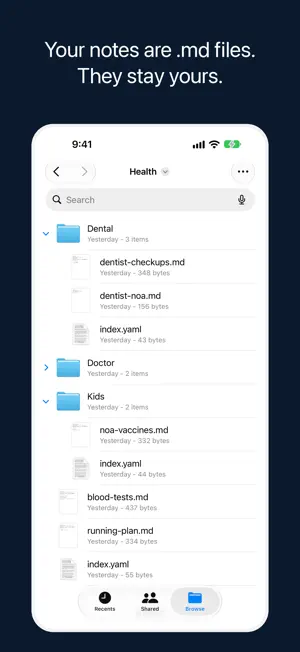
Notes work like memory. A short note goes into a capture stream first, the way short-term memory holds what just happened. Later you file it into a life area, such as home, work, health or study. There it becomes long-term knowledge. One note can belong to several areas, and it shows up in each of them. Every note is a plain Markdown file in a folder you choose. You write first and decide where it goes later. The answer can be more than one place. Documents work the same way: scan a page with the camera, and it goes into a Documents area and into the area you scanned it from. WRITE NOW, FILE LATER • A capture bar at the bottom of the screen takes a note in one line. • Mark each note To do, To know or To library. The stream has search, filters and pinning. • Move to hub turns a note into a wiki item inside an area. • Scan, take a photo or attach a file straight into a quick note. • A Home Screen and Lock Screen widget opens the bar with the keyboard up. YOUR NOTES ARE .MD FILES, AND THEY'RE YOURS • Every note is a plain Markdown (.md) file in a folder you pick, on the device or in iCloud Drive. • Open, edit or back them up with any editor. They stay readable without PureCodex. • No account, no server, no analytics. The app goes online only to fetch the title and image of a link you save, and you can turn that off. • Locked areas are the exception: their files are encrypted, and only PureCodex opens them. • Free, with no in-app purchases. LIFE AREAS INSTEAD OF FOLDERS • Each area holds its own items and sub-areas, up to three levels. • An item has one home area and can be added to others. It is listed in every area it belongs to. • It stays one Markdown file. The areas are written in the file itself. SCAN DOCUMENTS • Scan a page with the camera and it is found and straightened, or attach a PDF or photo. • Each document is an item in a Documents area, and it also shows in the area you scanned it from. • Text in English documents is recognized, kept in the item and searchable. A date and an amount are suggested from it. • Add pages to a document later, or open it in another app. SAVE LINKS • Paste an address and it is saved as a note with the page's title, a short summary and its image, shown as a card. • Share from Safari or any app to send a link straight to the Links hub. • Type in the top line to filter the cards. Images are kept on the device, so cards show them offline. LOCKED AREAS • Encrypt an area with a password, on the device: XChaCha20-Poly1305, with the key derived by Argon2id. • Unlock with Face ID. A one-time recovery code is shown when you create it. • Locks again after an idle time you choose, or when the app goes to the background. • Move existing notes in, and they are encrypted, with the photos and PDFs they attach. READY FOR AI AGENTS (OKF) OKF is an open format for knowledge: a folder of Markdown files that people and AI agents can both read. Each item says what kind of claim it is — a fact, a how-to, a decision, a passing note — so an agent knows how far to trust it. • Open your library in an AI agent of your choice. It can answer from your notes and point to the item each answer came from. • A contract file in the folder tells the agent what it may write: summaries as separate items that list their sources, never edits to what you wrote. • Every folder gets a table of contents, and links update when an item moves. • The app has no AI built in. Sensitive notes belong in a locked area, which an agent sees only as encrypted data. HEBREW AND ENGLISH ON THE SAME PAGE Every line takes its direction from its own first letter, so mixed Hebrew and English notes read correctly. The interface is in English and Hebrew. ALSO • Live-preview editor: tables, math (KaTeX), Mermaid diagrams, callouts, footnotes, task lists. • Links, backlinks, and embedding one note inside another. • Search the whole text of every item, from the top of the home screen.
What’s new
Version 1.3.0 · Updated November 15, 2026
• New: a Links hub. Paste an address and the link is saved as a note with the page's title, a short summary and its image, shown as a card. Typing in the top line filters the cards. • Share from Safari or any app to send a link straight to your Links hub. • A quick note that holds only a link moves to Links with one tap. • To get the title and image, the app contacts only the page you saved, and keeps the image on your device. You can turn this off in Settings. • Dictation is now a round button centered under the quick-note field, red while it records.
App privacy
The developer, Yechiel Ben David, reported these privacy practices to Apple.
Data Not Collected
The developer does not collect any data from this app.
Alternatives to PureCodex: Notes by Life Area
Looking for apps like PureCodex: Notes by Life Area? Here are 6 similar apps on the App Store. The highest rated is Jot - Notes (5.0/5), and all 6 are free to download.
-
 Simple.Notes
-
 BarPad Mobile
-
 Drypoint - Markdown Notes
-
 Jot - Notes
5.0
-
 Levity Markdown Notes
-
 Diple - Markdown Notes
5.0
| App | Rating | Price | Last updated | Compare |
|---|---|---|---|---|
| PureCodex: Notes by Life Area | – | Free | November 15, 2026 | |
| Simple.Notes | – | Free | Nov 8, 2026 | Compare |
| BarPad Mobile | – | Free | May 23, 2026 | Compare |
| Drypoint - Markdown Notes | – | Free | Oct 17, 2026 | Compare |
| Jot - Notes | 5.0 / 5 (1) | Free | Jul 14, 2026 | Compare |
| Levity Markdown Notes | – | Free | Aug 18, 2026 | Compare |
| Diple - Markdown Notes | 5.0 / 5 (1) | Free | Nov 1, 2026 | Compare |