

Diple - Markdown Notes
云强 林 Productivity iPhoneiPadiPod touch
Diple - Markdown Notes is a free Productivity app for iPhone and iPad by 云强 林. Rated 5.0/5 from 1 ratings. Requires iOS 17.0. Updated September 24, 2026.
- Rating
- 5.0
- 1 ratings
- Price
- Free
- on the App Store
- Size
- 22 MB
- Age 4+
- Updated
- Sep 24
- 2026 · v3.0.1
Screenshots
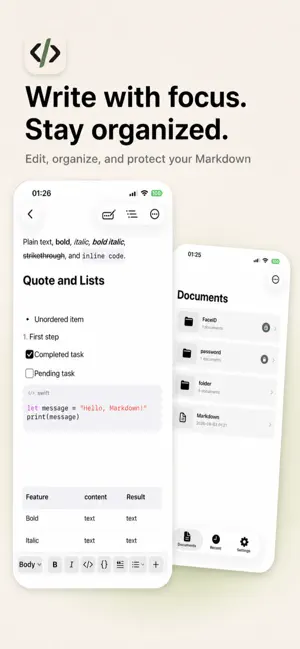
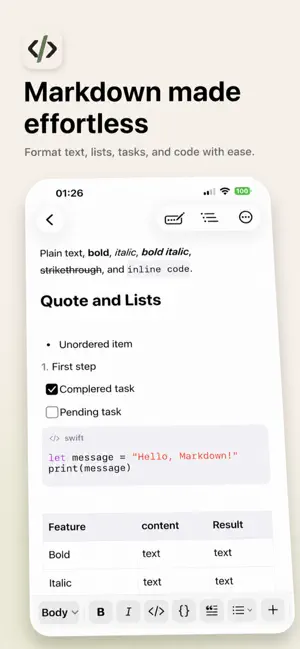

About Diple - Markdown Notes
Diple is a focused writing and document organization tool for Markdown notes, plain text jottings, journals, reports, and drafts. Capture ideas with Speech to Text, revisit edits with Version History, and export documents to Word or PDF to share or keep writing. Designed for Writing • Switch between Source, Focus, and Live modes — Markdown users can type raw syntax directly, while everyone else gets a WYSIWYG experience just like a regular document app • Use headings, bold, italics, inline code, quotes, lists, and to-do lists • Insert links, dividers, tables, image references, and language-tagged code blocks • Undo, redo, document outline, and code syntax highlighting are all supported Plain Text, Too • Create .txt documents and write in a lightweight editor with no syntax markers and no formatting tools • Renaming, find and replace, and sharing are all still there Speak Your Ideas • Use Speech to Text to write directly in Markdown or plain text documents • Choose a recognition language, and pause or resume whenever you need Revisit Your Edits • View before-and-after changes in Version History and choose the content to restore • Lock important versions to prevent automatic cleanup Organize Your Library • Create folders and nested folders • Jump back into what you're working on via Recents • Add notes, sort, move, rename, or batch-manage items • Deleted items go to Trash first and are kept for one month Take Control of Files and Display • Export documents or folders as Markdown, TXT, Word, or PDF — easy to share, print, or continue editing in other software • Customize font, font size, default editing mode, and save behavior • Follow system appearance, or choose Light or Dark theme • Available in 28 languages Extra Access Protection If needed, you can add in-app access verification to specific folders using a password, Face ID, or Touch ID. Face ID / Touch ID verification is handled entirely by the system — the app itself never accesses or stores your facial or fingerprint data. This feature does not modify or encrypt the files themselves. Your words, clear, focused, and in your control. Your subscription includes a free trial, which begins once your purchase is confirmed by your Apple ID account. After the trial ends, your subscription will automatically start and renew at the price shown on the page. Unless you disable auto-renewal or cancel the subscription in your account settings at least 24 hours before the end of the current period, it will automatically renew, and the fee will be charged to your Apple ID account within 24 hours before the current subscription expires. Terms of Use: https://michaelsilvester.github.io/journal/diple-terms-of-use/?lang=en Privacy Policy: https://michaelsilvester.github.io/journal/diple-privacy-policy/?lang=en
What’s new
Version 3.0.1 · Updated September 24, 2026
• Bug fixes
App privacy
The developer, 云强 林, reported these privacy practices to Apple.
Data Not Collected
The developer does not collect any data from this app.
Alternatives to Diple - Markdown Notes
Looking for apps like Diple - Markdown Notes? Here are 6 similar apps on the App Store. The highest rated is Boardify Task Management (5.0/5), and all 6 are free to download.
-
 HipMark - Markdown Editor
-
 Boardify Task Management
5.0
Boardify Task Management
5.0
-
 Levity Markdown Notes
-
 ScanWave Pro
-
 Noteline - Markdown Notes
-
 Klad: Git & Markdown Notes
3.5
Klad: Git & Markdown Notes
3.5
| App | Rating | Price | Last updated | Compare |
|---|---|---|---|---|
| Diple - Markdown Notes | 5.0 / 5 (1 rating) | Free | September 24, 2026 | |
| HipMark - Markdown Editor | – | Free | Jul 2, 2026 | Compare |
| Boardify Task Management | 5.0 / 5 (1) | Free | May 4, 2026 | Compare |
| Levity Markdown Notes | – | Free | Aug 18, 2026 | Compare |
| ScanWave Pro | – | Free | Aug 27, 2026 | Compare |
| Noteline - Markdown Notes | – | Free | Aug 22, 2026 | Compare |
| Klad: Git & Markdown Notes | 3.5 / 5 (2) | Free | Sep 23, 2026 | Compare |