

Markleaf - Markdown Editor
熙 冉 Productivity iPhoneiPadiPod touch
Markleaf - Markdown Editor is a free Productivity app for iPhone and iPad by 熙 冉. Requires iOS 17.0. Updated October 6, 2026.
- Price
- Free
- on the App Store
- Size
- 1 MB
- Age 4+
- Updated
- Oct 6
- 2026 · v1.0.2
Screenshots


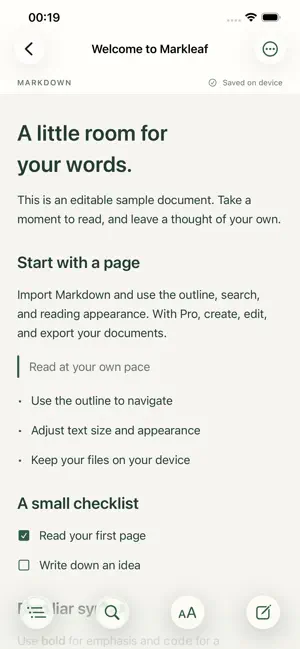
About Markleaf - Markdown Editor
Read comfortably. Write naturally. Import, reading, outline, search, and appearance are free. Your content is never deleted when purchase status changes. Start reading for free. Unlock Pro to write your own words and export them. One purchase. Lifetime access. No automatic renewal. Opening a file imports a local copy and keeps the original. Supports UTF-8 files up to 2 MB. Images, formulas, Mermaid, and editing external files in place are not supported in this version.
What’s new
Version 1.0.2 · Updated October 6, 2026
Fixed column alignment, text wrapping, and row separators in Markdown tables. Wide tables scroll horizontally within the table area. Fixed an issue that placed document text too close to the left edge when restoring your reading position.
App privacy
The developer, 熙 冉, reported these privacy practices to Apple.
Data Not Collected
The developer does not collect any data from this app.
Alternatives to Markleaf - Markdown Editor
Looking for apps like Markleaf - Markdown Editor? Here are 6 similar apps on the App Store. The highest rated is Cactus - AI memory sidekick (5.0/5), and 5 of the 6 are free to download.
-
 文阅
文阅
-
 Daylyft – Structure Planner
-
 QingMo - Markdown Editor
-
 Cactus - AI memory sidekick
5.0
Cactus - AI memory sidekick
5.0
-
 Beaver Notes
-
 StreakCycle
5.0
StreakCycle
5.0
| App | Rating | Price | Last updated | Compare |
|---|---|---|---|---|
| Markleaf - Markdown Editor | – | Free | October 6, 2026 | |
| 文阅 | – | 1.99 USD | Sep 23, 2026 | Compare |
| Daylyft – Structure Planner | – | Free | Feb 23, 2026 | Compare |
| QingMo - Markdown Editor | – | Free | Sep 2, 2026 | Compare |
| Cactus - AI memory sidekick | 5.0 / 5 (2) | Free | Jul 22, 2026 | Compare |
| Beaver Notes | – | Free | Jun 2, 2026 | Compare |
| StreakCycle | 5.0 / 5 (3) | Free | Jun 1, 2026 | Compare |