

Planwall: Lock Screen Calendar
Betul Sahin Productivity iPhoneiPadiPod touch
Planwall: Lock Screen Calendar is a free Productivity app for iPhone and iPad by Betul Sahin. Rated 1.0/5 from 2 ratings. Requires iOS 18.0.
- Rating
- 1.0
- 2 ratings
- Price
- Free
- on the App Store
- Size
- 10 MB
- Age 4+
- Updated
- Nov 10
- 2026 · v1.2.0
Screenshots
Save to Pinterest


About Planwall: Lock Screen Calendar
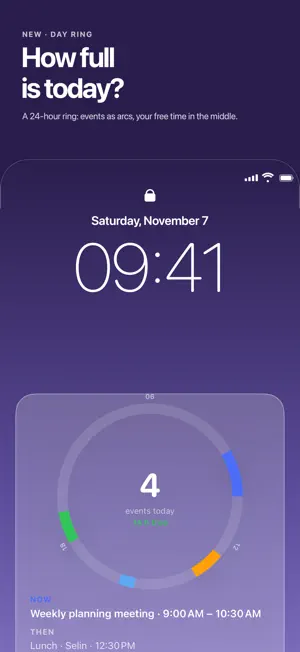
Pick up your phone and see your day. Planwall draws your calendar and reminders onto the Lock Screen wallpaper. No app to open, no widget to find. SET UP ONCE 1. Pick a layout: Today, Agenda, Month, Week Strip, Week Grid, Timeline, Events + Reminders, Note, Countdown, Quote, Life Calendar, Large Text. 2. Choose and order your calendars and reminder lists. 3. Add the ready-made shortcut and link the automation. It refreshes itself every morning. EVERYTHING ON THE PREVIEW Drag the card below the clock, swipe to change layout and background, pinch to enlarge text. WHAT'S FREE STAYS FREE The Today layout, all backgrounds, your own photo, unlimited rows and automatic refresh are free and will never be locked in future updates. Planwall Pro adds 11 more layouts: monthly or yearly. WORKS WITH EVERY CALENDAR ON YOUR IPHONE iCloud, Google, Outlook, Exchange and any other account you've added in iOS Settings. No extra sign-in. YOUR DATA STAYS ON YOUR IPHONE No account. Calendar and reminders are read and rendered only on your device; nothing is sent to a server. Note: Automatic refresh uses Apple Shortcuts; Planwall walks you through the setup. You can also update the wallpaper manually at any time. Terms of Use (EULA): https://kiyora.app/terms Privacy Policy: https://kiyora.app/privacy
What’s new
Version 1.2.0 · Updated November 10, 2026
7 new layouts: • Day Ring: how full your day is, on a 24-hour ring. • Day Blocks: hour-by-hour blocks with free gaps labeled. • Today + Tomorrow: two days side by side. • Next Up: your next event and its time, in huge type. • Week Rhythm: busy-hour bars for the week. • Coming Up: upcoming dates with days-left badges. • Task Ring: today's task progress. Lock Screen widgets: Next Up (live countdown), Day Ring and Tasks, right under the clock. Home Screen widgets: Today, Week, Countdown and Tasks (small, medium, large). Refresh plan: daily, 3× a day or hourly; the app walks you through the automations it needs. Also: wide layouts for the iPhone Duo inner display, five new ready-made designs, small fixes.
App privacy
The developer, Betul Sahin, reported these privacy practices to Apple.
Data Not Linked to You
The following data, which may be collected but is not linked to your identity, may be used for the following purposes:
- Purchases: Purchase History
- Identifiers: User ID
Used for: App Functionality
Alternatives to Planwall: Lock Screen Calendar
Looking for apps like Planwall: Lock Screen Calendar? Here are 6 similar apps on the App Store. The highest rated is PingRoom (5.0/5), and all 6 are free to download.
-
 Clipster: Clipboard Manager
-
 NotiKeep: Save Notifications
-
 PingRoom
5.0
-
 Flick Planner: Tasks Calendar
-
 LockCal
-
 DayWall: Calendar Wallpaper
| App | Rating | Price | Last updated | Compare |
|---|---|---|---|---|
| Planwall: Lock Screen Calendar | 1.0 / 5 (2 ratings) | Free | November 10, 2026 | |
| Clipster: Clipboard Manager | – | Free | Nov 6, 2026 | Compare |
| NotiKeep: Save Notifications | – | Free | Nov 10, 2026 | Compare |
| PingRoom | 5.0 / 5 (6) | Free | Nov 4, 2026 | Compare |
| Flick Planner: Tasks Calendar | – | Free | Nov 6, 2026 | Compare |
| LockCal | – | Free | Oct 7, 2026 | Compare |
| DayWall: Calendar Wallpaper | – | Free | Oct 30, 2026 | Compare |